Work incident report form 2026

Get Form
incedent report Preview on Page 1

Here's how it works

01. Edit your incedent report online
Type text, add images, blackout confidential details, add comments, highlights and more.

02. Sign it in a few clicks
Draw your signature, type it, upload its image, or use your mobile device as a signature pad.

03. Share your form with others
Send incident report template pdf via email, link, or fax. You can also download it, export it or print it out.

How to use or fill out work incident report form with our platform

Form edit decoration
9.5
Ease of Setup
DocHub User Ratings on G2
9.0
Ease of Use
DocHub User Ratings on G2
  1. Click ‘Get Form’ to open the work incident report form in the editor.
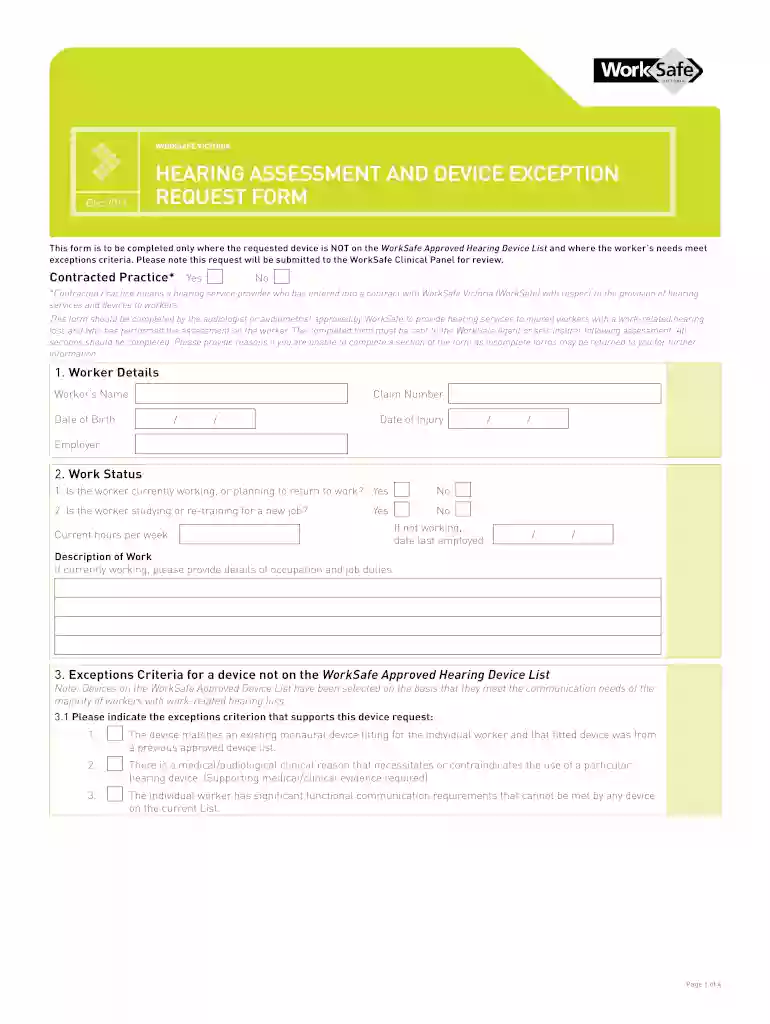
  2. Begin by filling out the 'Worker Details' section. Enter the worker’s name, claim number, date of birth, date of injury, and employer information.
  3. Proceed to the 'Work Status' section. Indicate whether the worker is currently working or planning to return to work, and provide details about their occupation and job duties if applicable.
  4. In the 'Exceptions Criteria' section, select the appropriate criterion that supports the device request. Ensure you provide any necessary supporting evidence.
  5. Complete the 'Hearing Device and Clinical History' section by indicating if this is a new or replacement device request and providing relevant clinical history.
  6. Fill out the 'Hearing Assessment' section with assessment dates and attach required test results such as audiograms.
  7. In the 'Recommended Hearing Device' section, specify details about the requested device not on the approved list, including manufacturer and model name.
  8. Provide a detailed description in the 'Communication Assessment and Clinical Rationale' section regarding communication environments and goals.
  9. Finally, complete the 'Treating Audiologist/Audiometrist Details' and 'Consent' sections before submitting your form for review.

Start using our platform today to streamline your document editing process for free!

See more work incident report form versions

We've got more versions of the work incident report form form. Select the right work incident report form version from the list and start editing it straight away!
Versions Form popularity Fillable & printable
2011 4.8 Satisfied (129 Votes)
be ready to get more

Complete this form in 5 minutes or less

Get form

Got questions?

We have answers to the most popular questions from our customers. If you can't find an answer to your question, please contact us.
Contact us
While specific requirements may vary, an incident report should be factual and contain these five key elements: Basic information: The where and when, date, time and location of the incident. Be specific when providing this information, for example give details of the precise location where the incident occurred.
Occupational Safety and Health Administration (OSHA) Form 301, Injury and Illness Incident Report, is used by employers to keep a record of a single injury, illness, or death in a workplace. This form is found within OSHA Form 300, which is used to log and classify all such incidents for a workplace.
How to write a workplace incident report Gather essential information. Describe the incident. Include injuries and damages. Interview witnesses. Identify contributing factors. Review company policies and procedures. Attach supporting documents. Maintain objectivity.
an overview of what happened, including date, time and location. information about anyone who was injured, including their date of birth, contact details and their relationship to you (worker, site visitor, volunteer, contractor, member of the public)
Key Takeaways. Incident reporting is the process of documenting unexpected events, accidents, or near-misses to identify risks, ensure accountability, and support corrective actions. It helps improve safety, compliance, and operational efficiency by addressing issues promptly and systematically.

Security and compliance

At DocHub, your data security is our priority. We follow HIPAA, SOC2, GDPR, and other standards, so you can work on your documents with confidence.

Learn more
ccpa2
pci-dss
gdpr-compliance
hipaa
soc-compliance

People also ask

when staff report incidents, they are directly contributing to potentially preventing a future incident from happening again. It allows the organisation to properly investigate and establish checks, procedures and implement risk controls in response to what has happened.
What to include in a work incident report The date and time of the incident. The name of the witness or author of the report. A detailed description of the events. The names of the affected parties. Other witness statements or important information. The result of the incident.

injury report form pdf