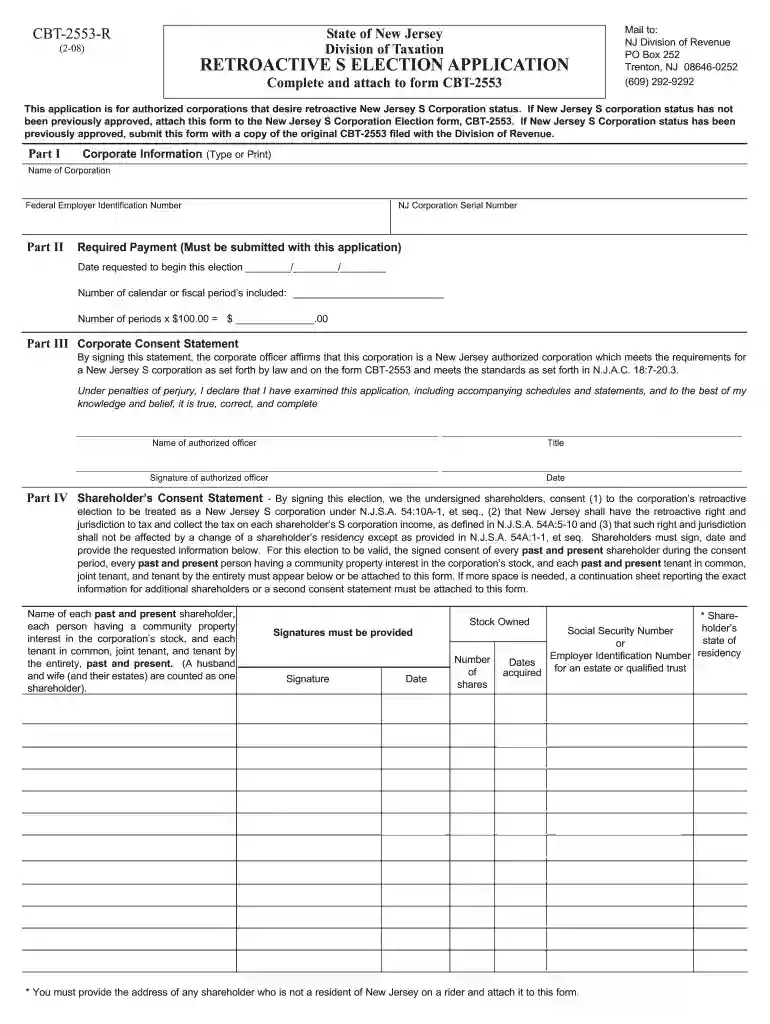
form tax filing Preview on Page 1

Cbt 2553 r-2026

Here's how it works

  • 01. Edit your form tax filing online

    Type text, add images, blackout confidential details, add comments, highlights and more.

  • 02. Sign it in a few clicks

    Draw your signature, type it, upload its image, or use your mobile device as a signature pad.

  • 03. Share your form with others

    Send new jersey corporation via email, link, or fax. You can also download it, export it or print it out.

How to use or fill out cbt 2553 r with our platform

Form edit decoration
9.5
Ease of Setup
DocHub User Ratings on G2
9.0
Ease of Use
DocHub User Ratings on G2
  1. Click ‘Get Form’ to open the CBT-2553-R in the editor.
  2. In Part I, enter the name of your corporation exactly as it appears on form NJ-REG and CBT-2553. Then, input your Federal Employer Identification Number (FEIN) assigned by the IRS.
  3. Proceed to Part II. Here, provide your NJ Corporation Serial Number and ensure you include the required payment of $100 for each year this retroactive request applies. Specify the date you wish to begin this election.
  4. In Part III, read through the Corporate Consent Statement carefully. Print the name and title of the corporate officer signing this document, ensuring it matches with CBT-2553.
  5. Finally, in Part IV, gather signatures from all shareholders for consent. Ensure that every past and present shareholder during the consent period has signed.

Start using our platform today to simplify your form completion process for free!

See more form tax filing versions

We've got more versions of the form tax filing form. Select the right form tax filing version from the list and start editing it straight away!

VersionsForm popularityFillable & printable
20084.9 Satisfied (381 Votes)

be ready to get more

Complete this form in 5 minutes or less

Got questions?

We have answers to the most popular questions from our customers. If you can't find an answer to your question, please contact us.

Most eSignature solutions require users to have a paid subscription. With DocHub, there are two options for you to add an electronic signature to your cbt 2553 r pdf at no cost:

  • You can do it during a 7-day trial period;
  • You can sign up for a free plan.

The second option, however, has limitations on the number of signatures, sign requests, emails, and forms for editing available per month. You can check for full details here.

It is a no-brainer on a computer or via a mobile phone to complete a cbt 2553 r with DocHub. All you need to do is open any installed internet browser on your smartphone and proceed to the DocHub site. Once authenticated, add your file and open it in editing mode. Use our toolbar to make your edits and save changes. Optionally, keep your file in your files or send it to a recipient immediately.

Corporations may elect to register in New Jersey as a Sub-Chapter S corporation. Since the S corporation status for federal purposes does not automatically flow through for New Jersey state purposes, you must apply for S corporation status in this state and receive approval of the election.
You need to file Form 2553, Election by a Small Business Corporation to be treated as an S corporation by the IRS. You may file the form online, but only from the ElectSCorp website. If you would prefer to file it offline, these instructions may be helpful.
To revoke a Subchapter S election/small business election that was made on Form 2553, submit a statement of revocation to the service center where you file your annual return. The statement should state: The corporation revokes the election made under Section 1362(a)

Security and compliance

At DocHub, your data security is our priority. We follow HIPAA, SOC2, GDPR, and other standards, so you can work on your documents with confidence.

People also ask

A federal S corporation that does not elect to be treated as an S corporation for New Jersey purposes is a non- electing federal S corporation.
Most states follow the federal government in recognizing the S election. However, Arkansas, New Jersey and New York require a separate state S election.
Yes. An electing small business trust (ESBT) that is a shareholder of a Federal S corporation can seek New Jersey S corporation status for the corporation of which it is a shareholder by completing the Subchapter S election form (CBT-2553) signed by the trustee of the ESBT.
A corporation electing to register as a New Jersey S Corporation must file a New Jersey S Corporation Election. The filing due date for the election is one month later than the time to file a federal election.

nj cbt 2553 r

NJ Division of Taxation - Electing S Corporation Status

Apr 9, 2025 You must apply for S corporation status in New Jersey and receive approval of the election to receive S corporation tax treatment.Read more

Learn more
If you believe that this page should be taken down, please follow our DMCA take down process here