Type text, add images, blackout confidential details, add comments, highlights and more.
02. Sign it in a few clicks
Draw your signature, type it, upload its image, or use your mobile device as a signature pad.
03. Share your form with others
Send it via email, link, or fax. You can also download it, export it or print it out.
How to use or fill out SECOND ADDENDUM TO LEASE AGREEMENT - City of Miami - southcom with our platform
Ease of Setup
DocHub User Ratings on G2
Ease of Use
DocHub User Ratings on G2
Click ‘Get Form’ to open it in the editor.
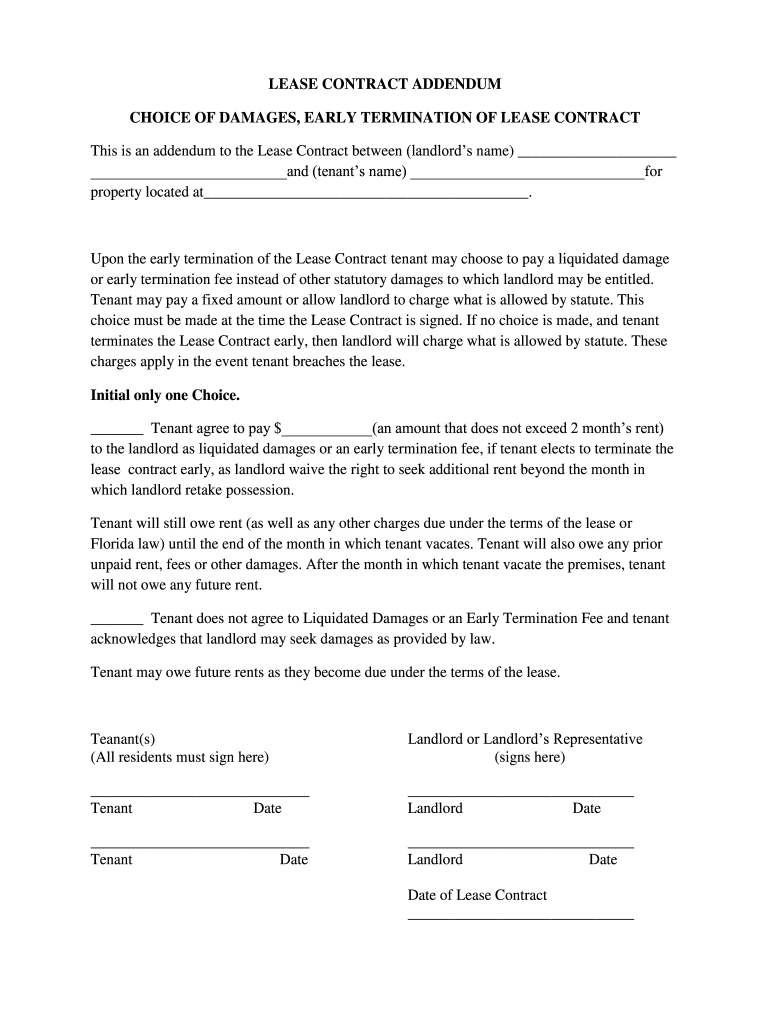
Begin by entering the landlord’s name and tenant’s name in the designated fields at the top of the form.
Fill in the property address where indicated, ensuring accuracy for legal purposes.
Choose your preferred option regarding early termination fees. Initial only one choice: either agree to pay a specified amount as liquidated damages or decline this option, acknowledging that statutory damages may apply.
If you choose to pay a liquidated damage fee, enter the agreed amount in the provided space, ensuring it does not exceed two months' rent.
All tenants must sign in the designated area, along with the landlord or their representative. Ensure each signature is dated appropriately.
Start using our platform today to complete your lease addendum online for free!
Fill out SECOND ADDENDUM TO LEASE AGREEMENT - City of Miami - southcom online It's free
FROM: Geri Bonzon-Keenan. SUBJECT: Resolution approving, pursuant to section 125.38, Florida. County Attorney. Statutes, a ground lease agreement for vacant
the viceroyalty of miami: colonial nostalgia and the making
by J Babb 2016 Cited by 4 This dissertation argues that the history of Miami is best understood as an imperial history. In a series of thematic chapters, it demonstrates how the city.Read more
Cookie consent notice
This site uses cookies to enhance site navigation and personalize your experience.
By using this site you agree to our use of cookies as described in our Privacy Notice.
You can modify your selections by visiting our Cookie and Advertising Notice.