Doj form bof116 2012-2026

Get Form
doj form bof116 2012 Preview on Page 1

Here's how it works

01. Edit your form online
Type text, add images, blackout confidential details, add comments, highlights and more.

02. Sign it in a few clicks
Draw your signature, type it, upload its image, or use your mobile device as a signature pad.

03. Share your form with others
Send it via email, link, or fax. You can also download it, export it or print it out.

How to use or fill out doj form bof116 2012 with our platform

Form edit decoration
9.5
Ease of Setup
DocHub User Ratings on G2
9.0
Ease of Use
DocHub User Ratings on G2
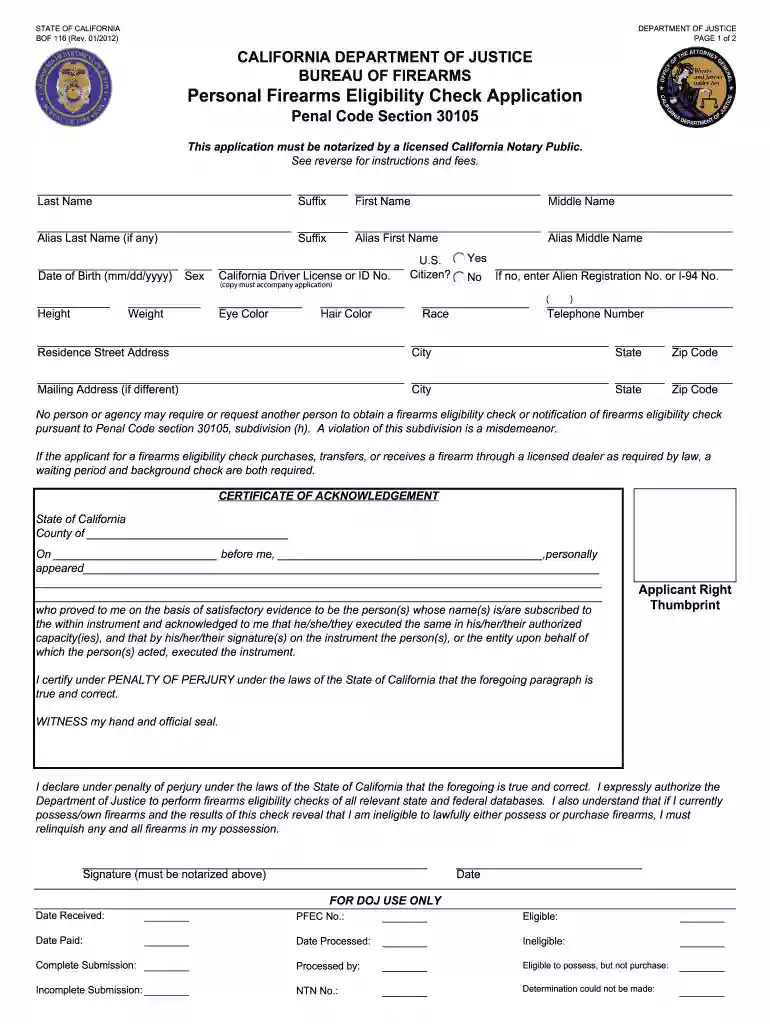
  1. Click ‘Get Form’ to open the DOJ Form BOF 116 in the editor.
  2. Begin by filling in your personal information, including your last name, first name, middle name, and any aliases. Ensure accuracy as this information is crucial for identification.
  3. Enter your date of birth, sex, and California Driver License or ID number. Remember to attach a photocopy of your ID as required.
  4. Indicate your citizenship status by selecting 'Yes' or 'No'. If you are not a U.S. citizen, provide your Alien Registration or I-94 number.
  5. Complete the physical description section by entering your height, weight, eye color, hair color, and race.
  6. Fill in your contact details including telephone number and residence address. If different from your residence address, provide a mailing address.
  7. Don’t forget to include your right thumbprint impression on the application for identification purposes.
  8. Finally, ensure that the application is notarized by a licensed California Notary Public before submission.

Start using our platform today to easily complete and submit your DOJ Form BOF 116 for free!

See more doj form bof116 2012 versions

We've got more versions of the doj form bof116 2012 form. Select the right doj form bof116 2012 version from the list and start editing it straight away!
Versions Form popularity Fillable & printable
2016 4.8 Satisfied (81 Votes)
2015 4.4 Satisfied (589 Votes)
2014 4 Satisfied (55 Votes)
2012 4.1 Satisfied (68 Votes)
2009 4 Satisfied (36 Votes)
be ready to get more

Complete this form in 5 minutes or less

Get form

Got questions?

We have answers to the most popular questions from our customers. If you can't find an answer to your question, please contact us.
Contact us
What do I need to buy a gun? If your DL/ID says Federal Limits Apply, then you need a Certified copy of your Birth Certificate, Passport, or Resident Alien Card. If it is a REAL ID or an old ID that doesnt say Federal Limits Apply then you do not need those documents.
Within 30 days of taking possession, the recipient must submit the Report of Operation of Law or Intra-Familial Firearm Transaction (Form BOF 4544A) to the California Department of Justice. The form, available at Form BOF 4544A, requires: A $19 processing fee (check or money order).
Generally, ATF Form 4473 must be completed at the licensed business premises when a firearm is transferred over-the-counter.
Within 30 days of the transfer, the recipient must submit the Report of Operation of Law or Intra-Familial Firearm Transaction (Form BOF 4544A) to the California Department of Justice. The form, available at Form BOF 4544A, requires: A $19 processing fee (check or money order).
BOF 4010A - NEW RESIDENT REPORT OF FIREARM OWNERSHIP.

Security and compliance

At DocHub, your data security is our priority. We follow HIPAA, SOC2, GDPR, and other standards, so you can work on your documents with confidence.

Learn more
ccpa2
pci-dss
gdpr-compliance
hipaa
soc-compliance

People also ask

California enforces a 10-day waiting period for all gun purchases. This time allows the California Department of Justice to complete a thorough background check on the potential buyer.
What information is required for a Personal Firearms Eligibility Check (PFEC)? You must submit a completed PFEC application, pdf, a copy of your California Drivers License or Identification Card, and fees in the amount of $20.

Related links