Da form 3953-2026

Get Form
da form 3953 Preview on Page 1

Here's how it works

01. Edit your da form 3953 online
Type text, add images, blackout confidential details, add comments, highlights and more.
02. Sign it in a few clicks
Draw your signature, type it, upload its image, or use your mobile device as a signature pad.
03. Share your form with others
Send da 3953 via email, link, or fax. You can also download it, export it or print it out.

How to use or fill out DA Form 3953 with our platform

Form edit decoration
9.5
Ease of Setup
DocHub User Ratings on G2
9.0
Ease of Use
DocHub User Ratings on G2
  1. Click ‘Get Form’ to open DA Form 3953 in the editor.
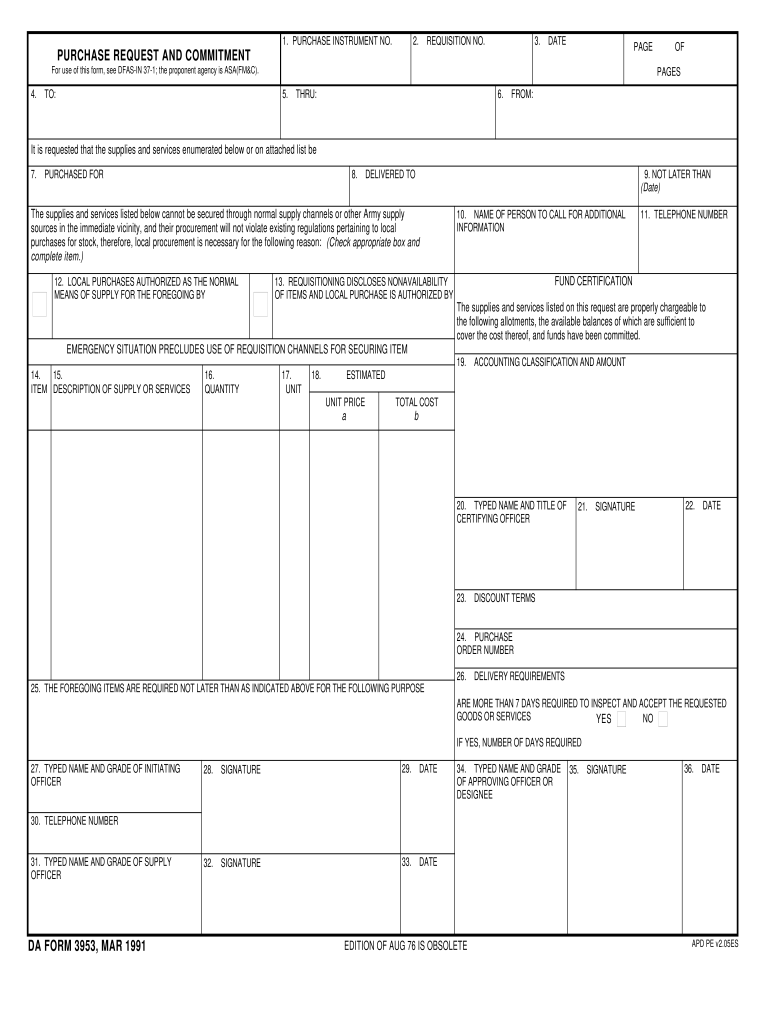
  2. Begin by entering the 'Purchase Instrument No.' and 'Requisition No.' at the top of the form. These identifiers are crucial for tracking your request.
  3. Fill in the 'Date' field to indicate when the request is being made, followed by specifying the number of pages in your submission.
  4. In section 4, provide details about who the request is directed to, and in section 5, indicate any intermediary approvals if necessary.
  5. Complete sections 6 through 9 with information about the requester, delivery requirements, and urgency of procurement.
  6. Detail each item needed in sections 15 through 18, including descriptions, quantities, units, estimated prices, and total costs.
  7. Ensure that all required signatures are obtained in sections 20 through 36 before finalizing your document.

Start using our platform today to fill out DA Form 3953 online for free!

See more da form 3953 versions

We've got more versions of the da form 3953 form. Select the right da form 3953 version from the list and start editing it straight away!
Versions Form popularity Fillable & printable
1991 4.9 Satisfied (383 Votes)
be ready to get more

Complete this form in 5 minutes or less

Get form

Got questions?

We have answers to the most popular questions from our customers. If you can't find an answer to your question, please contact us.
Contact us
Start by obtaining a copy of DA Form 3964 from your units administrative office or online resources. At the top of the form, fill in the date in the provided space. Enter the name of the service member or individual submitting the form. Specify the unit or organization of the individual above under the Unit section.
ADDENDUM TO CERTIFICATE AND ACKNOWLEDGEMENT OF SERVICE REQUIREMENTS (DA FORM 3540) FOR ALL PERSONNEL APPLYING FOR PARTICIPATION IN THE RESERVE. OFFICERS TRAINING CORPS (ROTC)/ SIMULTANEOUS MEMBERSHIP PROGRAM (SMP)
Equipment Receipt (DA Form 3749, Weapons Card) for 24 hours or less. Over 24 hours requires entry on the Weapons Control Log. Do not prepare a new DA Form 3749, solely for a change of CDR.
DA Form 4833 is a document used by the U.S. Army to report the results of a military members investigation into an incident that has resulted in administrative punishment or disciplinary action.
DA Form 3749, also known as the Equipment Receipt, is used by the U.S. Army to document the receipt of equipment by soldiers. This form is important because it provides a record of who received specific items, helping to track military property and ensure accountability.

People also ask

Use form FTB 3540 to figure and claim a prior year credit carryover of one or more repealed credits that no longer have separate credit forms. Credit carryovers may not be carried back and applied against a prior years tax.
The purpose of the DA Form 3953 is three-fold: To initiate the procurement process and provide a documented, bona fide need that can be scrutinized by the proponent (for instance, automation [G6/C6]) prior to purchase. Provide a medium for fund certification/availability of funds.

da form 3953 pdf fillable