Type text, add images, blackout confidential details, add comments, highlights and more.
02. Sign it in a few clicks
Draw your signature, type it, upload its image, or use your mobile device as a signature pad.
03. Share your form with others
Send it via email, link, or fax. You can also download it, export it or print it out.
How to use or fill out the identifier form with our platform
Ease of Setup
DocHub User Ratings on G2
Ease of Use
DocHub User Ratings on G2
Click ‘Get Form’ to open it in the editor.
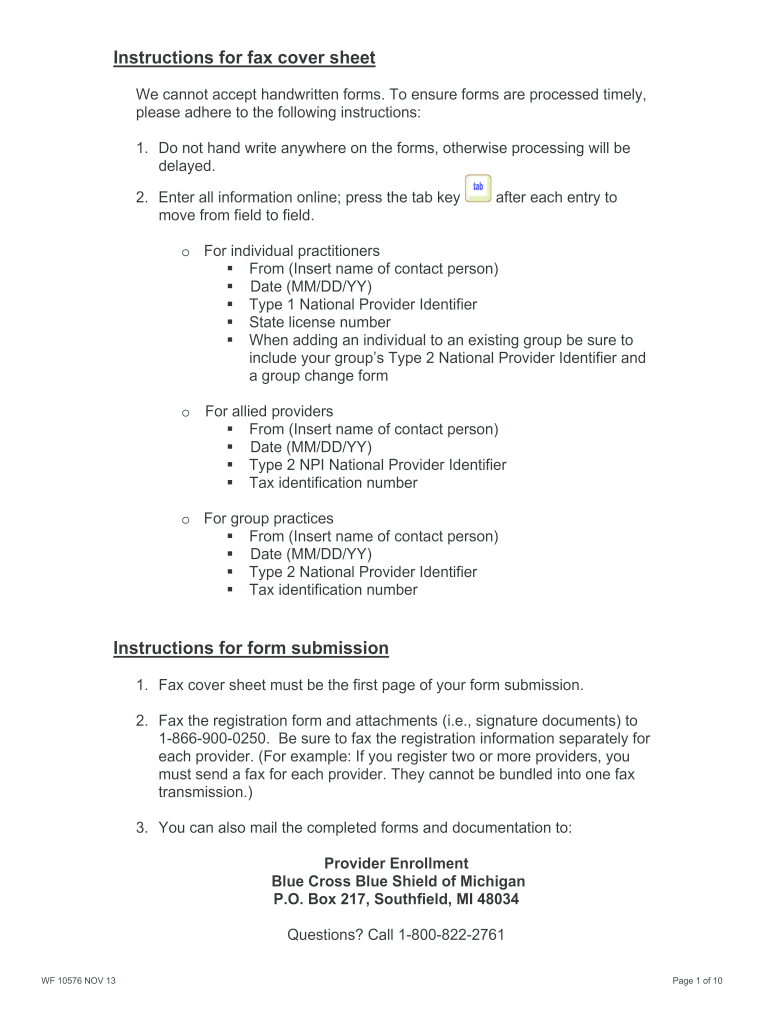
Begin by entering your contact information in the 'From' field, including the name of the contact person and the date in MM/DD/YY format.
For individual practitioners, input your Type 1 National Provider Identifier and state license number. If you are adding an individual to an existing group, include the group's Type 2 NPI.
Allied providers should enter their Type 2 NPI and tax identification number in the designated fields.
For group practices, ensure you fill out your Type 2 NPI and tax identification number accurately.
Complete all required demographic data, including first name, last name, degree, date of birth, and gender. Ensure that all fields marked with an asterisk (*) are filled out.
Review each section carefully before submitting to avoid any processing delays. Once completed, fax or mail your documents as instructed.
Start using our platform today for free to streamline your document completion process!
Identifier form templateIdentifier form pdfVoluntary Self-Identification of Disability name and DateForm CC-305 How to fill outVEVRAA Self-Identification form pdfVoluntary self-Identification form race and ethnicityVoluntary Self-Identification of Disability formIdentity Verification form pdf
Security and compliance
At DocHub, your data security is our priority. We follow HIPAA, SOC2, GDPR, and other standards, so you can work on your documents with confidence.
Nov 19, 2025 1. US Passport or US Passport Card 2. Permanent Resident Card or Alien Registration Receipt Card (Form I-551) 3. Foreign passport that contains a temporary I-Read more
3 days ago After the flattening, resource locations are the only accepted form of identifiers. pre4, Resource locations are now used to identify pluginRead more
Cookie consent notice
This site uses cookies to enhance site navigation and personalize your experience.
By using this site you agree to our use of cookies as described in our Privacy Notice.
You can modify your selections by visiting our Cookie and Advertising Notice.