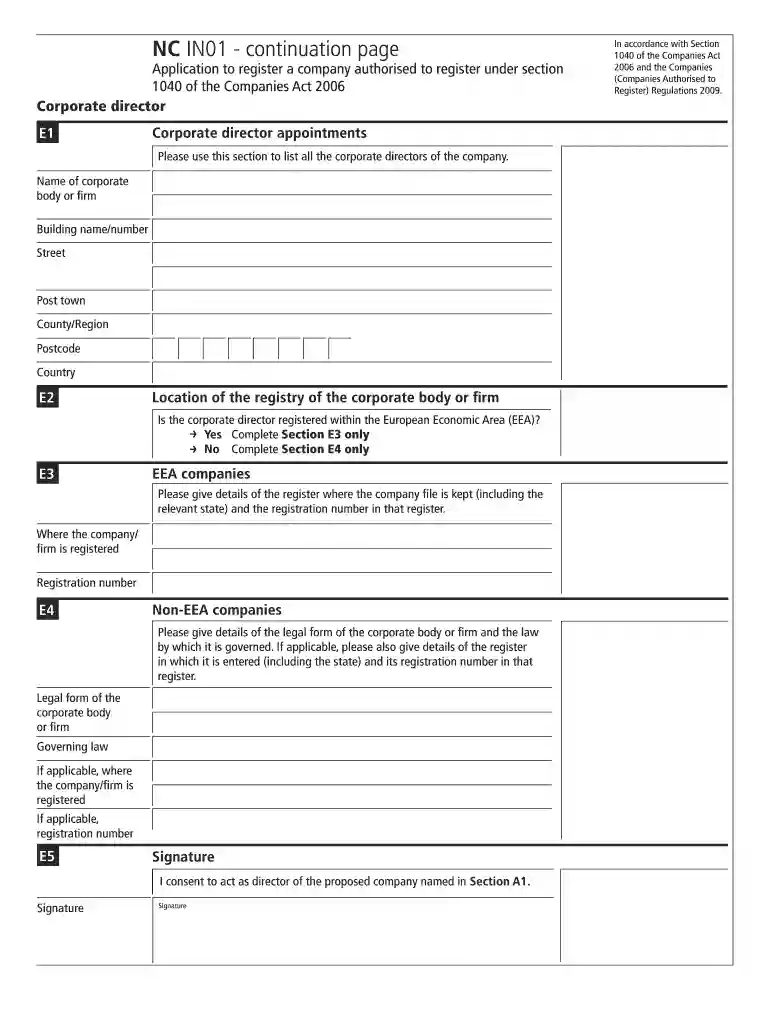
NC IN01 - continuation page - companieshouse gov 2026

Get Form
in01 Preview on Page 1

Here's how it works

01. Edit your in01 online
Type text, add images, blackout confidential details, add comments, highlights and more.

02. Sign it in a few clicks
Draw your signature, type it, upload its image, or use your mobile device as a signature pad.

03. Share your form with others
Send it via email, link, or fax. You can also download it, export it or print it out.

How to use or fill out NC IN01 - continuation page - companieshouse gov with DocHub

Form edit decoration
9.5
Ease of Setup
DocHub User Ratings on G2
9.0
Ease of Use
DocHub User Ratings on G2
  1. Click ‘Get Form’ to open the NC IN01 - continuation page in our editor.
  2. In Section E1, list all corporate directors by entering the name of the corporate body or firm, along with the building name/number, street, post town, county/region, postcode, and country.
  3. Proceed to Section E2. Indicate whether the corporate director is registered within the European Economic Area (EEA) by selecting 'Yes' or 'No'. Depending on your selection, complete either Section E3 or E4.
  4. If you selected 'Yes', fill out Section E3 with details of where the company is registered and its registration number. If 'No', complete Section E4 by providing the legal form of the corporate body, governing law, and any applicable registration details.
  5. Finally, in Section E5, provide your signature to consent to act as a director of the proposed company as stated in Section A1.

Start using our platform today for free to streamline your document editing and completion process!

See more NC IN01 - continuation page - companieshouse gov versions

We've got more versions of the NC IN01 - continuation page - companieshouse gov form. Select the right NC IN01 - continuation page - companieshouse gov version from the list and start editing it straight away!
Versions Form popularity Fillable & printable
2021 4.8 Satisfied (210 Votes)
2016 4.3 Satisfied (165 Votes)
2009 4 Satisfied (36 Votes)
be ready to get more

Complete this form in 5 minutes or less

Get form

Got questions?

We have answers to the most popular questions from our customers. If you can't find an answer to your question, please contact us.
Contact us

Sign in to your DocHub account and add your NC IN01 - continuation page - companieshouse gov to our editor using one of its upload options - from your device, cloud storage, secure URL, or your DocHub folders if you have already processed your document before. Open our editor, click the Sign button in the upper toolbar, and choose your signing method. You can use a picture of your handwritten signature, draw it, enter your name, or use a QR code as an alternative.

With DocHub, there are several convenient ways to edit your NC IN01 - continuation page - companieshouse gov online. You can drag and drop the form and modify it directly at the DocHub website or use our browser extension to fill out your form immediately. On top of that, you can modify your PDF on your phone, as DocHub works with all the available mobile platforms.

Unfortunately, those appointed before 10 October 2015 do not currently have the ability to remove their full date of birth from the older forms filed at Companies House and therefore this remains a risk area for fraud.
Company Information Supplied by Companies House We carry out basic checks on documents received to make sure that they have been fully completed and signed, but we do not have the statutory power or capability to verify the accuracy of the information that companies send to us.
The company registration process for non-UK residents is the same as for UK residents living in the UK. Foreign nationals can become the company director, shareholder, or company secretary of a UK business, and you do not even have to live in the UK.

Security and compliance

At DocHub, your data security is our priority. We follow HIPAA, SOC2, GDPR, and other standards, so you can work on your documents with confidence.

Learn more
ccpa2
pci-dss
gdpr-compliance
hipaa
soc-compliance
be ready to get more

Complete this form in 5 minutes or less

Get form

People also ask

The confirmation statement is a document that limited companies and LLPs must file at Companies House each year. For companies, the confirmation statement contains details of its directors and shareholders, while the confirmation statement of an LLP lists its members.
A UK establishment is a place of business or branch of an overseas company in the UK. The use of UK establishment in the law has ended the different registration and disclosure regimes for places of business and branches that were in place before 1 October 2009.
Yes. It may come as a surprise, but anyone of any nationality can start a business in the UK. You don't need residential status or even to be living in the country. The only stipulation is that the company must be registered to a UK address.
All you have to do is look it up on the Financial Conduct Authority (FCA) register. This is a database which holds details of every financial company that's registered and regulated by the FCA. You can search for a company by entering its name and/or postcode.
Check with the State Business Department The first way to check registration is by visiting the state's website and looking for their registry of businesses. Note that the entity name check should always occur in the state where the business was incorporated, not necessarily where it is currently active.

Related links