Affidavit amendment texas 2026

Get Form
7 things you need to know about 18 001 affidavits Preview on Page 1

Here's how it works

01. Edit your 7 things you need to know about 18 001 affidavits online
Type text, add images, blackout confidential details, add comments, highlights and more.
02. Sign it in a few clicks
Draw your signature, type it, upload its image, or use your mobile device as a signature pad.
03. Share your form with others
Send it via email, link, or fax. You can also download it, export it or print it out.

How to use or fill out affidavit amendment texas with our platform

Form edit decoration
9.5
Ease of Setup
DocHub User Ratings on G2
9.0
Ease of Use
DocHub User Ratings on G2
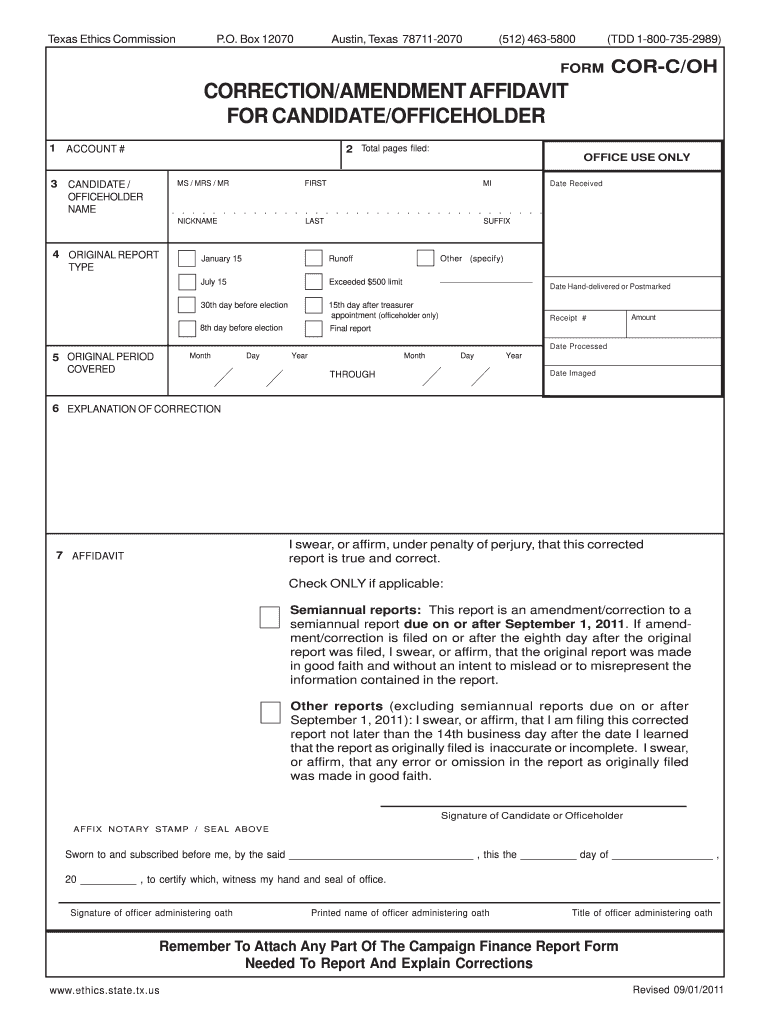
  1. Click ‘Get Form’ to open the affidavit amendment Texas in the editor.
  2. Enter your Account Number if you file with the Ethics Commission. If not, skip this field.
  3. Count the total pages of your submission and enter that number in the Total Pages Filed box.
  4. Fill in your full name as it appears on the original report in the Candidate/Officeholder Name section.
  5. Select the type of original report you are correcting by marking the appropriate box.
  6. Specify the Original Period Covered by entering the relevant dates accurately.
  7. In the Explanation of Correction section, detail what information has changed and why there was an error on the original report. Attach any necessary documents for clarity.
  8. Finally, read through the Affidavit carefully before signing it in front of a notary public, ensuring all required signatures and seals are included.

Start using our platform today to streamline your affidavit amendment process for free!

See more affidavit amendment texas versions

We've got more versions of the affidavit amendment texas form. Select the right affidavit amendment texas version from the list and start editing it straight away!
Versions Form popularity Fillable & printable
2021 4.8 Satisfied (76 Votes)
2011 4.4 Satisfied (136 Votes)
be ready to get more

Complete this form in 5 minutes or less

Get form

Got questions?

We have answers to the most popular questions from our customers. If you can't find an answer to your question, please contact us.
Contact us

Upload your affidavit amendment texas to DocHub (after you’ve set up an account for this). If you need to fill out fields in it, use appropriate tools from the top pane. For instance, add Signature Fields, assign each to a particular party, and click on Sign → Request signatures from others. Personalize your message for your recipients and click Send Request. You can also send your form by fax or as a Signing link instead of using email (you’ll find these options by navigating to the Menu → Send)

As a comprehensive document editing platform, DocHub is available on mobile phones. Open DocHub in your choice of mobile browser and employ our intelligent mobile-friendly toolset to complete your affidavit amendment texas.

Under Texas law, the affidavit must be filled out by two disinterested partiesindividuals who have no financial interest in the estate and are not heirs. These individuals must know the decedents family structure and history well enough to verify the heirs relationship to the decedent.
Each county has a different filing fee, but the cost of filing an affidavit of heirship in Texas runs from $50 to $75. You will likely also need to pay a notary public to witness the document signing.
Affidavits must be signed in front of a notary public. A notary must verify your identification before you sign the document. Bring ID (like a drivers license or other form of identification) for the notary before you sign the affidavit.

Security and compliance

At DocHub, your data security is our priority. We follow HIPAA, SOC2, GDPR, and other standards, so you can work on your documents with confidence.

Learn more

People also ask

Small estate affidavits are a fast and affordable way to transfer property after someone has died, when the decedent died without a will and the other requirements set out in the Texas Estates Code are satisfied.
How to Write an Affidavit Title and Caption. Start with a clear titletypically just Affidavit. Affiant Information. This section introduces the person making the affidavityou. Statement of Truth. Body of the Affidavit. Recipient and Oath. Signature and Notarization. Review and docHub.
A statement that the affiant is swearing under oath to the truthfulness of the information contained in the affidavit. The information that is being sworn to. The signature of the affiant. The attestation of a notary public or other official authorized to administer oaths.

Related links