Type text, add images, blackout confidential details, add comments, highlights and more.
02. Sign it in a few clicks
Draw your signature, type it, upload its image, or use your mobile device as a signature pad.
03. Share your form with others
Send it via email, link, or fax. You can also download it, export it or print it out.
How to use or fill out cref change address with our platform
Ease of Setup
DocHub User Ratings on G2
Ease of Use
DocHub User Ratings on G2
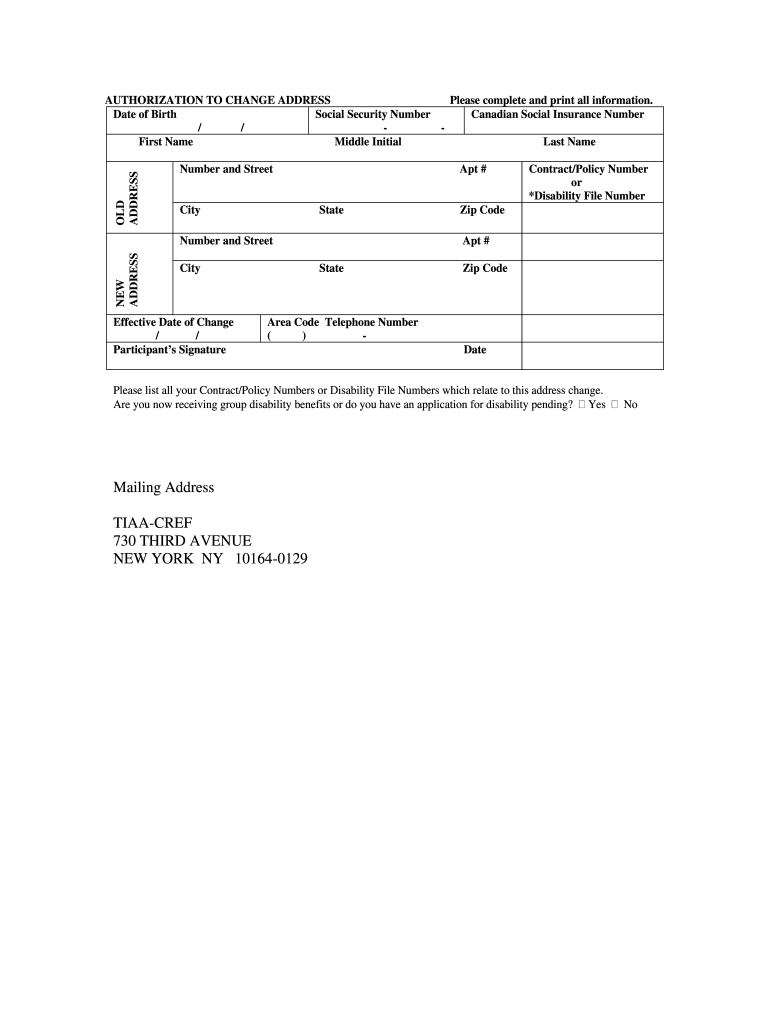
Click ‘Get Form’ to open the cref change address document in the editor.
Begin by entering your Date of Birth and Social Security Number in the designated fields. This information is crucial for verifying your identity.
Fill in your First Name, Middle Initial, and Last Name. Ensure that these match the identification documents you have on file.
In the OLD ADDRESS section, provide your current Number and Street, City, State, Apt # (if applicable), and Zip Code.
Next, move to the NEW ADDRESS section. Enter your new Number and Street, City, State, Apt # (if applicable), and Zip Code.
Specify the Effective Date of Change by selecting the appropriate date from the calendar tool available in our editor.
Sign in the Participant’s Signature field to authorize this change. Make sure to include your Contract/Policy Number or Disability File Number as required.
Indicate whether you are currently receiving group disability benefits or if you have an application pending by checking 'Yes' or 'No'.
Finally, review all entered information for accuracy before saving or printing your completed form.
Start using our platform today to easily complete your cref change address form for free!
If you change your mailing address, you wont be able to make a withdrawal for 20 business days. If you change banking information, you wont be able to make aRead more
To update your address with TIAA-CREF, please contact them directly at (800) 842-2776 . Department of Human Resources Benefits Benefits: SummariesRead more
The common mode bias voltage output signal (CREF) for the DAC output buffers must be decoupled through a. 0.1 F (CREF1) and a 1.0 F (CREF2) ceramic capacitorRead more
Cookie consent notice
This site uses cookies to enhance site navigation and personalize your experience.
By using this site you agree to our use of cookies as described in our Privacy Notice.
You can modify your selections by visiting our Cookie and Advertising Notice.