




Here's how it works



How to use or fill out Form CT-6.1 to terminate the election - The New York State ... with our platform

- Click ‘Get Form’ to open it in the editor.
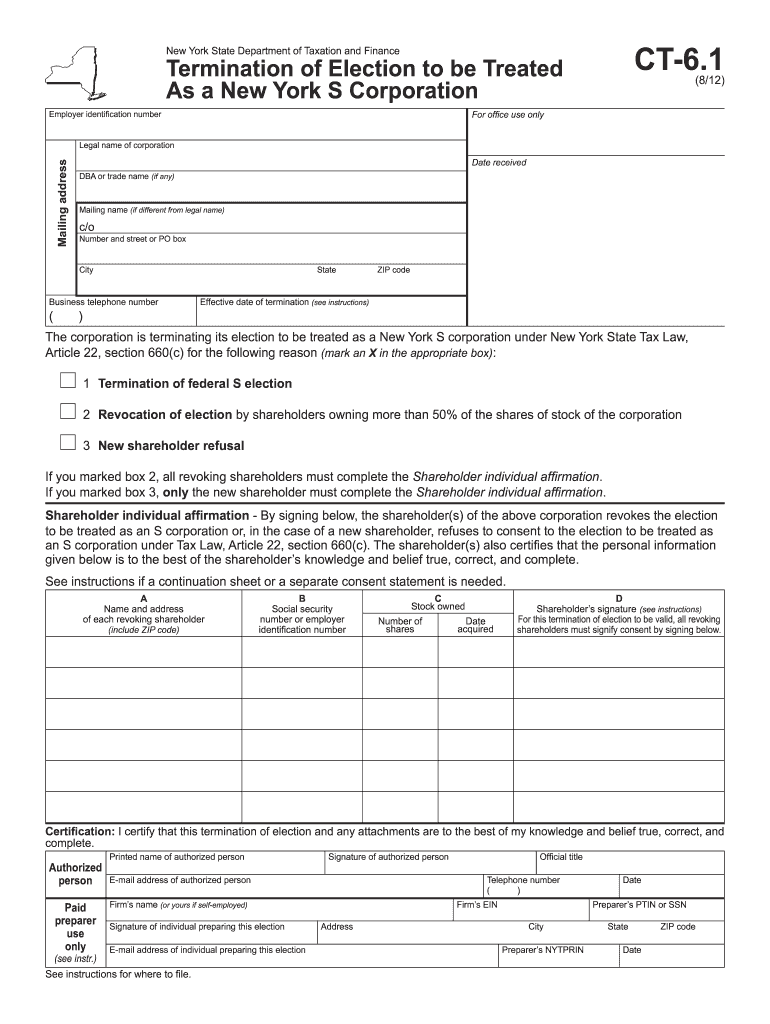
- Begin by entering the employer identification number and the legal name of your corporation in the designated fields.
- Fill in your mailing address, including city, state, and ZIP code. If applicable, provide a DBA or trade name.
- Specify the effective date of termination and select the reason for termination by marking an X in the appropriate box.
- If you selected option 2 or 3, ensure that all relevant shareholders complete their individual affirmations by providing their names, addresses, social security numbers or EINs, stock owned, and signatures.
- Finally, have an authorized person sign and certify the form. Ensure all required information is accurate before submitting.
Start using our platform today to easily complete Form CT-6.1 for free!
It's free
See more Form CT-6.1 to terminate the election - The New York State ... versions
Got questions?
How do I sign my Form CT-6.1 to terminate the election - The New York State ... free of charge?
Most eSignature services require users to have a paid subscription. With DocHub, there are two ways for you to create an electronic signature to your Form CT-6.1 to terminate the election - The New York State ... free of charge:
- You can do it during a 7-day trial period;
- You can sign up for a free plan.
The second option, though, has limitations on the number of signatures, sign requests, emails, and forms for editing available per month. You can check for full details here.
How do you edit Form CT-6.1 to terminate the election - The New York State ... in Chrome?
If you use Chrome, there are two straightforward methods to modify your Form CT-6.1 to terminate the election - The New York State ... online. First, visit the DocHub website, add your document, and modify it utilizing our toolbar. You can also install our Chrome extension and modify any document by dragging and dropping it in your browser window.
How do I fill out an S-Corp form?
Where do I mail CT 3s?
What is CT 3's form?
Security and compliance
At DocHub, your data security is our priority. We follow HIPAA, SOC2, GDPR, and other standards, so you can work on your documents with confidence.
Learn more


