Precertification template form 2026

Get Form
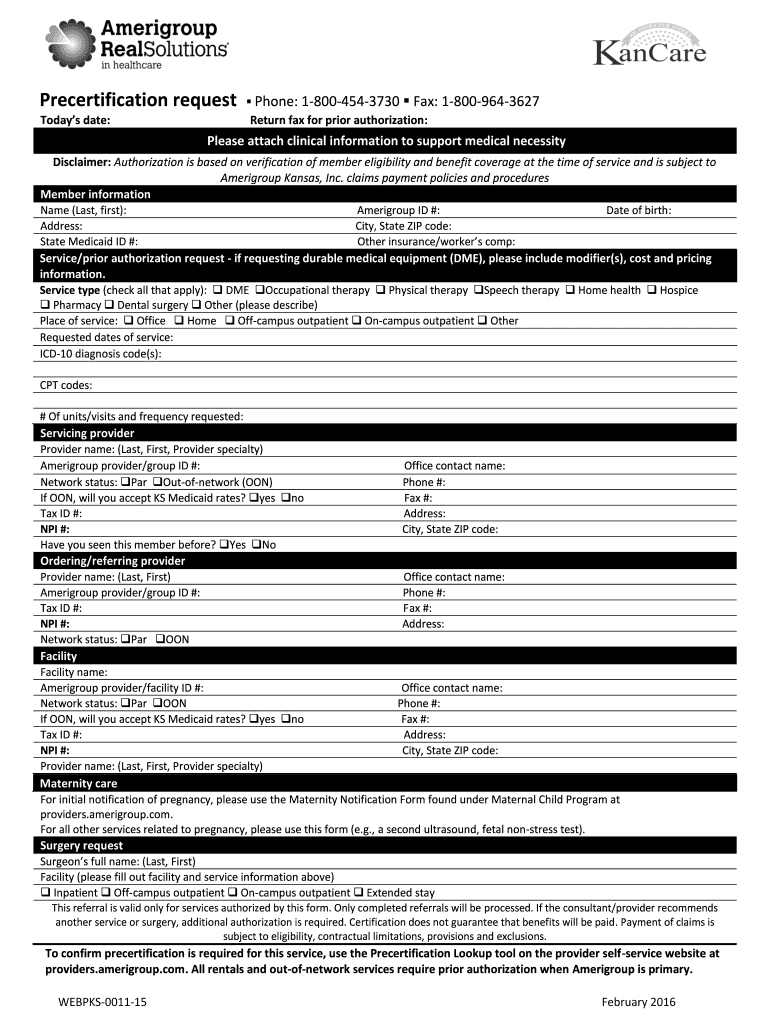
precertification template form Preview on Page 1

Here's how it works

01. Edit your form online
Type text, add images, blackout confidential details, add comments, highlights and more.
02. Sign it in a few clicks
Draw your signature, type it, upload its image, or use your mobile device as a signature pad.
03. Share your form with others
Send it via email, link, or fax. You can also download it, export it or print it out.

How to use or fill out precertification template form with our platform

Form edit decoration
9.5
Ease of Setup
DocHub User Ratings on G2
9.0
Ease of Use
DocHub User Ratings on G2
  1. Click ‘Get Form’ to open the precertification template form in the editor.
  2. Begin by entering today’s date at the top of the form. This helps track when the request was made.
  3. Fill in the member information section, including the member's name, address, Medicaid number, and Amerigroup number. Ensure all details are accurate for eligibility verification.
  4. In the referring provider information section, provide the necessary details such as name, Medicaid provider number, and contact information. Check the appropriate box for where you want the referral faxed back.
  5. Complete the specialist consult section by entering consultant details and ICD-9 code/diagnosis. Include any previous studies or treatments relevant to this referral.
  6. If applicable, fill out sections for maternity care or diagnostic study with specific facility names and procedure codes.
  7. Finally, review all entries for completeness before submitting. Attach any required clinical information to support medical necessity.

Start using our platform today to streamline your document editing and submission process for free!

See more precertification template form versions

We've got more versions of the precertification template form form. Select the right precertification template form version from the list and start editing it straight away!
Versions Form popularity Fillable & printable
2016 4.8 Satisfied (123 Votes)
2012 4.3 Satisfied (70 Votes)
be ready to get more

Complete this form in 5 minutes or less

Get form

Got questions?

We have answers to the most popular questions from our customers. If you can't find an answer to your question, please contact us.
Contact us
Prior authorizationsometimes called preauthorization or precertificationis a health plan cost-control process by which physicians and other health care providers must obtain advance approval from a health plan before a specific service is delivered to the patient to qualify for payment coverage.
How to Write a Pre-authorization Letter for a Medical Procedure The demographic information of the patient (name, date of birth, insurance ID number and more) Provider information (both referring and servicing provider) Requested service/procedure along with specific CPT/HCPCS codes. Diagnosis (ICD code and description)
How do I write a simple letter of authorization? Start with your name and contact information at the top. Include the current date. Write the recipients name and contact information. Clearly state your name and that youre writing to grant authorization to another individual or organization.
I am writing to request pre-approval for [service] by [name of provider]. I have reviewed my policy and believe that [name of health care plan] is required to cover this service. [Service] is evidence-based and is medically necessary in order to ensure that [Beneficiary] can communicate effectively.
For example, services that may require pre-certification include outpatient and inpatient hospital services, observation services, invasive procedures, CT, MRI and PET scans, and colonoscopies. Patients are responsible for knowing the pre-certification requirements of their health plans.

Security and compliance

At DocHub, your data security is our priority. We follow HIPAA, SOC2, GDPR, and other standards, so you can work on your documents with confidence.

Learn more
ccpa2
pci-dss
gdpr-compliance
hipaa
soc-compliance
be ready to get more

Complete this form in 5 minutes or less

Get form