




Here's how it works

01. Edit your are off premises field trips typically covered by school liability insurance policies online
Type text, add images, blackout confidential details, add comments, highlights and more.

02. Sign it in a few clicks
Draw your signature, type it, upload its image, or use your mobile device as a signature pad.

03. Share your form with others
Send field trip sign up sheet via email, link, or fax. You can also download it, export it or print it out.
How to use or fill out off site field trip with our platform

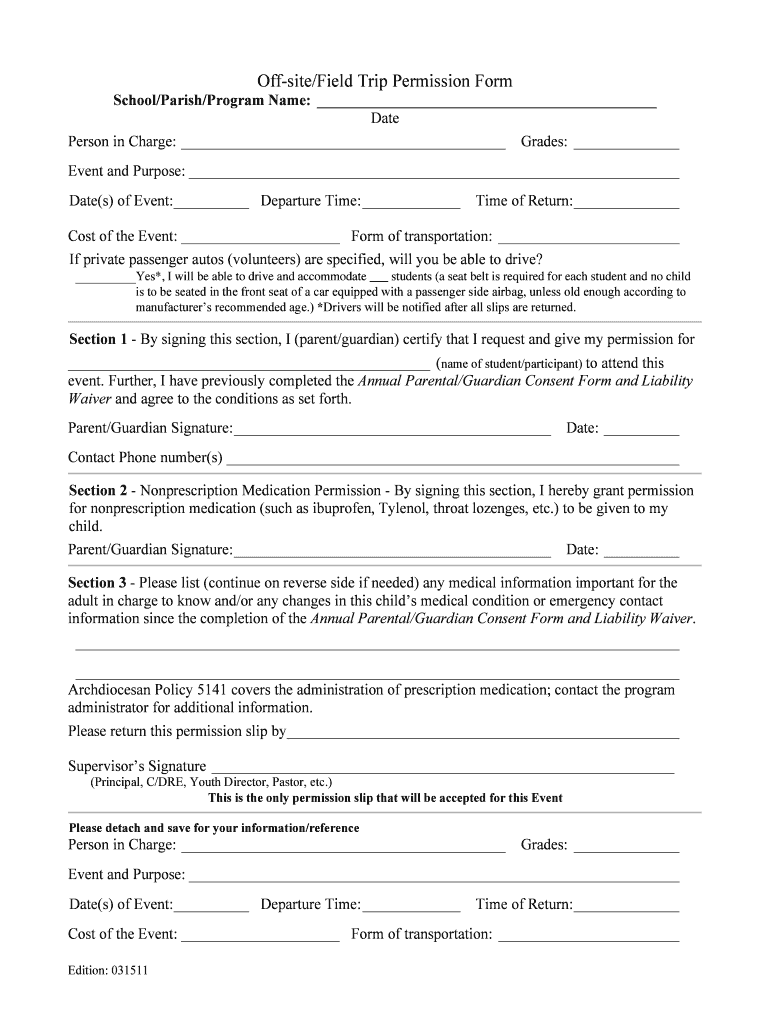
- Click ‘Get Form’ to open the Off-site Field Trip Permission Form in the editor.
- Begin by filling in the School/Parish/Program Name, Date, Person in Charge, and Grades. This information is essential for identifying the event and ensuring proper organization.
- Next, provide details about the Event and Purpose, Date(s) of Event, Departure Time, Time of Return, Cost of the Event, and Form of Transportation. Ensure accuracy as this will inform parents and guardians about logistics.
- If you are a volunteer driver, indicate your availability by checking 'Yes' and specify how many students you can accommodate. Remember to adhere to safety regulations regarding seat belts.
- In Section 1, have a parent or guardian sign to grant permission for their child to attend. They should also include their contact phone number for any emergencies.
- Section 2 requires another signature for nonprescription medication permission. Ensure this is completed if applicable.
- In Section 3, list any important medical information or changes that need to be communicated to the adult in charge.
- Finally, ensure that the Supervisor’s Signature is obtained before returning the form by the specified deadline.
Start using our platform today to streamline your document editing process for free!
Fill out off site field trip online
It's free
See more off site field trip versions
We've got more versions of the off site field trip form. Select the right off site field trip version from the list and start editing it straight away!
| Versions | Form popularity | Fillable & printable |
|---|---|---|
| 2011 | 4.8 Satisfied (21 Votes) |
Security and compliance
At DocHub, your data security is our priority. We follow HIPAA, SOC2, GDPR, and other standards, so you can work on your documents with confidence.
Learn more


