Tt form 2026

Get Form
tt form Preview on Page 1

Here's how it works

01. Edit your tt form online
Type text, add images, blackout confidential details, add comments, highlights and more.

02. Sign it in a few clicks
Draw your signature, type it, upload its image, or use your mobile device as a signature pad.

03. Share your form with others
Send what is a tt via email, link, or fax. You can also download it, export it or print it out.

How to use or fill out tt form with our platform

Form edit decoration
9.5
Ease of Setup
DocHub User Ratings on G2
9.0
Ease of Use
DocHub User Ratings on G2
  1. Click ‘Get Form’ to open the tt form in the editor.
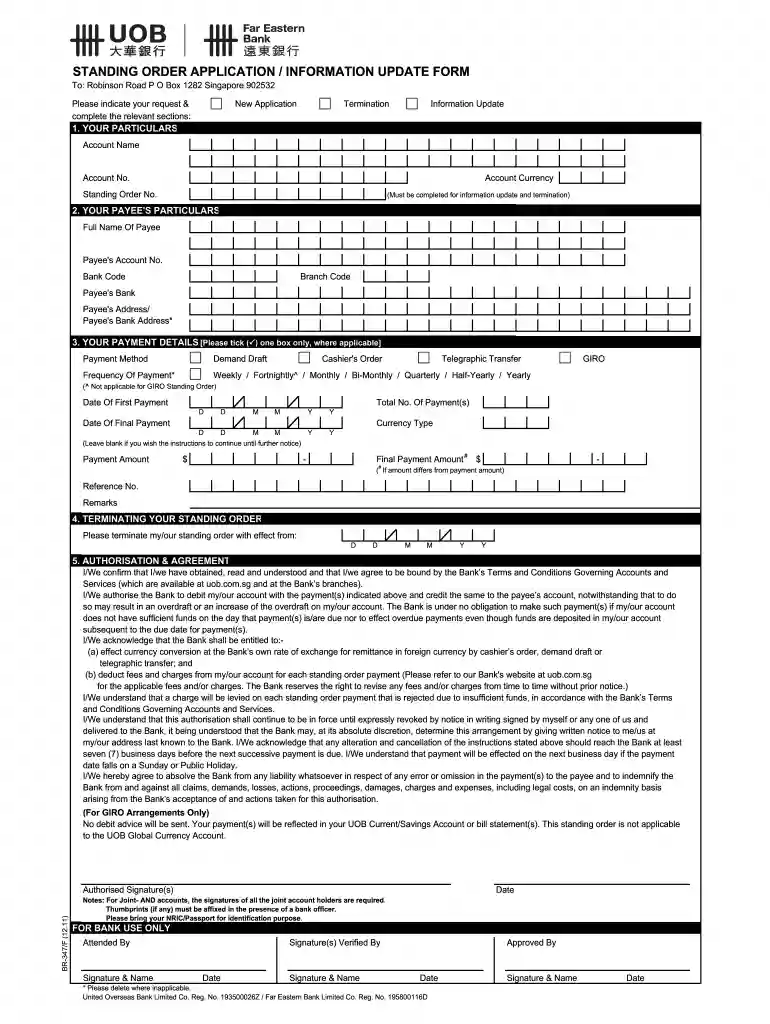
  2. Begin by filling out 'YOUR PARTICULARS'. Enter your Account Name, Account No., and Account Currency. If you are updating or terminating an existing standing order, ensure to include the Standing Order No.
  3. Next, move to 'YOUR PAYEE'S PARTICULARS'. Provide the Full Name of the Payee, their Account No., Bank Code, Branch Code, and both Payee's and Payee's Bank Address.
  4. In 'YOUR PAYMENT DETAILS', select your Payment Method by ticking one box. Specify the Frequency of Payment and enter the Date of First Payment along with Total No. of Payments. Fill in the Payment Amount and Currency Type as needed.
  5. If you wish to terminate a standing order, complete the section under 'TERMINATING YOUR STANDING ORDER' with the effective date.
  6. Finally, review and sign under 'AUTHORISATION & AGREEMENT'. Ensure all required signatures are provided before submitting.

Start using our platform today for free to streamline your document editing and form completion!

See more tt form versions

We've got more versions of the tt form form. Select the right tt form version from the list and start editing it straight away!
Versions Form popularity Fillable & printable
2017 4.8 Satisfied (103 Votes)
2016 4.4 Satisfied (59 Votes)
2011 4.4 Satisfied (136 Votes)
be ready to get more

Complete this form in 5 minutes or less

Get form

Got questions?

We have answers to the most popular questions from our customers. If you can't find an answer to your question, please contact us.
Contact us
What is the full form of TT payment? TT stands for Telegraphic Transfer, an online method for internationally transferring funds between Bank Accounts. It is fast and secure through digital banking networks.
A telegraphic transfer (TT) is an electronic way of transferring funds that is used primarily for overseas wire transactions. Usually, a telegraphic transfer is complete in two to four business days, depending on the origin and destination of the transfer.
Completion of Transfer: The recipients bank, upon receiving the instructions, credits the recipients account with the transferred amount. While the process is generally efficient, the total time can vary, typically ranging from one to several business days, depending on the banks processing times and policies.
How to fill out the Telegraphic Transfer Application Instructions? Fill in your personal details in block letters. Choose the desired payment mode and currency. Enter the remitting currency and amount. Provide beneficiary and bank details accurately. Review the terms and conditions before signing.
Telegraphic transfers which are also referred to as Telex transfers, TT payments, or simply TT is a way of transferring funds thats mostly used when you need to make an overseas transaction. The term telegraphic transfer has its origins in the way that banks used to make international money transfers.

Security and compliance

At DocHub, your data security is our priority. We follow HIPAA, SOC2, GDPR, and other standards, so you can work on your documents with confidence.

Learn more
ccpa2
pci-dss
gdpr-compliance
hipaa
soc-compliance
be ready to get more

Complete this form in 5 minutes or less

Get form

People also ask

Fill in all the necessary information. If youre happy with the terms of the transfer, youll need to provide the recipients name and basic bank details - often an IBAN and BIC/SWIFT code. You might need the recipients address, and even their banks address, as well.

t t form