




Here's how it works



How to use or fill out petition of reconsideration maine printable with our platform

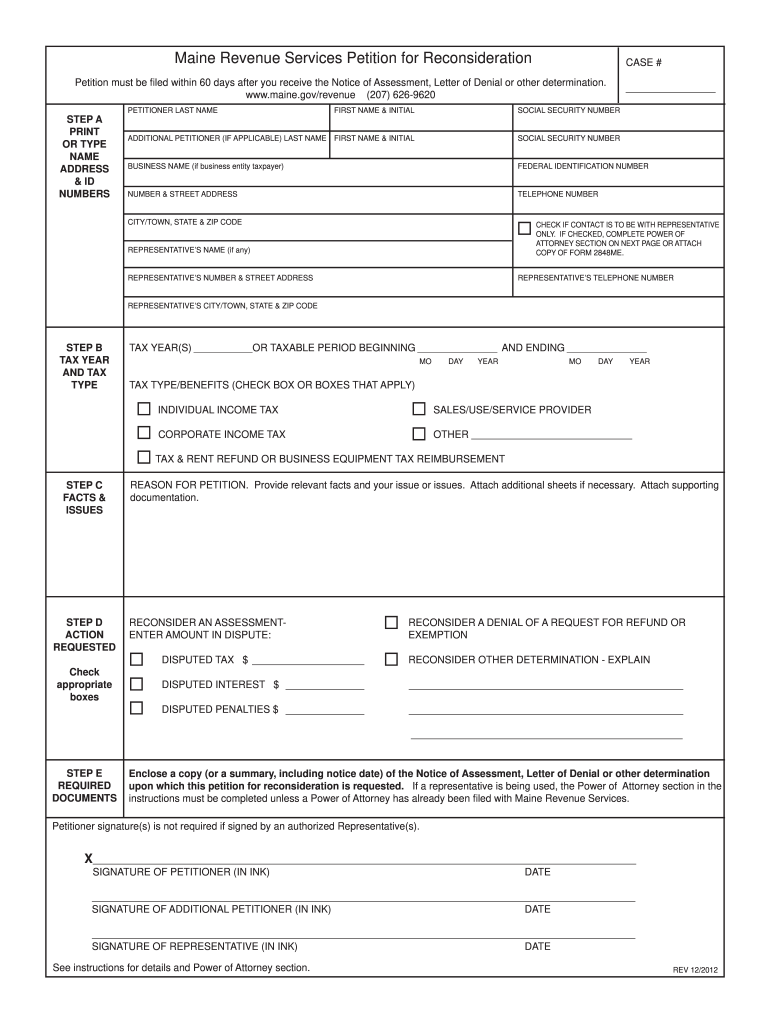
- Click ‘Get Form’ to open the petition of reconsideration in the editor.
- In Step A, provide your last name, first name, address, and identification numbers. If applicable, include details for any additional petitioner or representative.
- Move to Step B and enter the tax year(s) or taxable period(s) relevant to your petition. Check the appropriate tax type boxes that apply to your situation.
- In Step C, clearly outline the facts and issues related to your case. Attach any necessary documentation that supports your claims.
- Proceed to Step D where you will specify the action you are requesting from Maine Revenue Services. Include amounts in dispute if applicable.
- Finally, in Step E, attach a copy of the Notice of Assessment or Letter of Denial as required. Ensure all signatures are completed before submission.
Start using our platform today for free to streamline your petition process!
It's free
See more petition of reconsideration maine printable versions
| Versions | Form popularity | Fillable & printable |
|---|---|---|
| 2012 | 4.8 Satisfied (139 Votes) |
Got questions?
Is it secure to sign my petition of reconsideration maine printable electronically?
You should use only reliable software solutions with strong data protection compliance to approve your paperwork electronically. DocHub is just the type of software you need! It stores data on Amazon Web Servers and complies with all required security standards and eSignature regulations, so it’s a reliable way to electronically sign your petition of reconsideration maine printable or other documents using this tool.
How do you edit petition of reconsideration maine printable in Chrome?
If you are using Chrome, there are two easy methods to edit your petition of reconsideration maine printable online. First, go to the DocHub site, add your file, and edit it using our toolbar. You may also set up our Chrome extension and edit any document by dragging and dropping it in your web browser tab.
Security and compliance
At DocHub, your data security is our priority. We follow HIPAA, SOC2, GDPR, and other standards, so you can work on your documents with confidence.
Learn more


