Living application 2026

Get Form
living application Preview on Page 1

Here's how it works

01. Edit your living application online
Type text, add images, blackout confidential details, add comments, highlights and more.
02. Sign it in a few clicks
Draw your signature, type it, upload its image, or use your mobile device as a signature pad.
03. Share your form with others
Send it via email, link, or fax. You can also download it, export it or print it out.

How to use or fill out living application with our platform

Form edit decoration
9.5
Ease of Setup
DocHub User Ratings on G2
9.0
Ease of Use
DocHub User Ratings on G2
  1. Click ‘Get Form’ to open the living application in the editor.
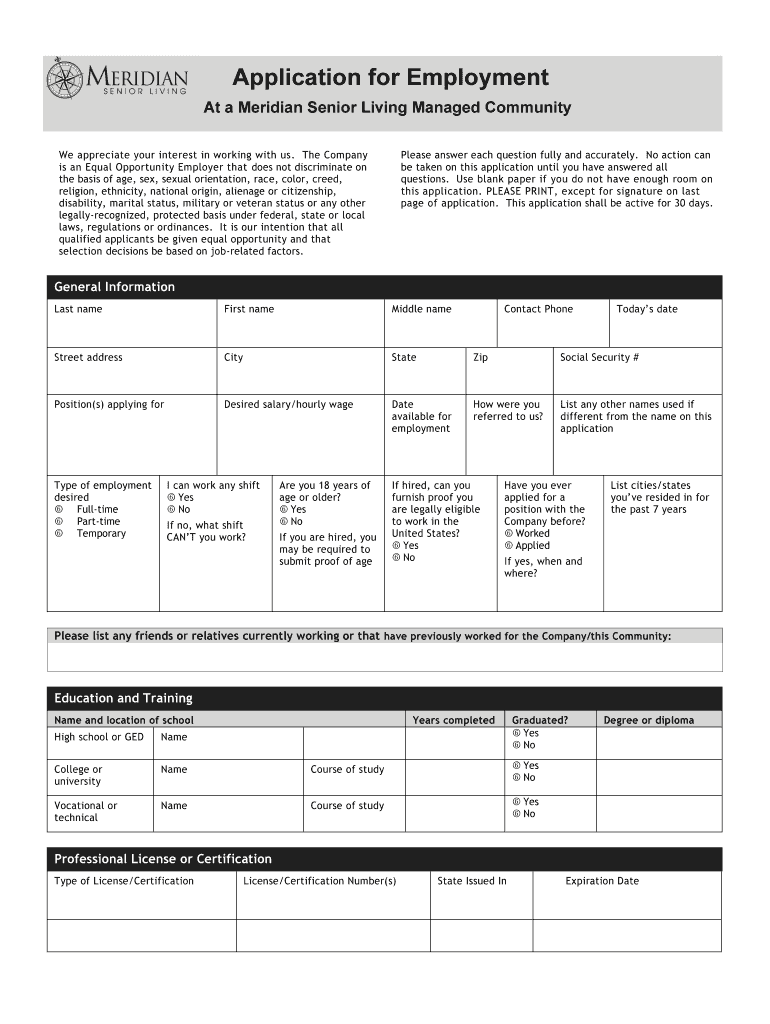
  2. Begin by filling out the 'General Information' section. Enter your last name, first name, middle name, and contact details including street address, city, state, and zip code. Ensure accuracy as this information is crucial for communication.
  3. Next, specify the position you are applying for and your desired salary or hourly wage. Indicate your availability date and how you were referred to the company.
  4. In the 'Education and Training' section, list your educational background. Include names of schools attended, years completed, and whether you graduated. Be thorough to highlight your qualifications.
  5. Proceed to 'Employment History'. List your previous employers starting with the most recent. Provide details such as job title, employment dates, salary information, and a brief summary of duties performed.
  6. Finally, review all sections for completeness before signing the acknowledgment at the end of the application. This confirms that all provided information is accurate.

Start filling out your living application today on our platform for free!

See more living application versions

We've got more versions of the living application form. Select the right living application version from the list and start editing it straight away!
Versions Form popularity Fillable & printable
2011 4.8 Satisfied (104 Votes)
be ready to get more

Complete this form in 5 minutes or less

Get form

Got questions?

We have answers to the most popular questions from our customers. If you can't find an answer to your question, please contact us.
Contact us
Seniors should require some assistance with personal care to qualify for assisted living, but they shouldnt need 24-hour medical care. New residents should meet the age requirement for assisted living, which may be 55, 60, or 65+.
However, in-home personal care professionals will provide dedicated, one-on-one care at your loved ones home. An in-home caregiver will focus entirely on your loved ones preferences, comfort, and safety. Assisted living care is provided by facility staff members, who may care for multiple residents during each shift.
Medicare and most health insurance plans dont pay for long-term care. in a nursing home. Even if Medicare doesnt cover your nursing home care, youll still need Medicare to cover your hospital care, doctors services, drugs and medical supplies while youre in a nursing home.
Ultimately, the answer to the question Do seniors live longer in assisted living? is complex and depends on the individual. Seniors who enter assisted living tend to be in better physical, mental, and emotional health than those who dont, which can contribute to longer lifespans.
The five levels of assisted living include: Level 1: Independent living. Level 2: Assisted living. Level 3: In-home care. Level 4: Memory care. Level 5: Skilled nursing care.

Security and compliance

At DocHub, your data security is our priority. We follow HIPAA, SOC2, GDPR, and other standards, so you can work on your documents with confidence.

Learn more
ccpa2
pci-dss
gdpr-compliance
hipaa
soc-compliance
be ready to get more

Complete this form in 5 minutes or less

Get form

People also ask

The pros of assisted living include help with daily activities, opportunities for socializing, and increased safety. The cons of assisted living include concerns with cost, privacy, and options for medical care.
Assisted living refers to support provided in a residential facility, where your loved one may reside in an accessible apartment, townhome, or suite with a private bathroom. Home care, on the other hand, is provided in your loved ones residence without the need to relocate to an assisted living facility.
Here are several ways low-income seniors can pay for assisted living: Medicare. Medicaid. Medicaid waivers. Veterans benefits. Social Security. United States Department of Housing and Urban Development (HUD) programs.

Related links