Bb t benefits plantrac 2026

Get Form
tax day Preview on Page 1

Here's how it works

01. Edit your tax day online
Type text, add images, blackout confidential details, add comments, highlights and more.
02. Sign it in a few clicks
Draw your signature, type it, upload its image, or use your mobile device as a signature pad.
03. Share your form with others
Send bbt plantrac via email, link, or fax. You can also download it, export it or print it out.

How to use or fill out BB&T Benefits PlanTrac with our platform

Form edit decoration
9.5
Ease of Setup
DocHub User Ratings on G2
9.0
Ease of Use
DocHub User Ratings on G2
  1. Click ‘Get Form’ to open the BB&T Benefits PlanTrac in the editor.
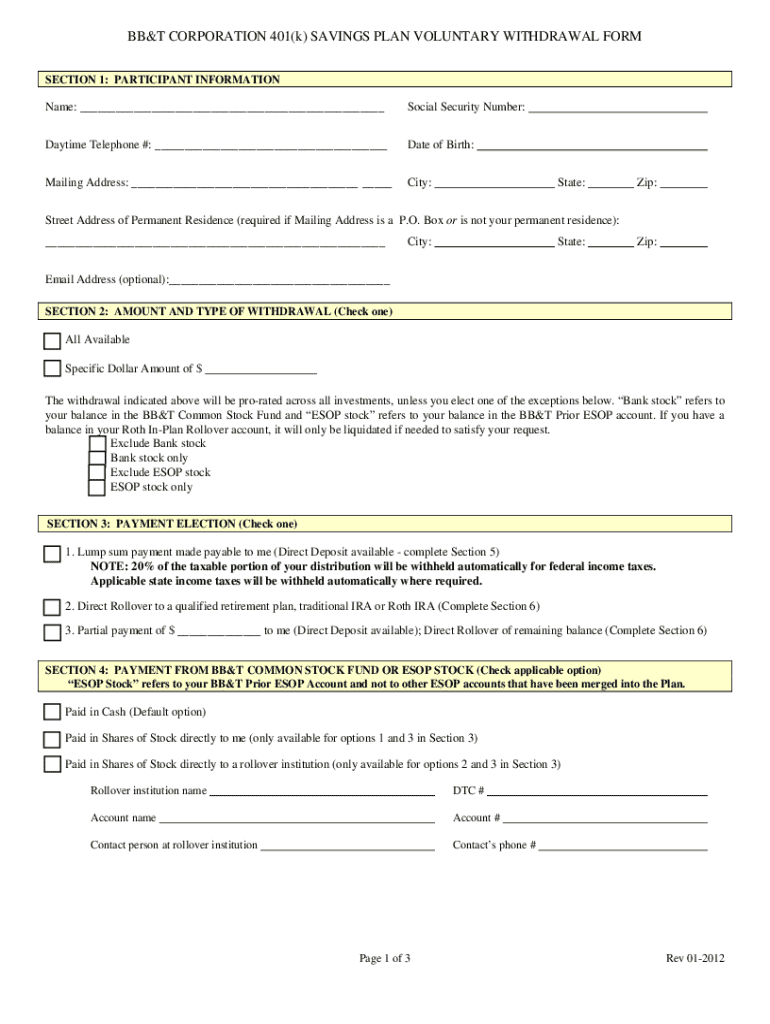
  2. In Section 1, enter your name, Social Security number, daytime phone number, date of birth, and both mailing and street addresses. Ensure that your street address is provided if your mailing address is a P.O. Box.
  3. Proceed to Section 2 where you will indicate the amount and type of withdrawal. Choose either 'All Available' or specify a dollar amount. Remember not to select both options.
  4. In Section 3, select how you want your payment processed: as a lump sum payable to you, a direct rollover to another qualified plan, or a partial payment with the remainder rolled over.
  5. If applicable, complete Section 4 regarding payments from the BB&T Common Stock Fund or ESOP stock by selecting your preferred payment method.
  6. For direct deposits, fill out Section 5 with your bank details including routing and account numbers.
  7. If rolling over funds, complete Section 6 with the details of your rollover institution(s).
  8. Finally, sign and date the form in Section 8 in front of a notary public before submitting it as instructed.

Start using our platform today for free to streamline your BB&T Benefits PlanTrac completion!

See more bb t benefits plantrac versions

We've got more versions of the bb t benefits plantrac form. Select the right bb t benefits plantrac version from the list and start editing it straight away!
Versions Form popularity Fillable & printable
2012 4 Satisfied (22 Votes)
be ready to get more

Complete this form in 5 minutes or less

Get form

Got questions?

We have answers to the most popular questions from our customers. If you can't find an answer to your question, please contact us.
Contact us
The Pension Plan is a defined benefit plan, which means it is wrapped around a formula. This formula is based on your years of credited service and average compensation. Funded by Truist on an annual basis, it includes the following features: 100% of the contributions to the pension plan are made by Truist.
Defined benefit plans provide a fixed, pre-established benefit for employees at retirement. Employees often value the fixed benefit provided by this type of plan. On the employer side, businesses can generally contribute (and therefore deduct) more each year than in defined contribution plans.
There are certain circumstances in which you may be eligible to withdraw funds before age 59 without taking a 10% penalty, including: Rollover of distributions to another IRA or employer plan. Termination of employment at or after age 55.
Recharge your work/life balance with time off benefits. Truist offers eligible teammates a generous range of time off programsfrom paid holidays, to vacation, new parent time off, leaves of absence, and more.
In the case of an applicable defined benefit plan, such plan shall be treated as meeting the requirements of subsection (a)(2) only if an employee who has completed at least 3 years of service has a nonforfeitable right to 100 percent of the employees accrued benefit derived from employer contributions.

Security and compliance

At DocHub, your data security is our priority. We follow HIPAA, SOC2, GDPR, and other standards, so you can work on your documents with confidence.

Learn more
ccpa2
pci-dss
gdpr-compliance
hipaa
soc-compliance
be ready to get more

Complete this form in 5 minutes or less

Get form

People also ask

Defined benefit plans carry more investment risk for the employer, while 401(k) plans transfer the investment risk to the employee.

tax form withdrawals