Statement sws get 2026

Get Form
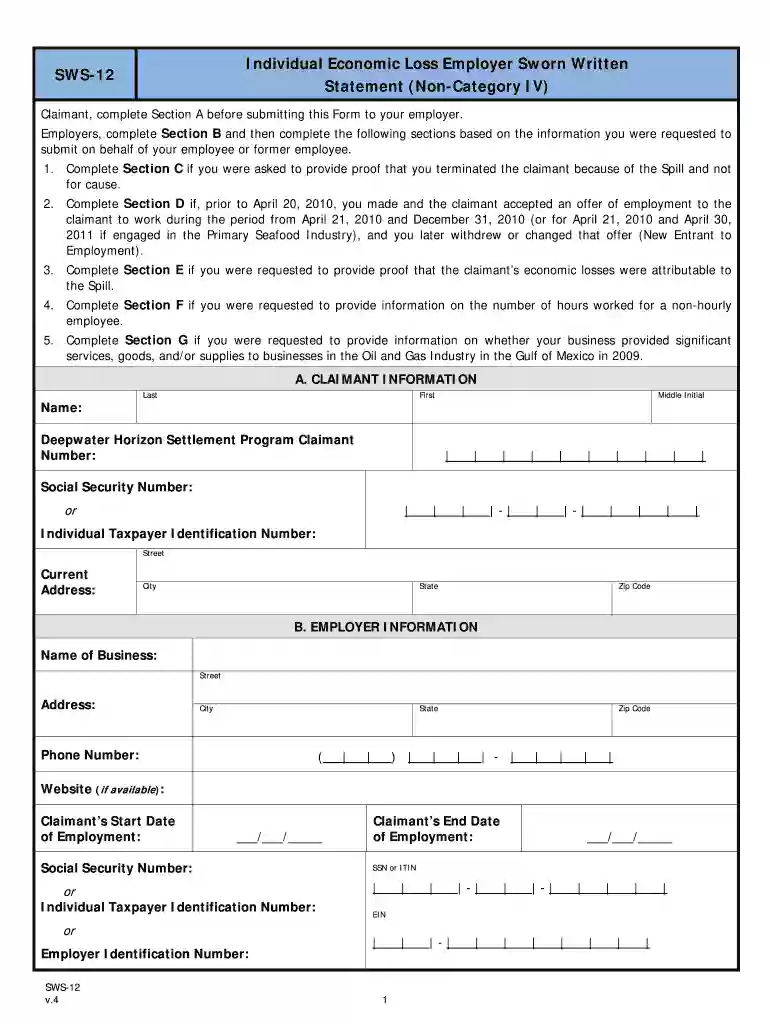
employer sworn statement Preview on Page 1

Here's how it works

01. Edit your employer sworn statement online
Type text, add images, blackout confidential details, add comments, highlights and more.

02. Sign it in a few clicks
Draw your signature, type it, upload its image, or use your mobile device as a signature pad.

03. Share your form with others
Send statement written via email, link, or fax. You can also download it, export it or print it out.

How to use or fill out statement sws get with our platform

Form edit decoration
9.5
Ease of Setup
DocHub User Ratings on G2
9.0
Ease of Use
DocHub User Ratings on G2
  1. Click ‘Get Form’ to open the statement sws get in the editor.
  2. In Section A, enter the claimant's information including their name, Social Security Number, and current address.
  3. Employers should proceed to Section B and fill in their business details such as name, address, and contact number.
  4. Complete Section C if you terminated the claimant due to the Spill. Select the appropriate reason for termination.
  5. If applicable, fill out Section D regarding any employment offers made to the claimant that were later changed or withdrawn.
  6. In Section E, provide a detailed explanation of how the claimant’s economic losses are related to the Spill.
  7. For non-hourly employees, complete Section F with details about their position, hours worked, and salary information.
  8. Finally, review all sections for accuracy before signing in Section H and submitting your completed form.

Start using our platform today for free to streamline your document editing and form completion!

be ready to get more

Complete this form in 5 minutes or less

Get form

Got questions?

We have answers to the most popular questions from our customers. If you can't find an answer to your question, please contact us.
Contact us
You can request one online by using your personal my Social Security account, which will allow you to immediately view, print, and save a copy of the letter. You can call us to request one at 1-800-772-1213 (TTY 1-800-325-0778), Monday through Friday from 8:00 a.m. to 7:00 p.m. local time.
How much will I get from Social Security if I make $100,000? If $100,000 is your average income over 35 of your highest-earning working years and you plan to max out your benefits by collecting when you turn 70, you can expect to get about $3,253 per month from Social Security.
It is a tax form we mail to you every January if you receive Social Security benefits. It shows the total amount of benefits you received in the previous year, so you know how much Social Security income to report to the IRS on your tax return. Supplemental Security Income (SSI) payments arent taxed.
That adds up to $2,096.48 as a monthly benefit if you retire at full retirement age. Put another way, Social Security will replace about 42% of your past $60,000 salary. Thats a lot better than the roughly 26% figure for those making $120,000 per year.

Security and compliance

At DocHub, your data security is our priority. We follow HIPAA, SOC2, GDPR, and other standards, so you can work on your documents with confidence.

Learn more
ccpa2
pci-dss
gdpr-compliance
hipaa
soc-compliance
be ready to get more

Complete this form in 5 minutes or less

Get form