Social security self employment income 2026

Get Form
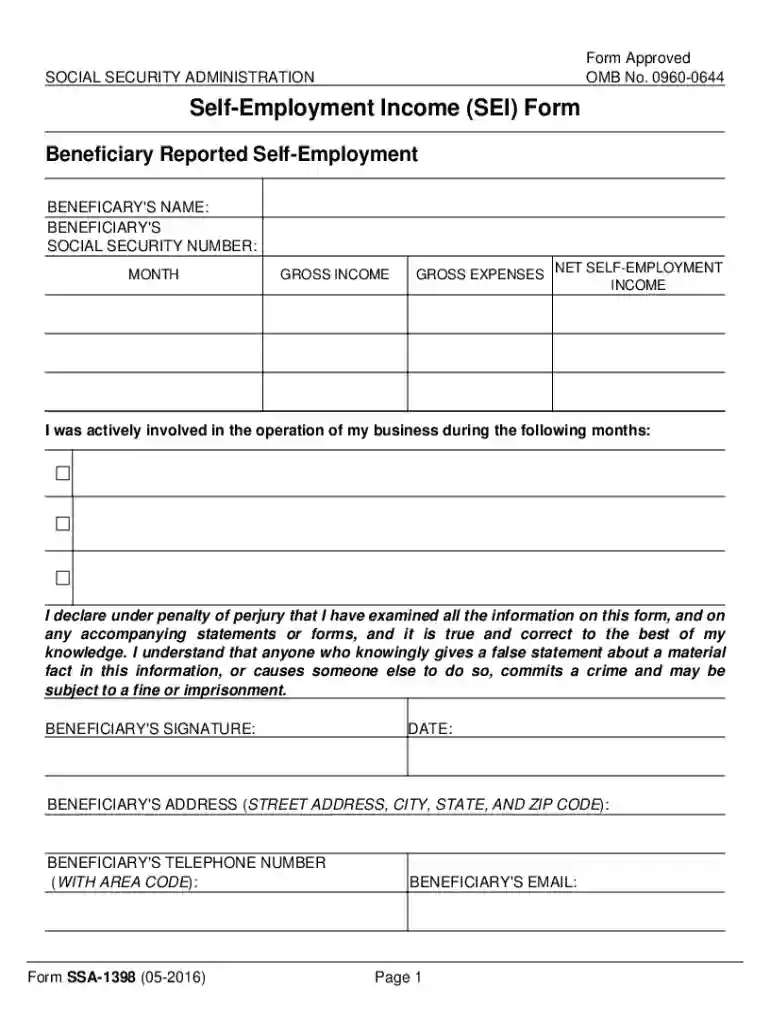
social self employment income Preview on Page 1

Here's how it works

01. Edit your social self employment income online
Type text, add images, blackout confidential details, add comments, highlights and more.

02. Sign it in a few clicks
Draw your signature, type it, upload its image, or use your mobile device as a signature pad.

03. Share your form with others
Send social security self employment income via email, link, or fax. You can also download it, export it or print it out.

How to use or fill out social security self employment income with our platform

Form edit decoration
9.5
Ease of Setup
DocHub User Ratings on G2
9.0
Ease of Use
DocHub User Ratings on G2
  1. Click ‘Get Form’ to open the Social Security Self Employment Income (SEI) form in the editor.
  2. Begin by entering the beneficiary's name and Social Security number at the top of the form. This information is crucial for identification purposes.
  3. In the 'Gross Income' section, input your total earnings from self-employment for the reported months. Ensure accuracy as this affects your benefits.
  4. Next, fill in 'Gross Expenses' to account for any business-related costs incurred during that period. This will help calculate your net income.
  5. Calculate and enter your 'Net Self-Employment Income' by subtracting gross expenses from gross income. This figure is essential for determining eligibility.
  6. Indicate the months you were actively involved in your business operations. This provides context for your reported income.
  7. Finally, sign and date the form, providing your address and contact information to complete the submission process.

Start using our platform today to easily fill out and submit your Social Security Self Employment Income form online, for free!

See more social security self employment income versions

We've got more versions of the social security self employment income form. Select the right social security self employment income version from the list and start editing it straight away!
Versions Form popularity Fillable & printable
2016 4.8 Satisfied (87 Votes)
be ready to get more

Complete this form in 5 minutes or less

Get form

Got questions?

We have answers to the most popular questions from our customers. If you can't find an answer to your question, please contact us.
Contact us
Earned income includes all the taxable income and wages you get from working for someone else, yourself or from a business or farm you own.
As a self-employed individual, estimated tax is the method used to pay Social Security, Medicare, and income taxes; this is because you do not have an employer withholding these taxes for you. Form 1040-ES, Estimated Tax for Individuals PDF, is used to figure these taxes.
If you are self-employed, you will need to report your net earnings to Social Security and the Internal Revenue Service (IRS). Net earnings for Social Security are your gross earnings from your trade or business, minus all of your allowable business deductions and depreciation.
This limit changes each year with changes in the national average wage index. We call this annual limit the contribution and benefit base. This amount is also commonly referred to as the taxable maximum. For earnings in 2025, this base is $176,100.

Security and compliance

At DocHub, your data security is our priority. We follow HIPAA, SOC2, GDPR, and other standards, so you can work on your documents with confidence.

Learn more
ccpa2
pci-dss
gdpr-compliance
hipaa
soc-compliance
be ready to get more

Complete this form in 5 minutes or less

Get form