




Here's how it works

01. Edit your missouri department of revenue online
Type text, add images, blackout confidential details, add comments, highlights and more.

02. Sign it in a few clicks
Draw your signature, type it, upload its image, or use your mobile device as a signature pad.

03. Share your form with others
Send missouri dept of revenue via email, link, or fax. You can also download it, export it or print it out.
How to use or fill out Missouri Dept of Revenue with DocHub

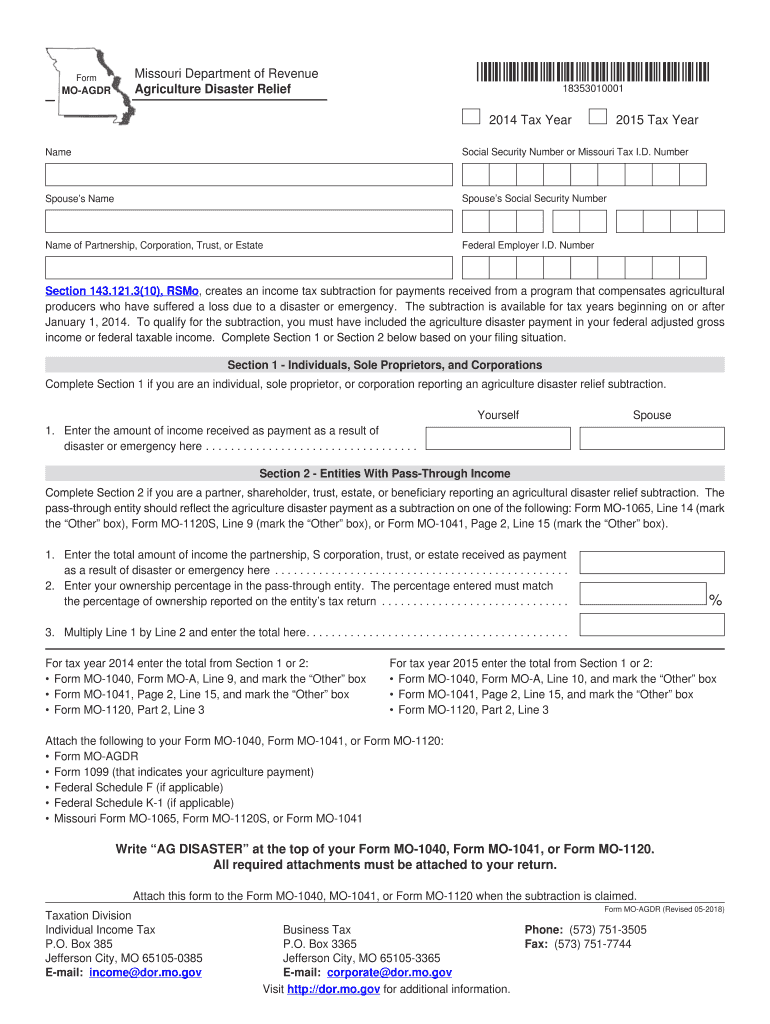
- Click ‘Get Form’ to open the Missouri Department of Revenue Agriculture Disaster Relief form in our editor.
- Begin by entering your name and Social Security Number or Missouri Tax I.D. Number in the designated fields at the top of the form.
- If applicable, provide your spouse’s name and Social Security Number. If you are filing as a partnership, corporation, trust, or estate, include the name and Federal Employer I.D. Number.
- Choose between Section 1 for individuals and corporations or Section 2 for entities with pass-through income based on your situation.
- In Section 1, enter the amount received from disaster payments. In Section 2, input the total income received by the entity and your ownership percentage.
- Multiply the amounts as instructed and ensure all calculations are accurate before proceeding to attach necessary documents.
- Finally, write 'AG DISASTER' at the top of your tax return forms and attach this completed form along with any required documentation.
Start using our platform today to simplify your document editing and form completion process for free!
Fill out missouri dept of revenue online
It's free
It's free
See more missouri dept of revenue versions
We've got more versions of the missouri dept of revenue form. Select the right missouri dept of revenue version from the list and start editing it straight away!
Got questions?
We have answers to the most popular questions from our customers. If you can't find an answer to your question, please contact us.
Contact us
Why would I get a letter from the Missouri Department of Revenue?
If you did not resolve the debt associated with the Notice of Adjustment or the Notice of Balance Due, the Department will issue an Assessment of Unpaid Tax. This is a statutory notice that assesses the tax, interest, and additions owed to the Department.
Why would I get a letter from revenue?
An enquiry letter from Revenue (or investigation letter) is generally a signal that a Revenue official has good reason to believe that a serious tax offence has been committed and that he/she is investigating with a view to criminal prosecution.
How do I check the status of my Missouri income tax refund?
Log on to to see the progress of your return.
What comes from the Missouri Department of Revenue?
The Missouri Department of Revenue was created in 1945 by the Missouri Constitution to serve as the central collection agency for all state revenue. The primary duties of the Department are to collect taxes, title and register motor vehicles, and license drivers.
How do I speak to someone at the Missouri Department of Revenue?
Now with AI-generative enhancements, DORA is able to answer a broader variety of questions to help with your tax, motor vehicle and driver licensing needs. Chat online at dora.chat, through Facebook Messenger, or by simply texting Hi to 59058.
Security and compliance
At DocHub, your data security is our priority. We follow HIPAA, SOC2, GDPR, and other standards, so you can work on your documents with confidence.
Learn more


People also ask
What happens if you cant pay your taxes in Missouri?
In fact, if you do not pay your taxes, penalties will be added to what you owe. In addition, you are also going to accrue interest for every day that those returns are not filed on time. Eventually, the state of Missouri will send you a notice saying you havent filed your return and inviting you to do so.