Mfut 76 2026

Get Form
individual trip report Preview on Page 1

Here's how it works

01. Edit your individual trip report online
Type text, add images, blackout confidential details, add comments, highlights and more.

02. Sign it in a few clicks
Draw your signature, type it, upload its image, or use your mobile device as a signature pad.

03. Share your form with others
Send mfut 76 via email, link, or fax. You can also download it, export it or print it out.

How to use or fill out mfut 76 with our platform

Form edit decoration
9.5
Ease of Setup
DocHub User Ratings on G2
9.0
Ease of Use
DocHub User Ratings on G2
  1. Click ‘Get Form’ to open the MFUT-76 in the editor.
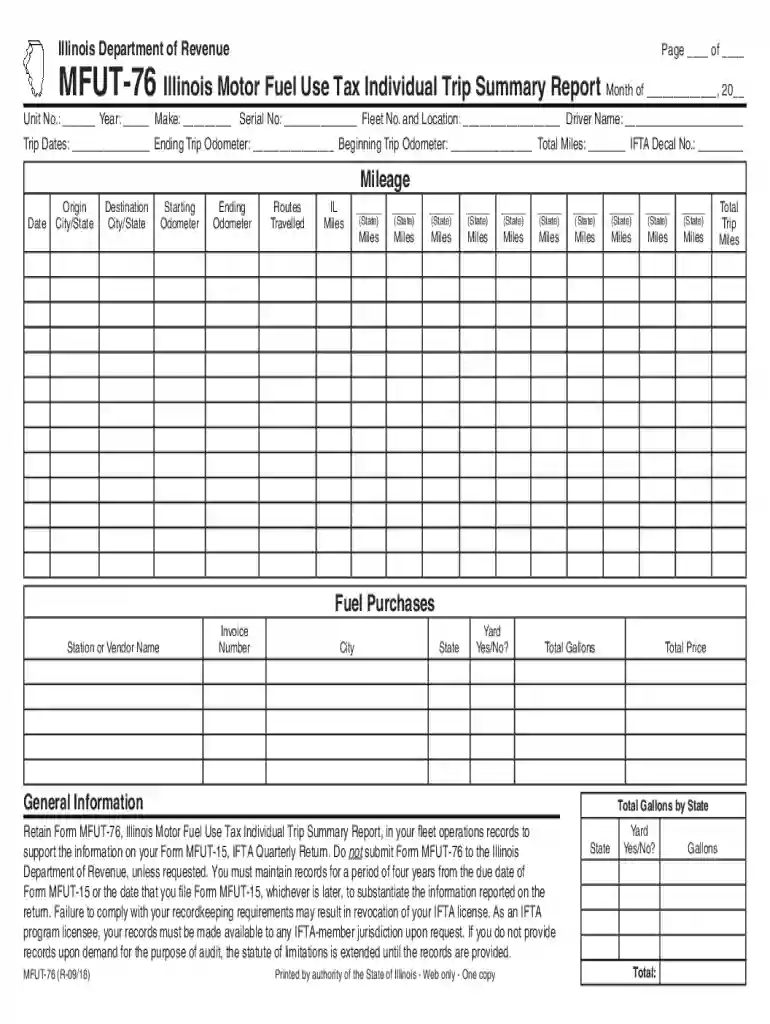
  2. Begin by entering the month and year at the top of the form. Fill in your unit number, make, serial number, fleet number, and driver name in the designated fields.
  3. Record the trip dates and odometer readings. Input the ending and beginning odometer readings to calculate total miles traveled.
  4. In the mileage section, list each trip's date, origin city/state, destination city/state, starting and ending odometer readings, and routes traveled. Ensure you accurately document IL miles for each entry.
  5. For fuel purchases, enter the station/vendor name, invoice number, city, state, whether it was a yard purchase (Yes/No), and total gallons purchased.
  6. Finally, summarize total gallons by state and total trip miles at the bottom of the form before saving your completed document.

Start using our platform today to fill out your MFUT-76 easily and for free!

See more mfut 76 versions

We've got more versions of the mfut 76 form. Select the right mfut 76 version from the list and start editing it straight away!
Versions Form popularity Fillable & printable
2018 4.8 Satisfied (116 Votes)
2015 4.3 Satisfied (79 Votes)
be ready to get more

Complete this form in 5 minutes or less

Get form

Got questions?

We have answers to the most popular questions from our customers. If you can't find an answer to your question, please contact us.
Contact us
You may file a claim for refund by completing and submitting Form RMFT-11-A. If you already have a Motor Fuel Refund account with the Illinois Department of Revenue, you may also submit your claim electronically using MyTax Illinois.
After revenues are deposited into the Motor Fuel Tax Fund, they are transferred into state construction funds, the Motor Fuel Tax - Municipalities Fund, the Motor Fuel Tax Fund - Town and Road Districts, and the Motor Fuel Tax Fund - Counties .
gasoline/gasohol $0.483 per gallon. diesel fuel $0.558 per gallon. liquefied petroleum gas (LPG) $0.558 per gallon.
Some refunds may take longer to process due to errors in filing or security measures. Overall, refunds resulting from electronically filed returns can be expected around 4 weeks after filing. Refunds resulting from returns filed on paper can be expected around 4 to 8 weeks after filing.
To inquire about a prior years, or amended, refund status, you may call us at 800 732-8866. For more specific information about the status of your refund after IDOR has finished processing it, you can check the Illinois Comptrollers Find Your Illinois Tax Refund System.

Security and compliance

At DocHub, your data security is our priority. We follow HIPAA, SOC2, GDPR, and other standards, so you can work on your documents with confidence.

Learn more
ccpa2
pci-dss
gdpr-compliance
hipaa
soc-compliance
be ready to get more

Complete this form in 5 minutes or less

Get form