2013 npt 2017 form-2026

Get Form
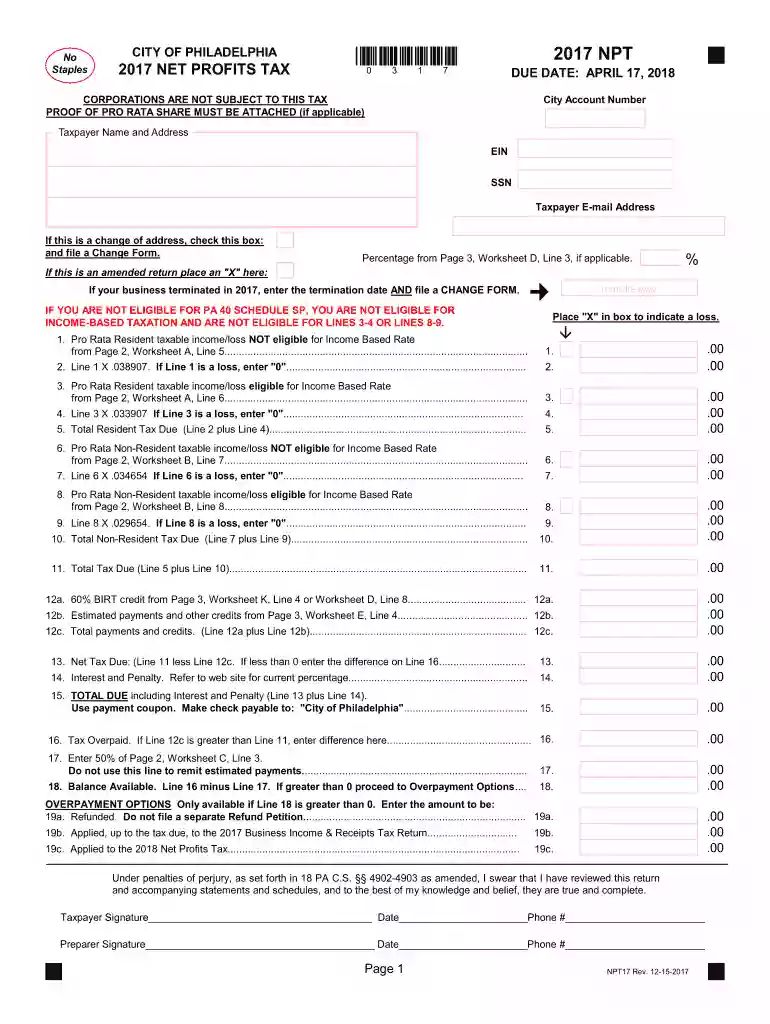
2013 npt 2017 form Preview on Page 1

Here's how it works

01. Edit your form online
Type text, add images, blackout confidential details, add comments, highlights and more.

02. Sign it in a few clicks
Draw your signature, type it, upload its image, or use your mobile device as a signature pad.

03. Share your form with others
Send it via email, link, or fax. You can also download it, export it or print it out.

How to use or fill out 2013 NPT 2017 form with our platform

Form edit decoration
9.5
Ease of Setup
DocHub User Ratings on G2
9.0
Ease of Use
DocHub User Ratings on G2
  1. Click ‘Get Form’ to open the 2013 NPT 2017 form in the editor.
  2. Begin by entering your City Account Number, Taxpayer Name, and Address in the designated fields at the top of the form.
  3. Provide your EIN or SSN and Taxpayer E-mail Address. If applicable, check the box for a change of address or if this is an amended return.
  4. Fill in your Pro Rata Resident taxable income/loss from Worksheet A, ensuring to follow the calculations for Lines 1 through 11 as indicated on the form.
  5. Complete any additional sections regarding Non-Resident taxable income/loss and ensure all calculations are accurate before proceeding.
  6. Finally, review your entries for accuracy, sign where indicated, and save your completed form. You can then easily share or submit it directly from our platform.

Start using our platform today to fill out your forms online for free!

See more 2013 npt 2017 form versions

We've got more versions of the 2013 npt 2017 form form. Select the right 2013 npt 2017 form version from the list and start editing it straight away!
Versions Form popularity Fillable & printable
2023 4.1 Satisfied (56 Votes)
2022 4.4 Satisfied (32 Votes)
2021 4.8 Satisfied (232 Votes)
2020 4.2 Satisfied (67 Votes)
2019 4.4 Satisfied (138 Votes)
2018 4.4 Satisfied (137 Votes)
2017 4.3 Satisfied (46 Votes)
2015 4.4 Satisfied (158 Votes)
2013 4.4 Satisfied (518 Votes)
be ready to get more

Complete this form in 5 minutes or less

Get form

Got questions?

We have answers to the most popular questions from our customers. If you can't find an answer to your question, please contact us.
Contact us
Key Takeaways. You can file back taxes for any past year, but the IRS usually considers you in good standing if you have filed the last six years of tax returns. If you qualified for federal tax credits or refunds in the past but didnt file tax returns, you may be able to collect the money by filing back taxes.
Check the (PO) Box. Mailing tax payments forms to Revenue. Tax type or form:Mailing address: Wage Tax Philadelphia Dept. of Revenue P.O. Box 8040 Philadelphia, PA 19101-8040 Earnings Tax Philadelphia Dept. of Revenue P.O. Box 1648 Philadelphia, PA 19105‐16486 more rows Apr 6, 2020
Who pays the tax. The Net Profits Tax (NPT) is imposed on the net profits from the operation of a trade, business, profession, enterprise, or other activity by: Philadelphia residents, even if their business is conducted outside of Philadelphia. Non-residents who conduct business in Philadelphia.
In order to file a 2013 IRS Tax Return, download, complete, print, and sign the 2013 IRS Tax Forms below and mail the forms to the address listed on the IRS and state forms. Select your state(s) and download, complete, print, and sign your 2013 State Tax Return income forms. You can no longer claim a 2013 Tax Refund.
There is no hard limit on how many years you can file back taxes. However, to be in good standing with the IRS, you should have filed tax returns for the last six years. If youre due a refund or tax credits, you must file the return within three years of the original due date to claim it.

Security and compliance

At DocHub, your data security is our priority. We follow HIPAA, SOC2, GDPR, and other standards, so you can work on your documents with confidence.

Learn more
ccpa2
pci-dss
gdpr-compliance
hipaa
soc-compliance
be ready to get more

Complete this form in 5 minutes or less

Get form

People also ask

Overview. Pennsylvania personal income tax is levied at the rate of 3.07 percent against taxable income of resident and nonresident individuals, estates, trusts, partnerships, S corporations, business trusts and limited liability companies not federally taxed as corporations.
The IRS allows 2022 federal tax returns to be e-filed until early November 2025. To e-file a prior year tax return, the IRS requires an Identity Protection PIN. The IRS shuts down e-filing for maintenance each year from late November to early January.

Related links