child care tax Preview on Page 1

Child Care Plus - acclarisbenefits.com 2026

Here's how it works

  • 01. Edit your child care tax online

    Type text, add images, blackout confidential details, add comments, highlights and more.

  • 02. Sign it in a few clicks

    Draw your signature, type it, upload its image, or use your mobile device as a signature pad.

  • 03. Share your form with others

    Send form eligible via email, link, or fax. You can also download it, export it or print it out.

How to use or fill out Child Care Plus - acclarisbenefits.com with our platform

Form edit decoration
9.5
Ease of Setup
DocHub User Ratings on G2
9.0
Ease of Use
DocHub User Ratings on G2
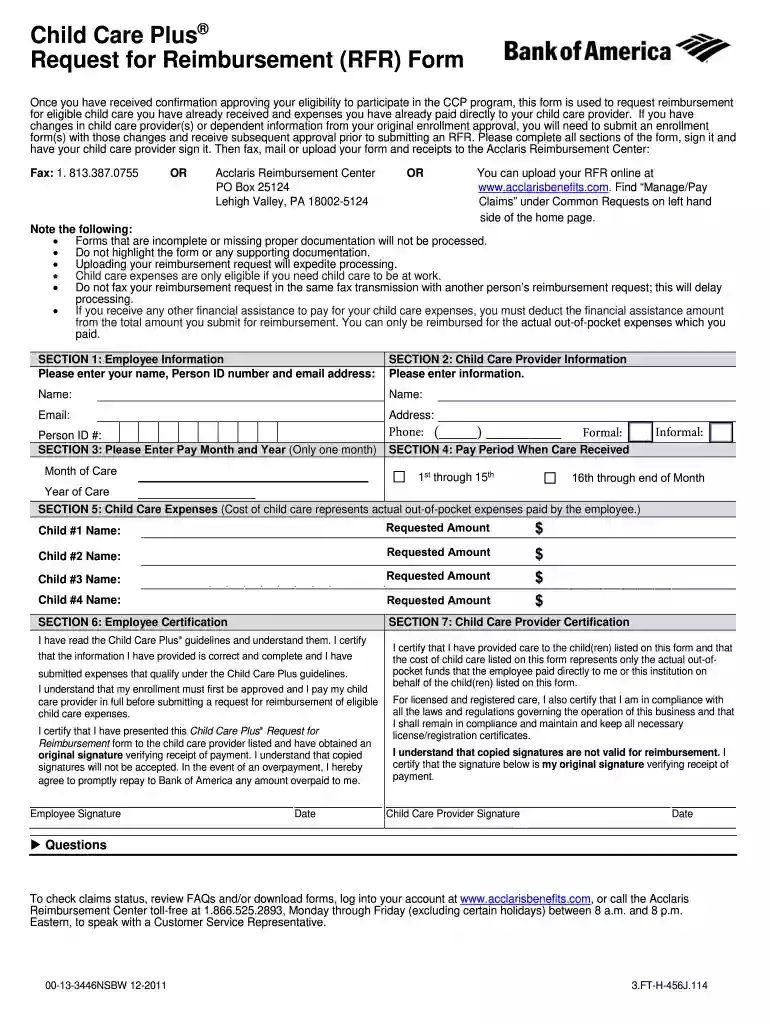
  1. Click ‘Get Form’ to open the Child Care Plus Request for Reimbursement (RFR) form in the editor.
  2. In Section 1, enter your name, Person ID number, and email address to identify yourself as the employee requesting reimbursement.
  3. Proceed to Section 2 and fill in the child care provider's information, including their name, email, and address.
  4. In Section 3, specify the month and year of care provided. Ensure you only select one month for accurate processing.
  5. For Section 4, indicate the pay period during which care was received by selecting either '1st through 15th' or '16th through end of Month'.
  6. In Section 5, list each child's name along with the requested reimbursement amount based on your actual out-of-pocket expenses.
  7. Complete Sections 6 and 7 by signing and dating the form. Ensure both you and your child care provider provide original signatures.
  8. Finally, upload your completed form and receipts using our platform for expedited processing.

Start filling out your Child Care Plus RFR form today using our platform for a seamless experience!

See more child care tax versions

We've got more versions of the child care tax form. Select the right child care tax version from the list and start editing it straight away!

VersionsForm popularityFillable & printable
20115 Satisfied (32 Votes)

be ready to get more

Complete this form in 5 minutes or less

Security and compliance

At DocHub, your data security is our priority. We follow HIPAA, SOC2, GDPR, and other standards, so you can work on your documents with confidence.

If you believe that this page should be taken down, please follow our DMCA take down process here