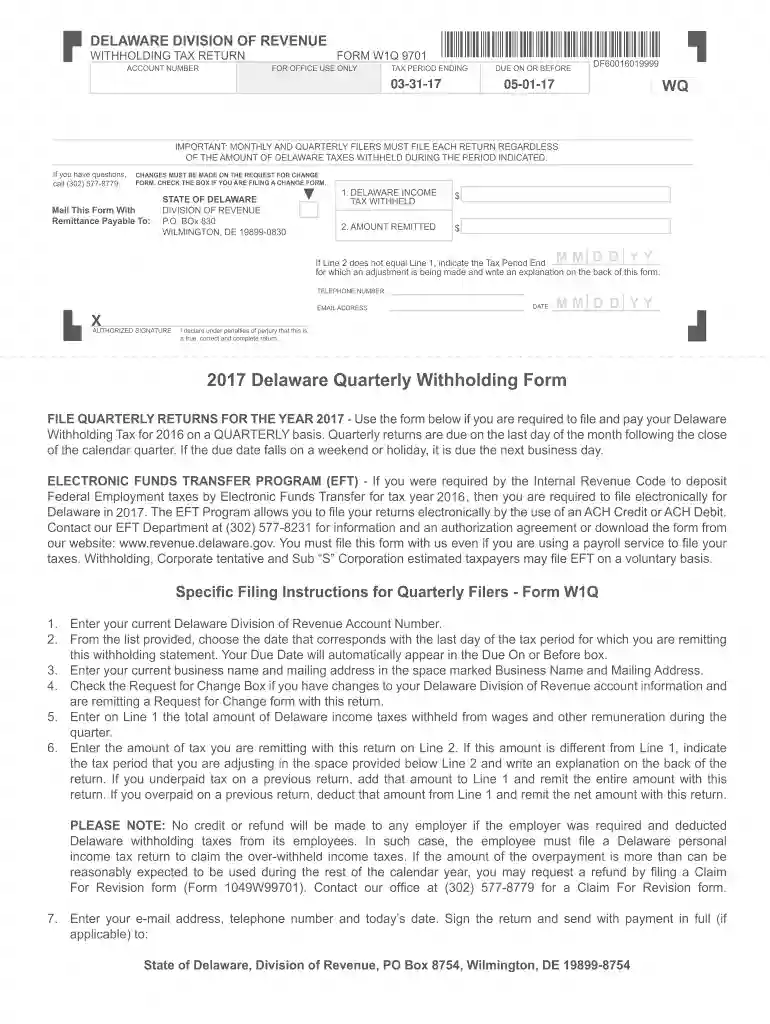
Delaware form w1q 9701 2019-2026

Get Form
w1q Preview on Page 1

Here's how it works

01. Edit your w1q online
Type text, add images, blackout confidential details, add comments, highlights and more.

02. Sign it in a few clicks
Draw your signature, type it, upload its image, or use your mobile device as a signature pad.

03. Share your form with others
Send it via email, link, or fax. You can also download it, export it or print it out.

How to use or fill out Delaware Form W1Q 9701 2019 with our platform

Form edit decoration
9.5
Ease of Setup
DocHub User Ratings on G2
9.0
Ease of Use
DocHub User Ratings on G2
  1. Click ‘Get Form’ to open it in the editor.
  2. Enter your Delaware Division of Revenue Account Number at the top of the form.
  3. Select the date corresponding to the last day of the tax period for which you are remitting this withholding statement. The due date will automatically populate.
  4. Fill in your business name and mailing address in the designated fields.
  5. On Line 1, input the total amount of Delaware income taxes withheld during the quarter.
  6. On Line 2, enter the amount of tax you are remitting. If this differs from Line 1, indicate the tax period being adjusted and provide an explanation on the back of the form.
  7. Complete your email address, telephone number, and today's date. Sign the return before submitting it along with any payment required.

Start using our platform today to streamline your form completion process for free!

See more delaware form w1q 9701 2019 versions

We've got more versions of the delaware form w1q 9701 2019 form. Select the right delaware form w1q 9701 2019 version from the list and start editing it straight away!
Versions Form popularity Fillable & printable
2020 4.8 Satisfied (85 Votes)
2018 4.4 Satisfied (262 Votes)
2017 4.4 Satisfied (45 Votes)
2016 4.1 Satisfied (70 Votes)
2014 4 Satisfied (22 Votes)
be ready to get more

Complete this form in 5 minutes or less

Get form

Got questions?

We have answers to the most popular questions from our customers. If you can't find an answer to your question, please contact us.
Contact us
Are tax forms available at my local Post Office? No, Post Offices do not have tax forms available for customers. However, you can view, download, and print specific tax forms and publications at the Forms, Instructions Publications page of the IRS website. You may also acquire tax forms through the mail.
The Division of Revenue links for online filing options are available at . Electronic filing is fast, convenient, accurate and easy. When completing a form electronically, please download the form prior to completing it to obtain the best results.
You may download and print Personal Income Tax Forms and Business Tax Forms directly from our website, or call (302) 577-8209 to have forms mailed to you.
Picking up copies at an IRS Taxpayer Assistance Center. Going to the IRS Small Business and Self-Employed Tax Center page. Requesting copies by phone 800-TAX-FORM (800-829-3676). Hours of operation are 7 a.m. to 10 p.m., Monday-Friday, your local time except Alaska and Hawaii which are Pacific time.
Take the stress out of tax season with federal tax forms and accessories to keep your filings organized. Our Walmart Business Checks tax forms are compatible with QuickBooks, Sage, and other accounting software programs.

Security and compliance

At DocHub, your data security is our priority. We follow HIPAA, SOC2, GDPR, and other standards, so you can work on your documents with confidence.

Learn more
ccpa2
pci-dss
gdpr-compliance
hipaa
soc-compliance
be ready to get more

Complete this form in 5 minutes or less

Get form

People also ask

Get the current filing years forms, instructions, and publications for free from the IRS. Download them from IRS.gov. Order online and have them delivered by U.S. mail. Order by phone at 1-800-TAX-FORM (1-800-829-3676)

Related links