Pay request 2026

Get Form
request jamaica Preview on Page 1

Here's how it works

01. Edit your request jamaica online
Type text, add images, blackout confidential details, add comments, highlights and more.
02. Sign it in a few clicks
Draw your signature, type it, upload its image, or use your mobile device as a signature pad.
03. Share your form with others
Send pay request via email, link, or fax. You can also download it, export it or print it out.

How to use or fill out pay request with our platform

Form edit decoration
9.5
Ease of Setup
DocHub User Ratings on G2
9.0
Ease of Use
DocHub User Ratings on G2
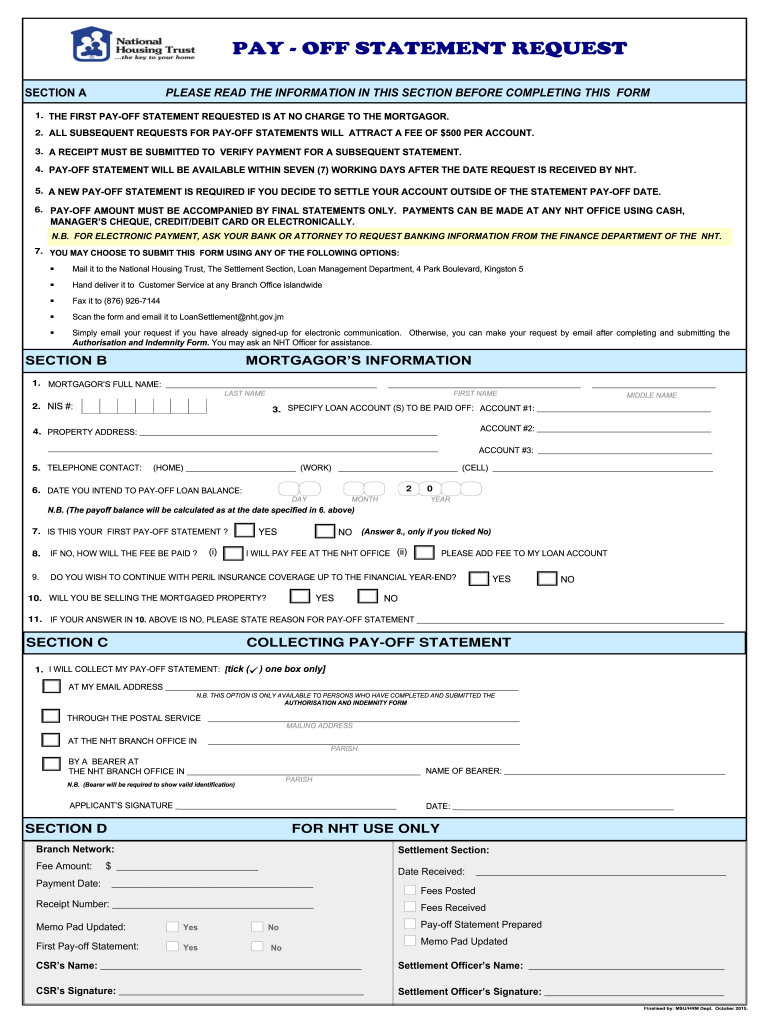
  1. Click ‘Get Form’ to open the pay request in the editor.
  2. Begin by filling out Section B, starting with your full name. Ensure you include your last, first, and middle names accurately.
  3. Enter your NIS number and specify the loan accounts you wish to pay off. Clearly list each account number in the designated fields.
  4. Provide the property address associated with the loan and your contact numbers for home, work, and cell.
  5. Indicate the date you intend to pay off the loan balance. This is crucial as it affects the payoff amount calculation.
  6. Answer whether this is your first pay-off statement and how any applicable fees will be paid if not. Make sure to check all relevant boxes.
  7. In Section C, choose how you would like to collect your pay-off statement by ticking one of the provided options.
  8. Finally, sign where indicated to complete your request before submitting it through your preferred method outlined in Section A.

Start using our platform today for free to streamline your pay request process!

See more pay request versions

We've got more versions of the pay request form. Select the right pay request version from the list and start editing it straight away!
Versions Form popularity Fillable & printable
2015 4.8 Satisfied (248 Votes)
be ready to get more

Complete this form in 5 minutes or less

Get form

Got questions?

We have answers to the most popular questions from our customers. If you can't find an answer to your question, please contact us.
Contact us
Tips for Writing Payment Request Emails Nail the subject line. Be direct. Attach the invoice, always. Dont make your clients hunt for the invoice in another system. Reiterate the key details. Make paying easy. Keep it strictly business.
The payment request links are usually provided in advance of invoices. The communicated message must include detailed information that will enable the shopper to complete a purchase. It includes the payment amount, the banking details of the payer and the payee, the payment due date, and a payment link.
Respond to a request for money Open Google Pay . Tap the name or photo of the contact who sent the request. Tap the Pay option on the request. Review information about the requester, amount, and description and choose a form of payment. Tap Proceed to pay. Enter your UPI PIN.
In the general sense, a request for payment refers to any communication sent out to customers asking for them to pay for goods and services. Payment requests are often sent in the form of clickable links over email, SMS text, or chat service.
These digital requests frequently include Clickable links that lead to a secure payment page or QR codes that can be scanned to initiate payment. Purpose: To simplify and expedite the payment process for both the sender and the recipient. To provide a clear and direct method for paying outstanding balances.

Security and compliance

At DocHub, your data security is our priority. We follow HIPAA, SOC2, GDPR, and other standards, so you can work on your documents with confidence.

Learn more
ccpa2
pci-dss
gdpr-compliance
hipaa
soc-compliance