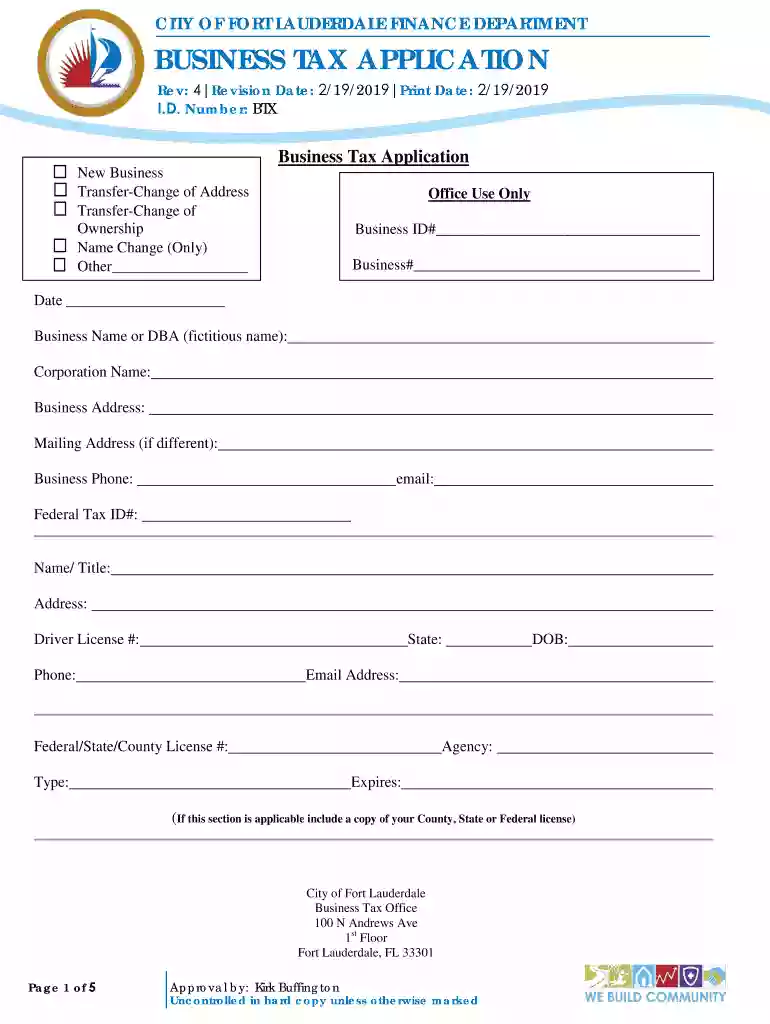
CITY OF FORT LAUDERDALE FINANCE DEPARTMENT BUSINESS TAX ... 2026

Get Form
12 2020 Preview on Page 1

Here's how it works

01. Edit your 12 2020 online
Type text, add images, blackout confidential details, add comments, highlights and more.

02. Sign it in a few clicks
Draw your signature, type it, upload its image, or use your mobile device as a signature pad.

03. Share your form with others
Send bamabydistance via email, link, or fax. You can also download it, export it or print it out.

How to use or fill out CITY OF FORT LAUDERDALE FINANCE DEPARTMENT BUSINESS TAX APPLICATION

Form edit decoration
9.5
Ease of Setup
DocHub User Ratings on G2
9.0
Ease of Use
DocHub User Ratings on G2
  1. Click ‘Get Form’ to open the CITY OF FORT LAUDERDALE FINANCE DEPARTMENT BUSINESS TAX APPLICATION in our editor.
  2. Begin by filling out the 'Business Name or DBA' and 'Corporation Name' fields. Ensure that the names are accurate as they will be used for official records.
  3. Complete the 'Business Address' and 'Mailing Address' sections. If your mailing address differs from your business address, make sure to specify it clearly.
  4. Provide your contact information, including 'Business Phone' and 'Email'. This is crucial for communication regarding your application.
  5. In the section labeled 'Type of Business / Products/ Services offered', circle all applicable options. Be specific about the nature of your business in the detailed description field.
  6. Fill out any additional questions regarding operations, such as whether you will sell alcoholic beverages or if there will be outdoor storage. These details are important for compliance with local regulations.
  7. Finally, review all entered information for accuracy before submitting. Use our platform's features to save or print a copy for your records.

Start using our editor today to complete your CITY OF FORT LAUDERDALE FINANCE DEPARTMENT BUSINESS TAX APPLICATION quickly and efficiently!

See more CITY OF FORT LAUDERDALE FINANCE DEPARTMENT BUSINESS TAX ... versions

We've got more versions of the CITY OF FORT LAUDERDALE FINANCE DEPARTMENT BUSINESS TAX ... form. Select the right CITY OF FORT LAUDERDALE FINANCE DEPARTMENT BUSINESS TAX ... version from the list and start editing it straight away!
Versions Form popularity Fillable & printable
2019 4.8 Satisfied (115 Votes)
be ready to get more

Complete this form in 5 minutes or less

Get form

Got questions?

We have answers to the most popular questions from our customers. If you can't find an answer to your question, please contact us.
Contact us
A BTR is a tax for the privilege of engaging in or managing a business, profession, or occupation within the town limits. (The Florida Legislature enacted legislation which amended references to Occupational License. On January 1, 2007, the term Occupational License was amended to read Business Tax Receipt.)
All unpaid Business Tax Receipts become delinquent October 1 and are assessed a penalty. If you do not receive your renewal notice, you should contact the Broward County Call Center at 954-357-4829. Fax number: 954-357-5479.
FixIt FTL, the City of Fort Lauderdale Customer Service Center is available 24-hours a day. Visit the FixIt FTL page on the City website to submit a service request or inquiry. Neighbors can also call 954-828-8000 to speak to a Customer Service Representative.
You may also call 954-828-6520 for DSD Customer Service. To avoid any potential delay in permitting services, please be sure you are registered with the City and that we have current documentation. Visit the Contractor Registration Renewals page for details.

Security and compliance

At DocHub, your data security is our priority. We follow HIPAA, SOC2, GDPR, and other standards, so you can work on your documents with confidence.

Learn more
ccpa2
pci-dss
gdpr-compliance
hipaa
soc-compliance