2018 541-2026

Get Form
form 541 instructions 2018 Preview on Page 1

Here's how it works

01. Edit your form 541 instructions 2018 online
Type text, add images, blackout confidential details, add comments, highlights and more.

02. Sign it in a few clicks
Draw your signature, type it, upload its image, or use your mobile device as a signature pad.

03. Share your form with others
Send 541 instructions via email, link, or fax. You can also download it, export it or print it out.

How to use or fill out 2018 541 with our platform

Form edit decoration
9.5
Ease of Setup
DocHub User Ratings on G2
9.0
Ease of Use
DocHub User Ratings on G2
  1. Click ‘Get Form’ to open the 2018 541 in the editor.
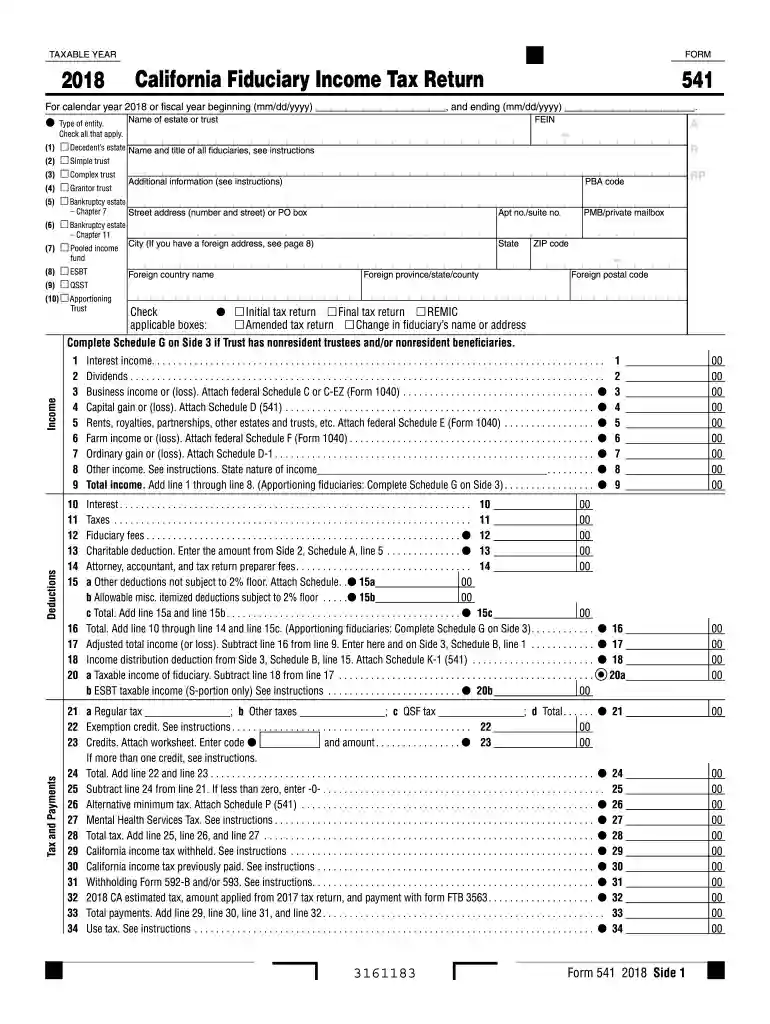
  2. Begin by entering the taxable year at the top of the form. Ensure you select '2018' and specify if it’s for a calendar or fiscal year.
  3. In the entity type section, check all applicable boxes such as Decedent’s estate, Simple trust, or Complex trust based on your situation.
  4. Fill in the name of the estate or trust along with its FEIN. Make sure to provide accurate details to avoid processing delays.
  5. Proceed to report income by completing lines for interest, dividends, business income, and other relevant categories. Attach necessary schedules as indicated.
  6. Complete deductions and tax calculations on subsequent lines. Pay attention to instructions for specific entries like charitable deductions and fiduciary fees.
  7. Finally, review all entries for accuracy before signing and submitting your form electronically through our platform.

Start using our platform today to fill out your 2018 541 form easily and for free!

See more 2018 541 versions

We've got more versions of the 2018 541 form. Select the right 2018 541 version from the list and start editing it straight away!
Versions Form popularity Fillable & printable
2022 4.6 Satisfied (54 Votes)
2020 4.9 Satisfied (59 Votes)
2019 4.2 Satisfied (97 Votes)
2018 4.3 Satisfied (133 Votes)
2017 4.2 Satisfied (40 Votes)
2016 4.4 Satisfied (669 Votes)
2015 4.3 Satisfied (61 Votes)
2014 4.3 Satisfied (54 Votes)
be ready to get more

Complete this form in 5 minutes or less

Get form

Got questions?

We have answers to the most popular questions from our customers. If you can't find an answer to your question, please contact us.
Contact us

According to eSignature regulations, documents approved electronically have the same validity as traditionally approved ones. You can electronically sign almost any business and personal documentation. Four types of documents still call for wet signatures only - wills and testamentary trusts, court orders and other court papers, state statutes regulating divorce, adoption, or other family law, and notice of cancellation of utility services. If you follow the guidelines and utilize a reliable and compliant software solution, like DocHub, you can eSign your ca form 541 without printing it.

Using a swift editing system like DocHub, you do not require anything but a browser and connection to the internet to edit your ca form 541 instructions online easily. Upload your document or get the appropriate form in DocHub’s catalog, open our editor with a single click, and complete it digitally. To revise your forms at any time, register a free account with DocHub.

The fiduciary (or one of the joint fiduciaries) must file Form 1041 for a domestic trust taxable under section 641 that has: Any taxable income for the tax year, Gross income of $600 or more (regardless of taxable income), or.
The fiduciary (or one of the fiduciaries) must file Form 541 for a trust if any of the following apply: Gross income for the taxable year of more than $10,000 (regardless of the amount of net income) Net income for the taxable year of more than $100. An alternative minimum tax liability.
Who is subject to the California exit tax? While California doesnt have an official exit tax, the term refers to ongoing tax obligations for those leaving the state with docHub financial ties. This primarily affects high-net-worth individuals and long-term residents.

Security and compliance

At DocHub, your data security is our priority. We follow HIPAA, SOC2, GDPR, and other standards, so you can work on your documents with confidence.

Learn more
ccpa2
pci-dss
gdpr-compliance
hipaa
soc-compliance
be ready to get more

Complete this form in 5 minutes or less

Get form

People also ask

Use Form 541 if any of the following apply to report: Income received by an estate or trust. Income that is accumulated or currently distributed to the beneficiaries. An applicable tax liability of the estate or trust.
Estates and trusts FormWithout paymentWith payment 541 Franchise Tax Board PO Box 942840 Sacramento CA 94240-0001 Franchise Tax Board PO Box 942867 Sacramento CA 94267-0001 May 24, 2023
Sec. 541 imposes a 20% tax on the undistributed personal holding company income of a personal holding company. Initially enacted in 1934, the tax was intended to discourage individuals from using closely held corporations as tax shelters for investment income.

california form 541 instructions