01. Edit your domestic wire transfer form template online
Type text, add images, blackout confidential details, add comments, highlights and more.
02. Sign it in a few clicks
Draw your signature, type it, upload its image, or use your mobile device as a signature pad.
03. Share your form with others
Send domestic wire transfer form via email, link, or fax. You can also download it, export it or print it out.
How to use or fill out domestic wire transfer form with our platform
Ease of Setup
DocHub User Ratings on G2
Ease of Use
DocHub User Ratings on G2
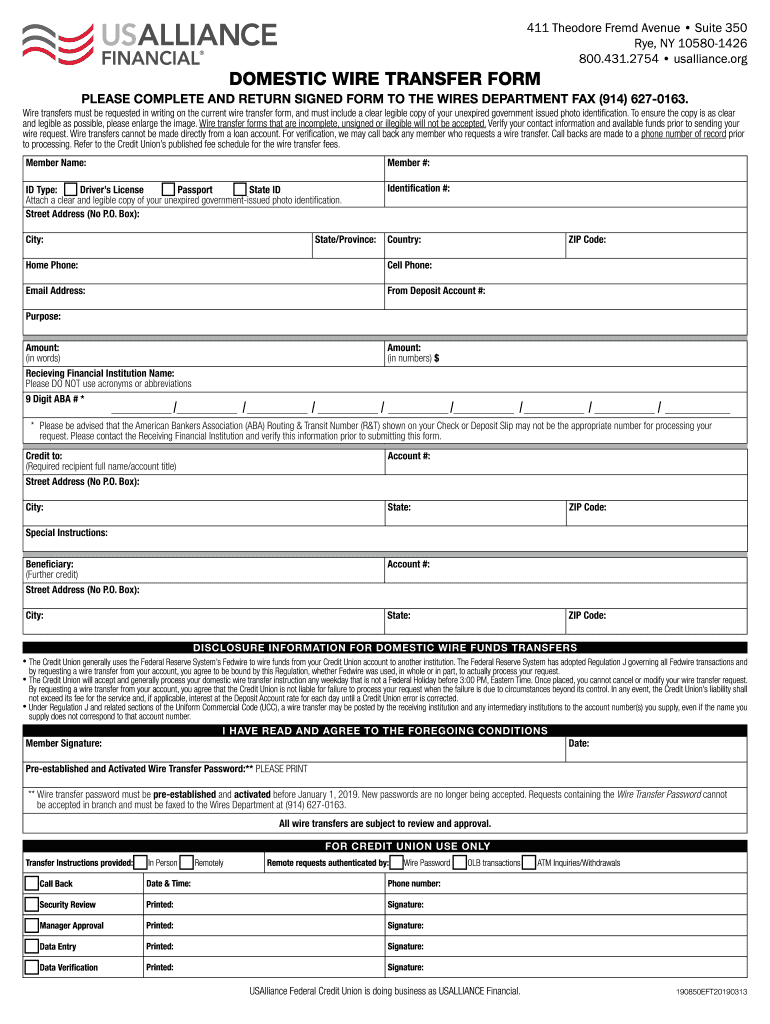
Click ‘Get Form’ to open the domestic wire transfer form in the editor.
Begin by entering your Member Name and Member Number at the top of the form. Ensure these details are accurate for processing.
Select your ID Type from the options provided (Passport, State ID, Driver’s License) and attach a clear copy of your unexpired government-issued photo identification.
Fill in your Street Address, City, State/Province, ZIP Code, Home Phone, Cell Phone, and Email Address. This information is crucial for verification purposes.
Indicate the From Deposit Account Number from which you wish to transfer funds. Verify that sufficient funds are available before proceeding.
Specify the Purpose of the transfer and enter the Amount both in words and numbers. Ensure accuracy to avoid processing delays.
Provide the Receiving Financial Institution Name along with its 9 Digit ABA Routing Number. Confirm this number with your financial institution to ensure correctness.
Complete the Credit To section with the recipient's full name/account title and their address details.
If applicable, fill in any Special Instructions or Beneficiary information as needed.
Finally, sign and date the form at the bottom to confirm your agreement with all terms outlined in the disclosure information.
Start using our platform today for free to streamline your domestic wire transfer process!
Fill out domestic wire transfer form online It's free
We've got more versions of the domestic wire transfer form form. Select the right domestic wire transfer form version from the list and start editing it straight away!
Domestic wire transfer form pdfDomestic wire transfer form templateDomestic wire transfer form onlineNavy Federal Domestic Wire Transfer FormWire transfer form pdfSimple wire transfer formNavy Federal wire transfer onlineNavy Federal wire transfer on app
Security and compliance
At DocHub, your data security is our priority. We follow HIPAA, SOC2, GDPR, and other standards, so you can work on your documents with confidence.
WIRE TRANSFER FORM. Instructions: 1. Attach this form to the payment request being submitted (Toolkit, TravelND, etc). 2. Contact Accounts Payable (JulieRead more
Completed domestic wire forms received after 12:00pm PST will be processed the next business day. * Foreign transfers may be subject to delays. International.Read more
Cookie consent notice
This site uses cookies to enhance site navigation and personalize your experience.
By using this site you agree to our use of cookies as described in our Privacy Notice.
You can modify your selections by visiting our Cookie and Advertising Notice.