Type text, add images, blackout confidential details, add comments, highlights and more.
02. Sign it in a few clicks
Draw your signature, type it, upload its image, or use your mobile device as a signature pad.
03. Share your form with others
Send cbus super withdrawal online via email, link, or fax. You can also download it, export it or print it out.
How to use or fill out cbus rollover form with our platform
Ease of Setup
DocHub User Ratings on G2
Ease of Use
DocHub User Ratings on G2
Click ‘Get Form’ to open the cbus rollover form in the editor.
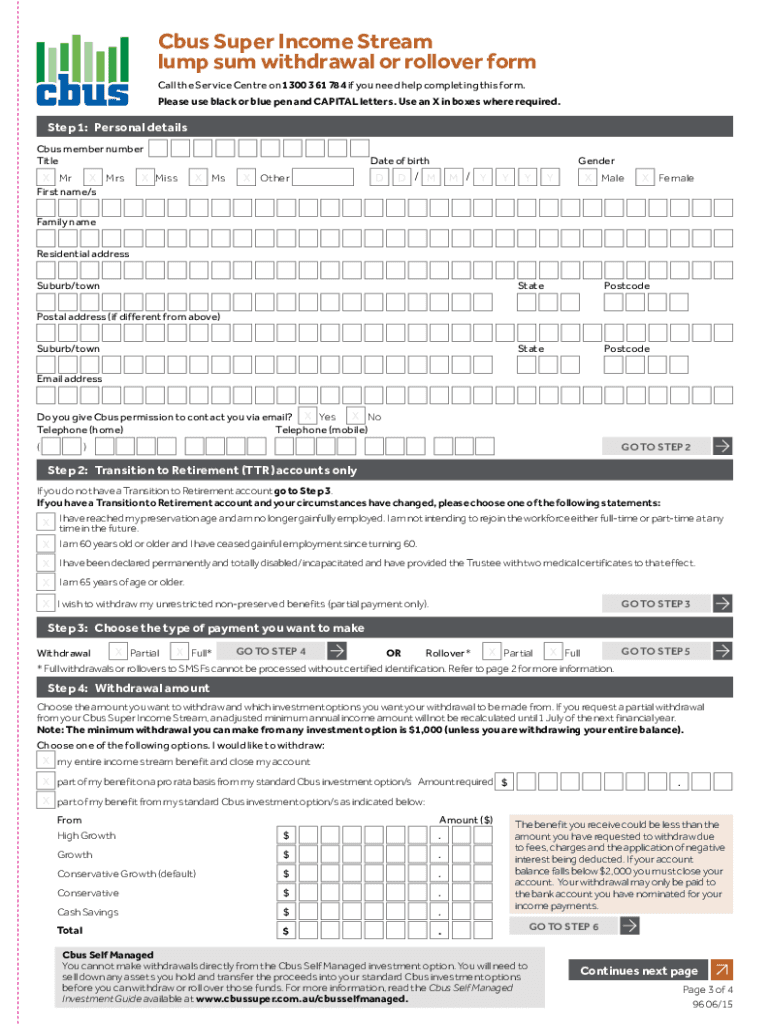
Begin by filling in your personal details, including your Cbus member number, title, first name, last name, date of birth, and contact information. Ensure all fields are completed accurately.
If applicable, indicate if you have a Transition to Retirement (TTR) account and select the appropriate statement that reflects your current employment status.
Choose the type of payment you wish to make—either a withdrawal or a rollover. Specify whether it is a partial or full request.
For withdrawals, enter the amount you wish to withdraw and select from which investment options the funds should be taken. Remember that the minimum withdrawal is $1,000 unless closing your account.
Complete the identity verification section by choosing either electronic verification or providing certified copies of identification documents as required.
Finally, review your entries for accuracy and sign the declaration before submitting your completed form to Cbus at the specified address.
Start using our platform today for free to streamline your cbus rollover form completion!
Cbus rollover form pdfCbus rollover form to smsfCbus super withdrawal form PDF download freeCbus super withdrawal form onlineCbus rollover form onlineCbus rollover form downloadCbus super withdrawal formsCbus financial hardship form
Security and compliance
At DocHub, your data security is our priority. We follow HIPAA, SOC2, GDPR, and other standards, so you can work on your documents with confidence.
Aug 12, 2022 This revised application, submitted on August 12, 2022 following the withdrawal of the Initial Application, (Revised. Application) is based onRead more
This ensures that the SCLx high time will always be at least one BRG rollover count in the event that the clock is held low by an external device, as shown inRead more
Welcome the official source of IAU forms and downloads. Many of the forms here are available as Google Forms and Google Docs for convenient online completion.Read more
Cookie consent notice
This site uses cookies to enhance site navigation and personalize your experience.
By using this site you agree to our use of cookies as described in our Privacy Notice.
You can modify your selections by visiting our Cookie and Advertising Notice.