




Here's how it works



How to use or fill out tc 922 2008 form with our platform

- Click ‘Get Form’ to open the TC-922 2008 form in the editor.
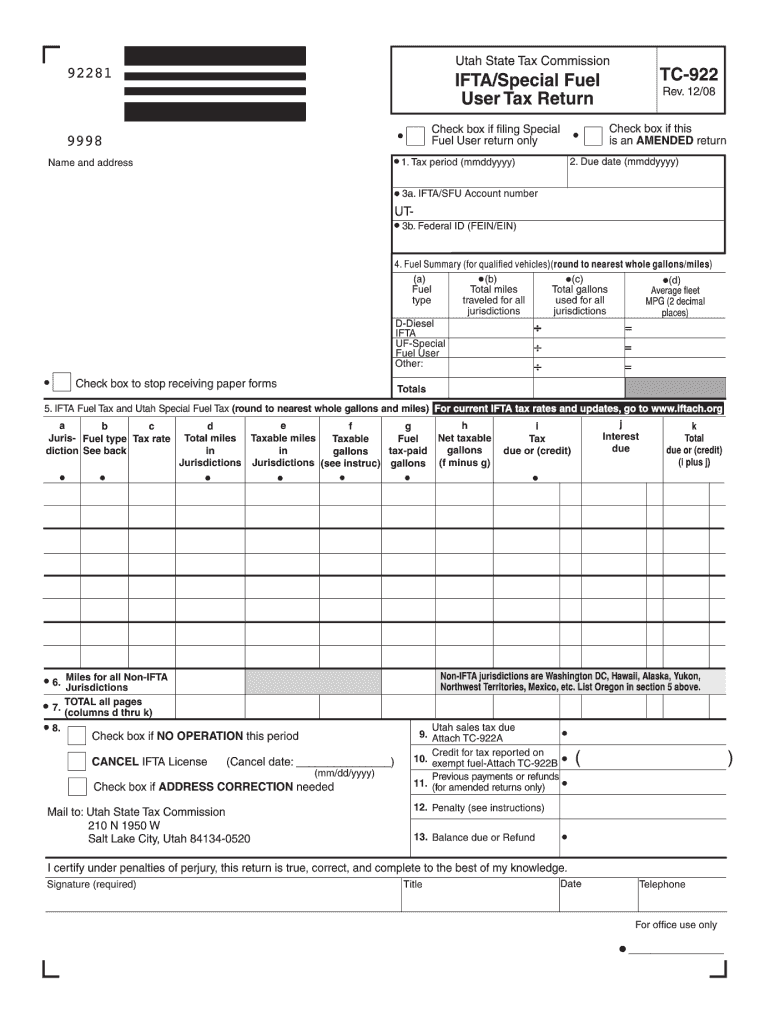
- Begin by entering the 'Tax Period' and 'Due Date' in the specified fields. Ensure you follow the correct format (mmddyyyy) for accuracy.
- Fill in your 'IFTA/SFU Account Number' and 'Federal ID (FEIN/EIN)' as required. This information is crucial for identification purposes.
- Complete the 'Fuel Summary' section by detailing total gallons, miles traveled, and average fleet MPG for each fuel type used during the tax period.
- In the 'IFTA Fuel Tax and Utah Special Fuel Tax' section, enter jurisdiction details, fuel types, tax rates, and calculate taxable miles and gallons accordingly.
- Review all entries for accuracy before signing at the bottom of the form. Ensure that your signature, title, date, and telephone number are included.
Start filling out your TC-922 2008 form online for free today!
It's free
See more tc 922 2008 form versions
Got questions?
Is it safe to sign my tc 922 2008 form electronically?
You need to use only trustworthy software solutions with strong data protection compliance to sign your paperwork electronically. DocHub is just the type of software you need! It stores data on Amazon Web Servers and complies with all required security criteria and eSignature regulations, so it’s a trusted way to eSign your tc 922 2008 form or other paperwork with this tool.
How do you complete tc 922 2008 form on Android?
It is a no-brainer on a computer or via a mobile device to fill out a tc 922 2008 form with DocHub. All you need to do is open any installed browser on your smartphone and go to the DocHub site. Once authenticated, add your document and open it in editing mode. Use our toolbar to make your edits and save modifications. Optionally, keep your document in your files or send it to a recipient on the spot.
Is there a Utah state tax withholding form?
What is tc40w?
What does the TC 922 indicate?
Security and compliance
At DocHub, your data security is our priority. We follow HIPAA, SOC2, GDPR, and other standards, so you can work on your documents with confidence.
Learn more


