Affinity Credit Union - Payor 's PAD Agreement - townofnaicam 2026

Get Form
agreement pad Preview on Page 1

Here's how it works

01. Edit your agreement pad online
Type text, add images, blackout confidential details, add comments, highlights and more.
02. Sign it in a few clicks
Draw your signature, type it, upload its image, or use your mobile device as a signature pad.
03. Share your form with others
Send order agreement via email, link, or fax. You can also download it, export it or print it out.

How to use or fill out Affinity Credit Union - Payor's PAD Agreement - townofnaicam

Form edit decoration
9.5
Ease of Setup
DocHub User Ratings on G2
9.0
Ease of Use
DocHub User Ratings on G2
  1. Click ‘Get Form’ to open it in the editor.
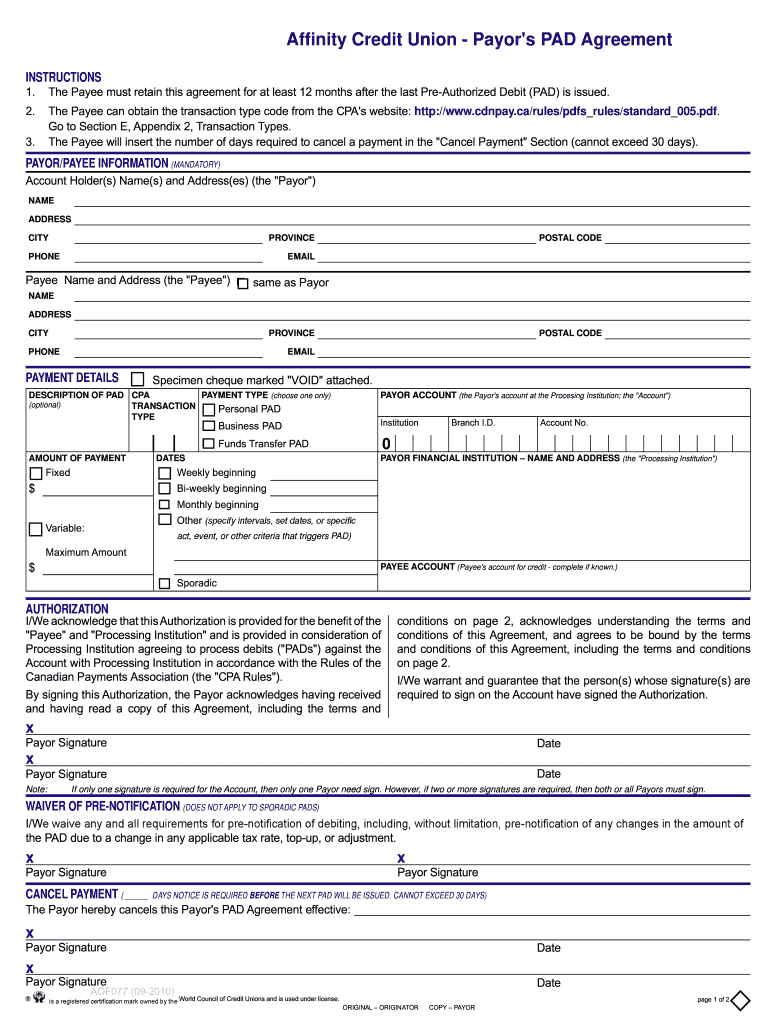
  2. Begin by filling out the 'Payor' section with your name, address, city, province, phone number, postal code, and email. Ensure all mandatory fields are completed.
  3. Next, provide the 'Payee' information. If it is the same as the Payor, check the box provided. Otherwise, enter the Payee's details.
  4. In the 'Payment Details' section, attach a specimen cheque marked 'VOID'. Select your payment type (Personal PAD or Business PAD) and specify whether it is fixed or variable.
  5. Fill in your account details at the Processing Institution including institution name and account number if known.
  6. Complete the authorization section by signing and dating where indicated. If multiple signatures are required for your account, ensure all necessary parties sign.
  7. Review all entered information for accuracy before submitting your form through our platform.

Start using our platform today to easily complete your Affinity Credit Union PAD Agreement for free!

See more Affinity Credit Union - Payor 's PAD Agreement - townofnaicam versions

We've got more versions of the Affinity Credit Union - Payor 's PAD Agreement - townofnaicam form. Select the right Affinity Credit Union - Payor 's PAD Agreement - townofnaicam version from the list and start editing it straight away!
Versions Form popularity Fillable & printable
2010 4.8 Satisfied (119 Votes)
be ready to get more

Complete this form in 5 minutes or less

Get form

Got questions?

We have answers to the most popular questions from our customers. If you can't find an answer to your question, please contact us.
Contact us

Electronic document approval demands a software solution that works in compliance with data security and eSignature laws. DocHub is an excellent tool for that, because it meets all the previously mentioned requirements. Whatever method you like to sign your payor payee in DocHub, your eSignature will be legally binding and court-admissible.

Using a swift editing platform like DocHub, you do not require anything but a web browser and internet connection to edit your payor vs payee on the internet easily. Add your document or find the appropriate form in DocHub’s catalog, open our editor with a single click, and finish it electronically. To revise your forms anytime, register a free account with DocHub.

Keep more money in your pocket with Affinity Checking, a standard checking account that doesn't surprise you with hidden fees. Plus, there's: No minimum deposit requirement. No minimum balance requirement. No fees for teller transactions.
The FICO® Score that we provide to you is based on data from your Experian report as of the 'pulled on date' shown with your score.
Meant to help you spot potential fraud and/or identity theft attempts, this free credit monitoring service checks your credit report daily. You'll get an email when the system detects any of these events related to your identity: New accounts opened. Address changes.
be ready to get more

Complete this form in 5 minutes or less

Get form

People also ask

Federally insured credit unions are required to indicate their insured status in their advertising and to display the official NCUSIF insurance sign in their offices and branches. For a complete directory of federally insured credit unions, visit the NCUA's agency website at ncua.gov.
If you are placing an order for the first time or having trouble ordering through the site, call us at 1-800-343-1028 or use our online contact us form.
Like at a traditional bank, your deposits with Affinity Plus federal Credit Union accounts are federally insured up to $250,000 per member-owner.
You can get a cashier's check by visiting your bank branch or credit union or going to its website if it offers these checks online. If you don't want to use a cashier's check, other options include a money order, certified check, wire transfer, or social payment app.
Most banks will allow you to order checks by visiting a local branch in person. You can either visit your regular branch, or search online or in the phone book to find the bank branch closest to you. Try using online checking. Many banks offer online checking (also called paper-free checking or online bill pay).