01. Edit your crucial conversations facilitator guide online
Type text, add images, blackout confidential details, add comments, highlights and more.
02. Sign it in a few clicks
Draw your signature, type it, upload its image, or use your mobile device as a signature pad.
03. Share your form with others
Send crucial conversations training ppt via email, link, or fax. You can also download it, export it or print it out.
How to use or fill out Crucial Conversations Course Evaluation with our platform
Ease of Setup
DocHub User Ratings on G2
Ease of Use
DocHub User Ratings on G2
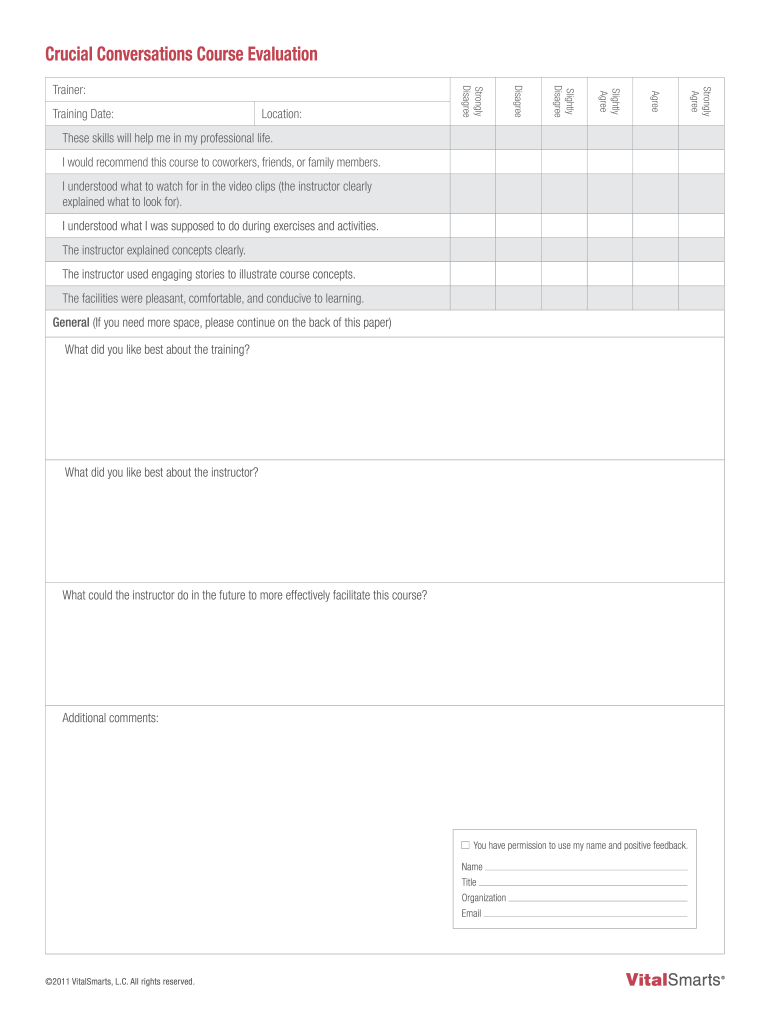
Click ‘Get Form’ to open the Crucial Conversations Course Evaluation in the editor.
Begin by rating your agreement with statements regarding the course and instructor. Use the provided scale from 'Strongly Disagree' to 'Strongly Agree' for each statement.
In the General section, provide detailed feedback on what you liked best about the training and the instructor. Feel free to elaborate as needed.
Offer constructive suggestions on how the instructor can improve future sessions in the designated field.
Complete any additional comments you may have in the space provided.
Fill in your personal information, including your name, title, organization, and email address at the bottom of the form.
Start using our platform today to easily complete your evaluation form for free!
Fill out Crucial Conversations Course Evaluation online It's free
Crucial conversations course evaluation pdfCrucial Conversations in-person trainingCrucial Conversations trainingCrucial Conversations training freeCrucial Conversations Training pptCrucial Conversations Facilitator GuideCrucial Conversations for Mastering DialogueCrucial Conversations training near me
Security and compliance
At DocHub, your data security is our priority. We follow HIPAA, SOC2, GDPR, and other standards, so you can work on your documents with confidence.
Evaluating the Effectiveness of Crucial Conversations
by DR McCallie The purpose of this study was to assess if Crucial. Conversations training improved self-efficacy in clinical nurses working at a large, academic medicalRead more
To clarify how these dialogues aid in understanding synthetic biology, well break down their functionality into smaller parts; followed by their minigames.Read more
Utilizing the Style Under Stress tool within Crucial - PMC
by RS Bagley 2026 The feedback provided through the assessment is used as a component of medical communication training in developing competency during crucialRead more
Cookie consent notice
This site uses cookies to enhance site navigation and personalize your experience.
By using this site you agree to our use of cookies as described in our Privacy Notice.
You can modify your selections by visiting our Cookie and Advertising Notice.