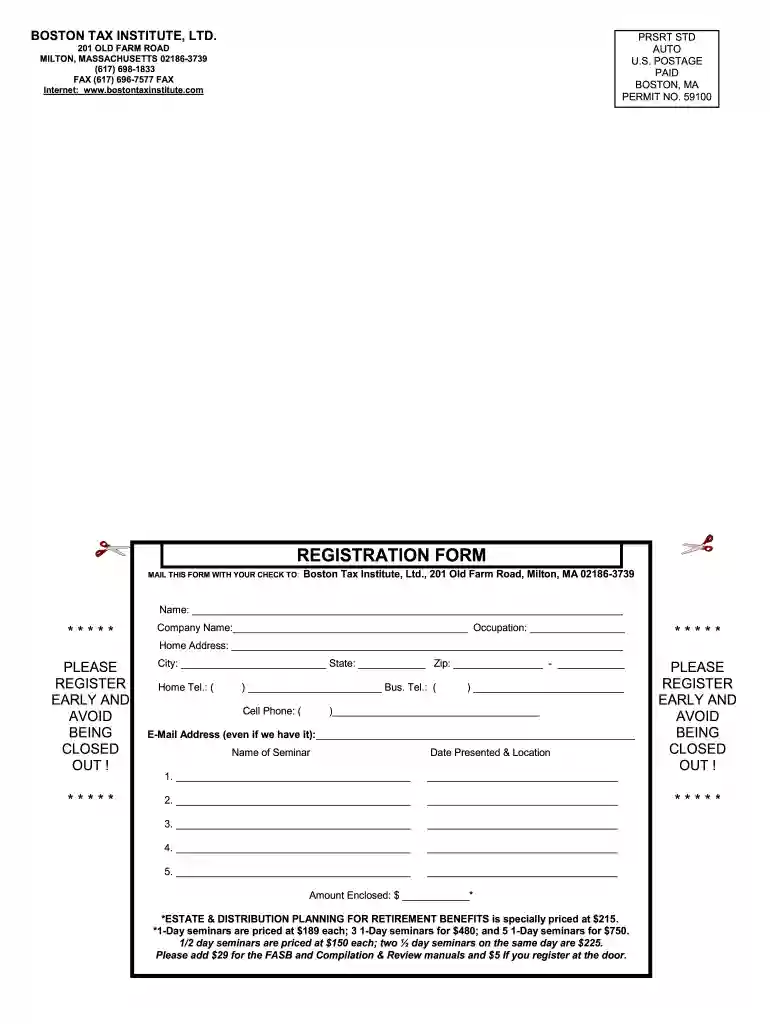
REGISTRATION FORM - Boston Tax Institute 2026

Get Form
boston tax institute Preview on Page 1

Here's how it works

01. Edit your boston tax institute online
Type text, add images, blackout confidential details, add comments, highlights and more.

02. Sign it in a few clicks
Draw your signature, type it, upload its image, or use your mobile device as a signature pad.

03. Share your form with others
Send it via email, link, or fax. You can also download it, export it or print it out.

How to use or fill out REGISTRATION FORM - Boston Tax Institute with our platform

Form edit decoration
9.5
Ease of Setup
DocHub User Ratings on G2
9.0
Ease of Use
DocHub User Ratings on G2
  1. Click ‘Get Form’ to open the REGISTRATION FORM in the editor.
  2. Begin by entering your name in the designated field at the top of the form. This is essential for identification.
  3. Next, fill in your company name and occupation. These details help us understand your professional background.
  4. Provide your city, state, and zip code in the respective fields to ensure accurate location information.
  5. Complete your home address and telephone numbers (home, business, and cell) for contact purposes.
  6. Enter your email address, even if it’s already on file, to ensure we have the most current information.
  7. List the seminars you wish to register for along with their dates and locations. Be sure to check pricing details provided on the form.
  8. Finally, indicate the total amount enclosed based on your selected seminars and any additional materials required.

Start filling out your registration form today for free using our platform!

See more REGISTRATION FORM - Boston Tax Institute versions

We've got more versions of the REGISTRATION FORM - Boston Tax Institute form. Select the right REGISTRATION FORM - Boston Tax Institute version from the list and start editing it straight away!
Versions Form popularity Fillable & printable
2015 4.9 Satisfied (61 Votes)
be ready to get more

Complete this form in 5 minutes or less

Get form

Got questions?

We have answers to the most popular questions from our customers. If you can't find an answer to your question, please contact us.
Contact us
Your college or career school will provide your 1098-T form electronically or by postal mail if you paid any qualified tuition and related education expenses during the previous calendar year.
What Tax Forms Do Students Need? 1040: This is the basic income-reporting form that nearly everyone uses. State tax return forms: States have their own rules for who must pay state taxes. 1098-T: This form tells the IRS how much you paid in tuition and fees. 1098-E: Did you pay any interest on student loans last year?
Form 1098-T should be sent for anyone who had education expenses or received scholarships, fellowships, or grants. If you, your spouse, or your dependent had education expenses and did not receive Form 1098-T, you may need to still report the amounts on the return.
Your student loan servicer (who you make payments to) will send you a copy of your 1098-E via email or postal mail if the interest you paid in 2022 met or exceeded $600. Even if you didnt receive a 1098-E from your servicer, you can download your 1098-E from your loan servicers website.
You can contact the MA Department of Revenue for general help and informaton, or to order forms, by calling 1-800-392-6089. Tax forms can be printed for you free of charge at the Reference Desk.

Security and compliance

At DocHub, your data security is our priority. We follow HIPAA, SOC2, GDPR, and other standards, so you can work on your documents with confidence.

Learn more
ccpa2
pci-dss
gdpr-compliance
hipaa
soc-compliance
be ready to get more

Complete this form in 5 minutes or less

Get form