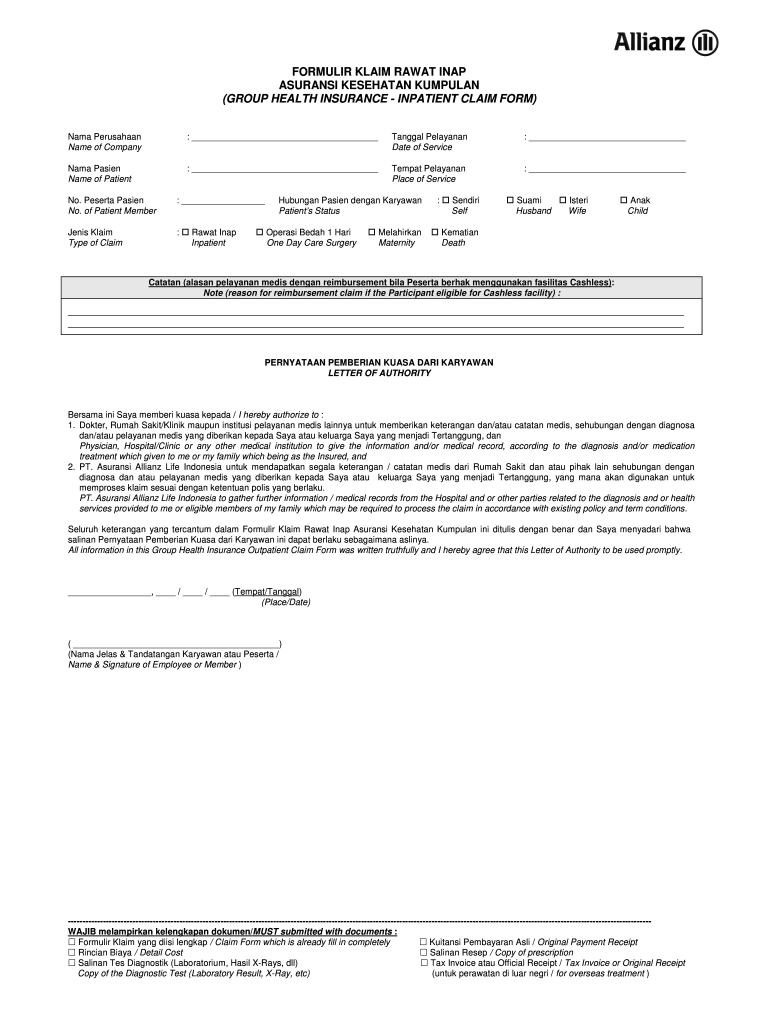
Klaim rawat form 2025

Get Form
formulir klaim rawat inap Preview on Page 1

Here's how it works

01. Edit your formulir klaim rawat inap online
Type text, add images, blackout confidential details, add comments, highlights and more.
02. Sign it in a few clicks
Draw your signature, type it, upload its image, or use your mobile device as a signature pad.
03. Share your form with others
Send formulir klaim rawat via email, link, or fax. You can also download it, export it or print it out.

How to use or fill out klaim rawat form with our platform

Form edit decoration
9.5
Ease of Setup
DocHub User Ratings on G2
9.0
Ease of Use
DocHub User Ratings on G2
  1. Click ‘Get Form’ to open the klaim rawat form in the editor.
  2. Begin by filling in the 'Nama Perusahaan' (Name of Company) and 'Tanggal Pelayanan' (Date of Service) fields. Ensure accuracy as this information is crucial for processing your claim.
  3. Next, enter the 'Nama Pasien' (Name of Patient) and 'Tempat Pelayanan' (Place of Service). These details help identify the patient and where services were rendered.
  4. Fill in the 'No. Peserta Pasien' (No. of Patient Member) and select the appropriate 'Jenis Klaim' (Type of Claim), such as Rawat Inap (Inpatient).
  5. Indicate the relationship of the patient to the employee by selecting from options like Self, Husband, Wife, or Child.
  6. Provide a detailed note explaining the reason for reimbursement if applicable. This section is vital for claims involving cashless facilities.
  7. Complete the Letter of Authority section by signing and dating it, allowing medical institutions to share necessary information regarding your claim.
  8. Finally, ensure all required documents are attached before submitting your claim through our platform for a seamless experience.

Start using our platform today to fill out your klaim rawat form easily and efficiently!

be ready to get more

Complete this form in 5 minutes or less

Get form

Got questions?

We have answers to the most popular questions from our customers. If you can't find an answer to your question, please contact us.
Contact us

Sure, you’ll find many different applications for this on the web. However, if you need to eSign your claim rawat inap without installing extra software, DocHub is the best choice you can make. This powerful editor works on mobile devices just like on desktops. Open our editor in your preferred internet browser, register or sign in to your account, and start processing your paperwork.

You can easily edit fill out your allianz formulir rawat on any iOS gadget. Open an internet browser of your choice, go to the DocHub website, authorize or create a new account, upload your file for editing, and make your desired changes. Our service is mobile-friendly, so using its features on your smartphone will be a no-brainer, even on the first try.

be ready to get more

Complete this form in 5 minutes or less

Get form