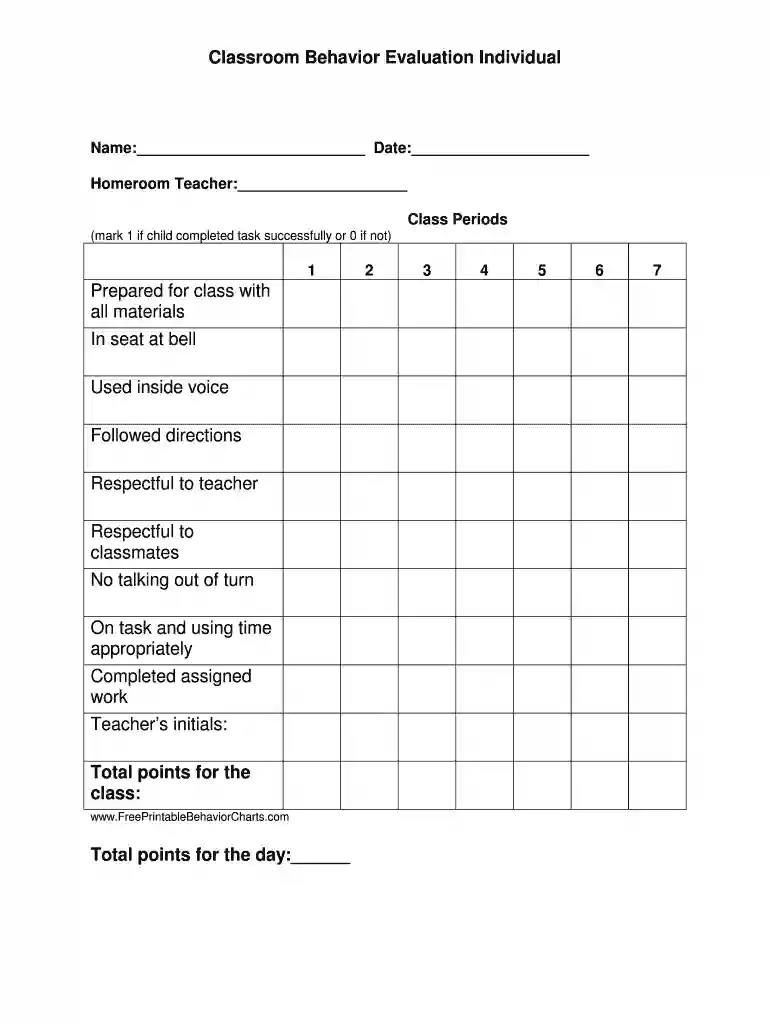
Behavior chart for school 2026

Get Form
on task behavior chart Preview on Page 1

Here's how it works

01. Edit your on task behavior chart online
Type text, add images, blackout confidential details, add comments, highlights and more.

02. Sign it in a few clicks
Draw your signature, type it, upload its image, or use your mobile device as a signature pad.

03. Share your form with others
Send behavior chart online via email, link, or fax. You can also download it, export it or print it out.

How to use or fill out behavior chart for school with our platform

Form edit decoration
9.5
Ease of Setup
DocHub User Ratings on G2
9.0
Ease of Use
DocHub User Ratings on G2
  1. Click ‘Get Form’ to open the behavior chart in the editor.
  2. Begin by entering the student's name and date at the top of the form. This personalizes the chart and makes it easy to track individual progress.
  3. Fill in the homeroom teacher's name to ensure proper accountability and communication regarding the student's behavior.
  4. In the class periods section, mark '1' if the child completed each task successfully or '0' if not. This allows for a clear visual representation of their performance throughout the day.
  5. After completing all tasks, add your initials as a teacher to validate the evaluation.
  6. Finally, calculate and enter the total points for both the class and day at the bottom of the form, providing a summary of overall behavior.

Start using our platform today to effortlessly manage your classroom behavior evaluations online for free!

be ready to get more

Complete this form in 5 minutes or less

Get form

Got questions?

We have answers to the most popular questions from our customers. If you can't find an answer to your question, please contact us.
Contact us
The behavior flow chart is a fundamental tool that assist in modifying problematic behaviors. It allows the student to be recognized for positive behaviors. While at the same time it provides the immediate feed-back on unsafe or unwanted behaviors.
One thing you can do to help your students with ADHD modify their behaviors is work with behavior charts. A behavior chart is a dynamic document that lets you and your student keep track of positive behaviors over a certain period of time.
How to Make a Good Behavior Chart Keep the chart straightforward and simple. Draw lines to divide the paper into several boxes. Every time that new thing happens, your child gets a point or a sticker in a box. When they fill all the boxes on the whole page, then they earn a prize.
In its most basic form, these charts reward students for positive behavior, such as making progress on a specific skill or acting in alignment with the behavioral standards set by ones school, district, or teacher.

Security and compliance

At DocHub, your data security is our priority. We follow HIPAA, SOC2, GDPR, and other standards, so you can work on your documents with confidence.

Learn more
ccpa2
pci-dss
gdpr-compliance
hipaa
soc-compliance
be ready to get more

Complete this form in 5 minutes or less

Get form