




Here's how it works



How to use or fill out editable flyers for charity fundraising with our platform

- Click ‘Get Form’ to open the editable flyer in the editor.
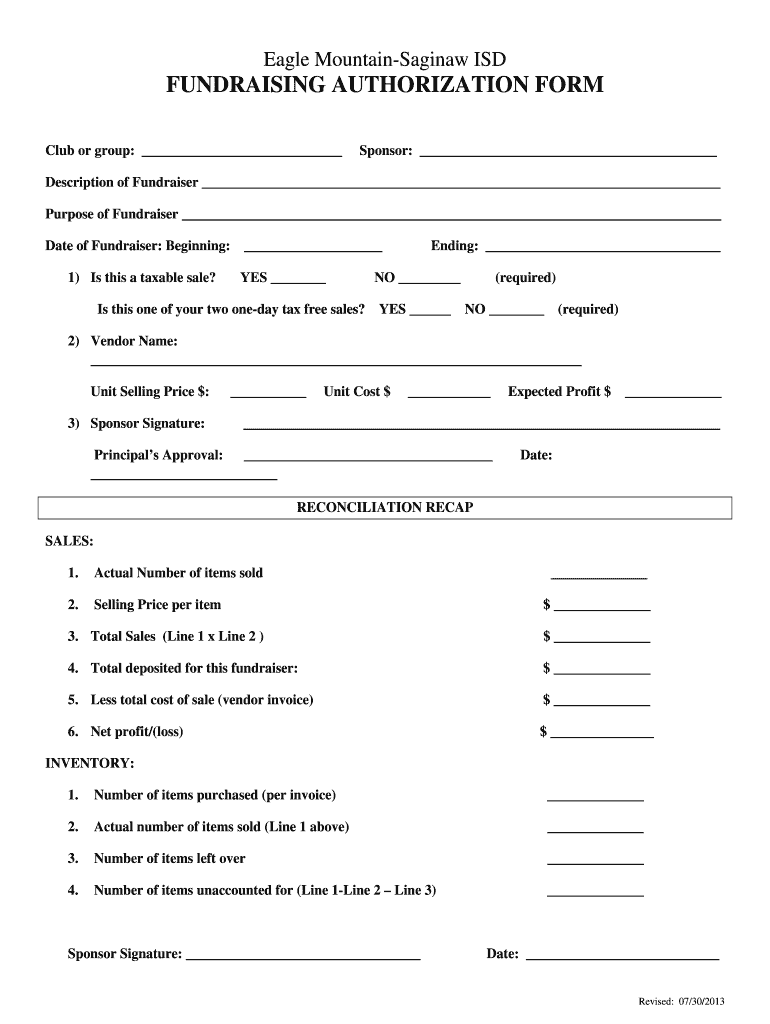
- Begin by filling in the 'Club or group' and 'Sponsor' sections with the relevant information about your fundraising initiative.
- In the 'Description of Fundraiser' field, provide a brief overview of what your fundraiser entails, followed by its purpose in the designated area.
- Specify the dates for your fundraiser by entering both the beginning and ending dates. Ensure you indicate if it is a taxable sale and whether it qualifies as one of your two one-day tax-free sales.
- Complete the vendor details, including name, unit selling price, unit cost, and expected profit. Don’t forget to sign as a sponsor.
- After the fundraiser, fill out the reconciliation recap section with actual sales data, total deposits, costs, and net profit or loss.
- Finally, ensure all signatures are completed and save your document for distribution.
Start using our platform today to create impactful fundraising flyers effortlessly!
It's free
See more editable flyers for charity fundraising versions
| Versions | Form popularity | Fillable & printable |
|---|---|---|
| 2013 | 4.8 Satisfied (264 Votes) |
Got questions?
How can I send my editable flyers for charity fundraising for eSignature?
Upload your editable flyers for charity fundraising to DocHub (after you’ve created an account for this). If you need to fill out fields in it, use proper tools from the upper pane. For example, add Signature Fields, assign each to specific party, and click on Sign → Request signatures from others. Change your message for your recipients and click Send Request. You can also send your document by fax or as a Signing link instead of using email (you’ll locate these options by navigating to the Menu → Send)
How do you edit editable flyers for charity fundraising on iOS?
You can easily edit fill out your editable flyers for charity fundraising on any iOS device. Open an internet browser of your liking, go to the DocHub website, authorize or create a new account, add your file for editing, and make your desired alterations. Our service is mobile-friendly, so using its functions on your smartphone will be a no-brainer, even on the first try.
What goes into a fundraising poster?
How do you create a fundraising poster?
How do I make a fundraiser poster?
Security and compliance
At DocHub, your data security is our priority. We follow HIPAA, SOC2, GDPR, and other standards, so you can work on your documents with confidence.
Learn more


