
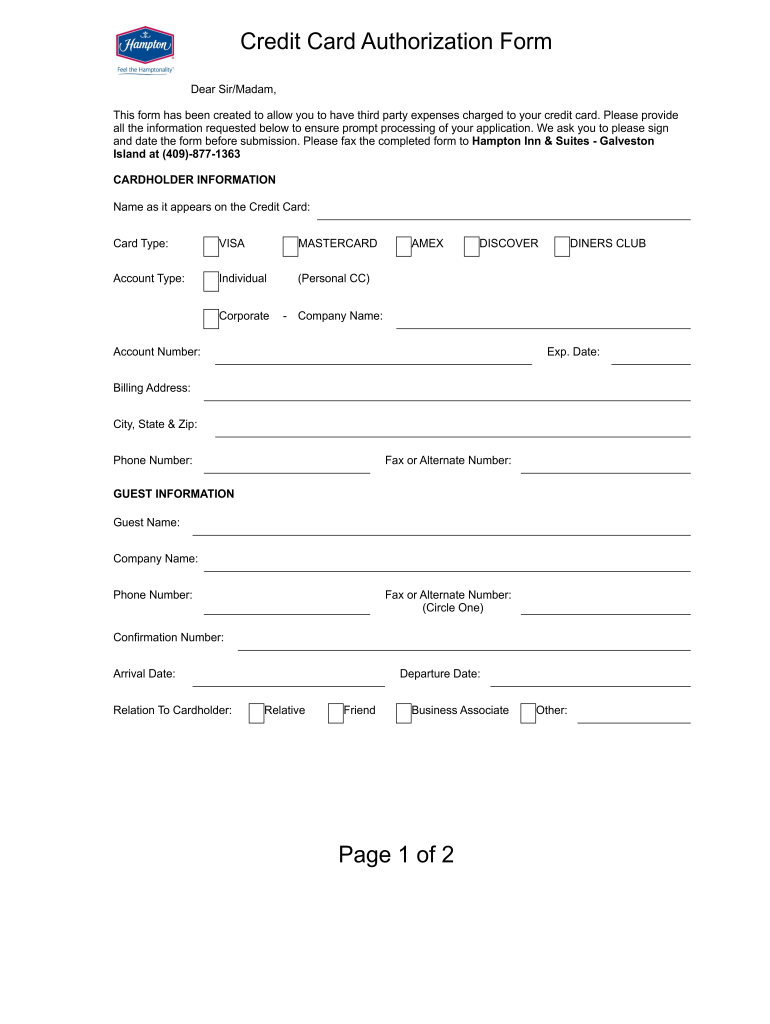





hampton credit card authorization form Preview on Page 1

Page 1 of 2 Credit Card Authorization Form - Free PDF Hosting 2026

Here's how it works

  • 01. Edit your hampton credit card authorization form online

    Type text, add images, blackout confidential details, add comments, highlights and more.

  • 02. Sign it in a few clicks

    Draw your signature, type it, upload its image, or use your mobile device as a signature pad.

  • 03. Share your form with others

    Send hampton credit card authorization via email, link, or fax. You can also download it, export it or print it out.

How to use or fill out Page 1 of 2 Credit Card Authorization Form - Free PDF Hosting with DocHub

Form edit decoration
9.5
Ease of Setup
DocHub User Ratings on G2
9.0
Ease of Use
DocHub User Ratings on G2
  1. Click ‘Get Form’ to open it in the editor.
  2. Begin by filling out the 'Cardholder Information' section. Enter your name as it appears on the credit card, select the card type (VISA, MASTERCARD, AMEX, etc.), and specify whether it's an individual or corporate account.
  3. Provide your account number and expiration date. Next, fill in your billing address along with the city, state, and zip code. Don’t forget to include your phone number and any alternate contact numbers.
  4. Move on to the 'Guest Information' section. Input the guest's name, company name if applicable, and their contact details including phone and fax numbers.
  5. Complete the 'Rate Information & Approved Charges' section by detailing room rates, taxes, total daily rate, number of nights, and any additional charges you wish to authorize.
  6. Finally, certify that all information is accurate by signing and dating the form before submission.

Start using our platform today for free to streamline your document editing experience!

See more hampton credit card authorization form versions

We've got more versions of the hampton credit card authorization form form. Select the right hampton credit card authorization form version from the list and start editing it straight away!

VersionsForm popularityFillable & printable
20134 Satisfied (44 Votes)

be ready to get more

Complete this form in 5 minutes or less

Got questions?

We have answers to the most popular questions from our customers. If you can't find an answer to your question, please contact us.

Yes, a typed name is accepted as a valid electronic signature when you add it to your paperwork using a compliant solution like DocHub. Simply import your tx credit card authorization form to our editor, click Sign in the top tool pane → Create your signature → Type your name in the proper tab, and choose how it will look on your document.

You can easily edit and complete your texas credit card authorization on any iOS gadget. Open an internet browser of your choice, visit the DocHub site, authorize or create a new account, upload your file for editing, and make your required alterations. Our service is mobile-friendly, so using its features on your smartphone will be a no-brainer, even on the first try.

Send by Email These types of messages are encrypted before they are sent. The message and the encryption key stay encrypted until they reach the sender. This reduces the risk of being intercepted by hackers. If you have secured email, the risk associated with sending your credit card number is fairly low.
\u201cI (your full name) hereby authorize (name of the person to be authorized) to act as a representative on my behalf to collect (name of the documents ) from (name of the source). You can find the identical copy of (name) to enclosed with this letter, to identify the person when they arrive to collect the documents.
How Do I Write a Credit Card Authorization Letter? Your full name. Your contact information. The date. Your credit card information and billing address (exclude the CVV code) The amount you are authorizing. The reason for the authorization (be specific!) The business or institution that is authorized to use it.

Security and compliance

At DocHub, your data security is our priority. We follow HIPAA, SOC2, GDPR, and other standards, so you can work on your documents with confidence.

People also ask

A credit card authorization form is a document, signed by a cardholder, that grants a merchant permission to charge their credit card for recurring payments during a period of time as written in that document.
Cardholder's card information, including card type, name on card, card number, and expiration date. Your business information. Cardholder's billing address. Verbiage that states cardholder is authorizing your business to charge their card.
0:31 1:42 Credit Card Authorization Form - YouTube YouTube Start of suggested clip End of suggested clip Put the company name if the payment is being made on behalf of a company if you have a unique IDMorePut the company name if the payment is being made on behalf of a company if you have a unique ID number you would put that number on the bottom line in the identification.
0:31 1:42 Credit Card Authorization Form - YouTube YouTube Start of suggested clip End of suggested clip The first step in completing the form is to enter the information of the person or company that theMoreThe first step in completing the form is to enter the information of the person or company that the payment is being made for include. The last name first name and initial.
At the very least, all you need on your authorization form template is: Cardholder's card information, including card type, name on card, card number, and expiration date. Your business information. Cardholder's billing address.

credit card authorization form square

DCP-9045CDN

By registering your product with Brother, you will be recorded as the original owner of the product. Your registration with Brother:.Read more

Learn more
G-1450, Authorization for Credit Card Transactions

Page 1. Form G-1450 Edition 02/06/26. Page 1 of 1. Complete the Applicants/Petitioners/Requesters Information, Credit Card Billing Information, andRead more

Learn more
If you believe that this page should be taken down, please follow our DMCA take down process here