




Here's how it works

01. Edit your controlled substance form online
Type text, add images, blackout confidential details, add comments, highlights and more.

02. Sign it in a few clicks
Draw your signature, type it, upload its image, or use your mobile device as a signature pad.

03. Share your form with others
Send controlled substance list via email, link, or fax. You can also download it, export it or print it out.
How to use or fill out the controlled substance form with our platform

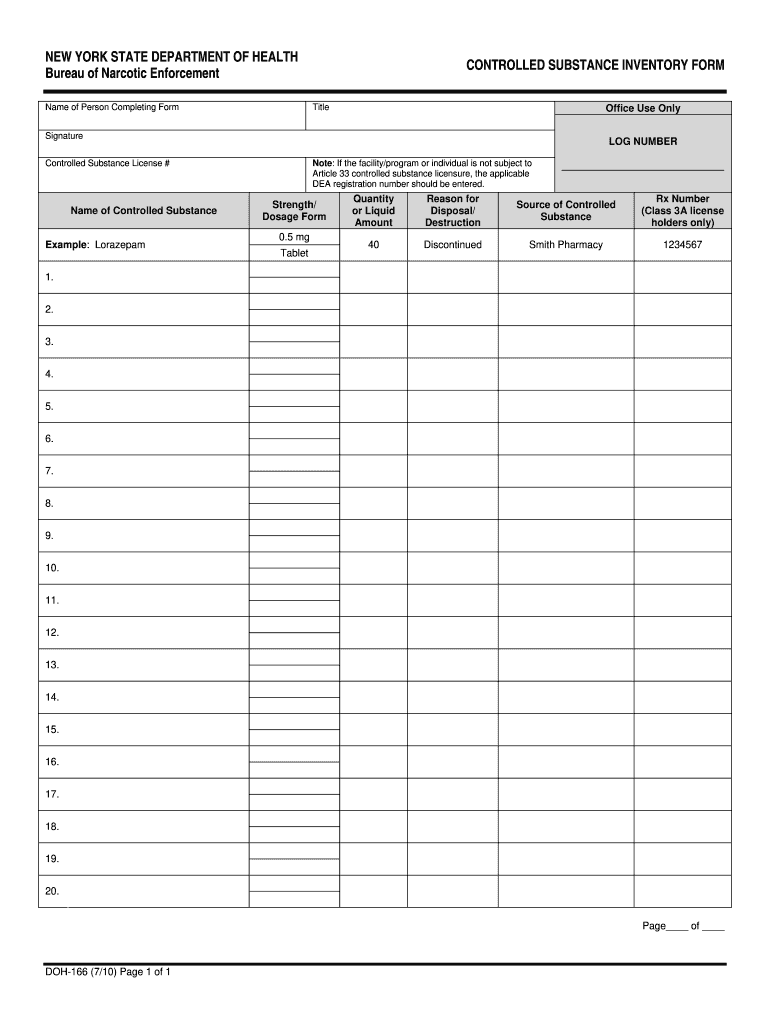
- Click ‘Get Form’ to open the controlled substance inventory form in the editor.
- Begin by entering your name in the 'Name of Person Completing Form' field. This identifies who is responsible for the information provided.
- Fill in your title in the designated section to clarify your position within the organization.
- In the 'Controlled Substance License #' field, input your license number if applicable, ensuring compliance with regulations.
- Specify the 'Name of Controlled Substance' you are documenting, such as Lorazepam, to accurately reflect what is being reported.
- Indicate the 'Strength/Dosage Form' of the substance, for example, 0.5 mg Tablet, to provide precise details about its formulation.
- Enter the 'Quantity or Liquid Amount' that corresponds to what you are reporting or disposing of.
- State the 'Reason for Disposal/Destruction', such as discontinued use, which helps justify your actions regarding this substance.
- Identify the 'Source of Controlled Substance', like Smith Pharmacy, to trace where it was obtained.
- If applicable, include an Rx Number in the designated area for Class 3A license holders only.
Start using our platform today to streamline your document editing and ensure compliance effortlessly!
Fill out controlled substance form online
It's free
It's free
See more controlled substance form versions
We've got more versions of the controlled substance form form. Select the right controlled substance form version from the list and start editing it straight away!
| Versions | Form popularity | Fillable & printable |
|---|---|---|
| 2010 | 4.8 Satisfied (289 Votes) |
Security and compliance
At DocHub, your data security is our priority. We follow HIPAA, SOC2, GDPR, and other standards, so you can work on your documents with confidence.
Learn more


