




01. Edit your et 141 online
Type text, add images, blackout confidential details, add comments, highlights and more.

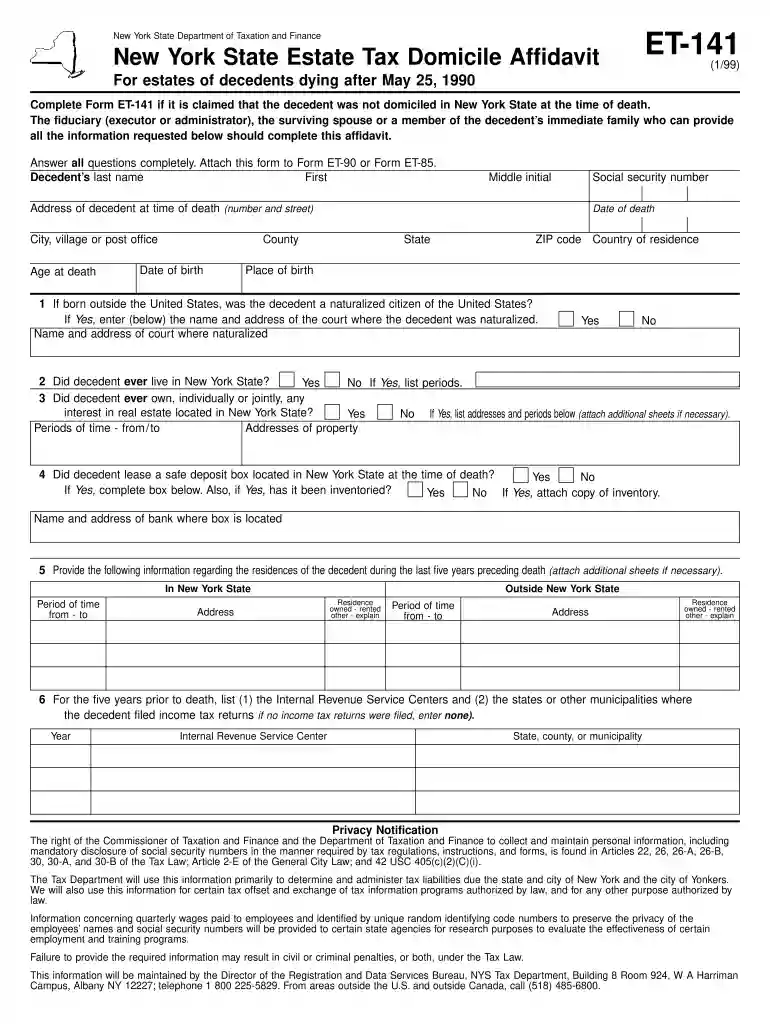
Type text, add images, blackout confidential details, add comments, highlights and more.

Draw your signature, type it, upload its image, or use your mobile device as a signature pad.

Send form et 141 via email, link, or fax. You can also download it, export it or print it out.

Start filling out your ET-141 form online for free today!
We've got more versions of the et 141 form. Select the right et 141 version from the list and start editing it straight away!
At DocHub, your data security is our priority. We follow HIPAA, SOC2, GDPR, and other standards, so you can work on your documents with confidence.




Mar 8, 1999 a/ General form of the exponential relationship is y = bemx where y = concentration, b = calculated y intercept, m = slope of regression line,Read more
The weight of authorities is determined in light of the pertinent facts and circumstances. There may be substantial authority for more than one positionRead more
Jan 26, 2022 ET-130, Instructions on form, Tentative Payment of Estate Tax - For an estate of an individual who died on or before March 31, 2014. ET-141Read more


