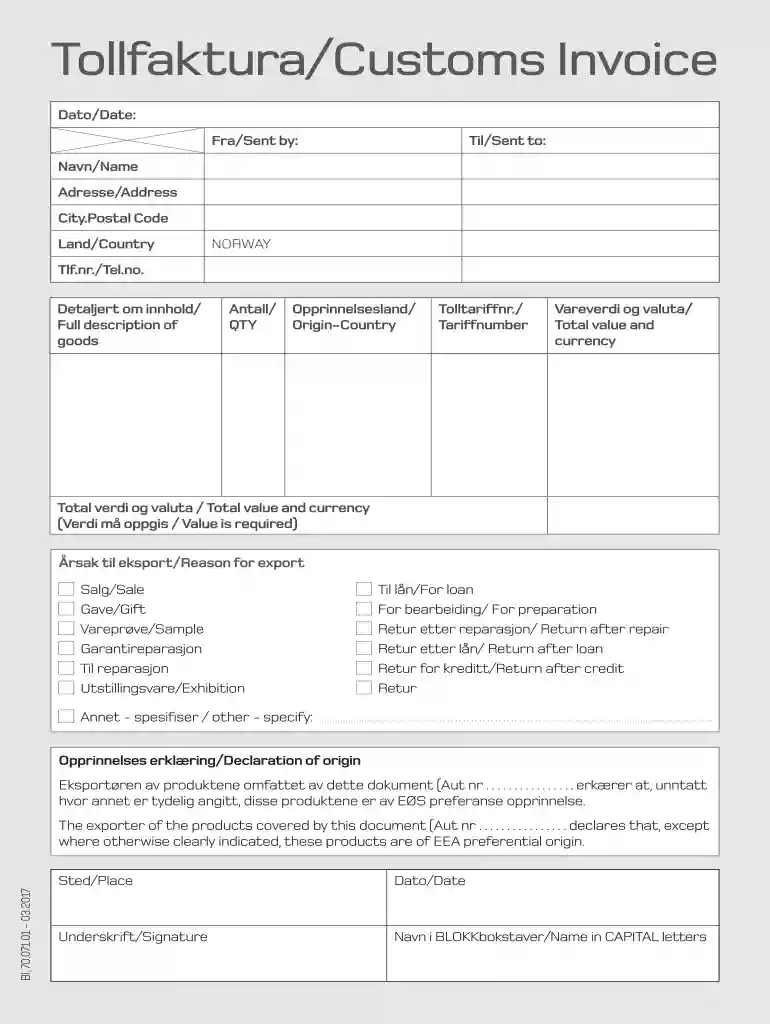
Tollfaktura / Customs Invoice 2026

Get Form
Tollfaktura / Customs Invoice Preview on Page 1

Here's how it works

01. Edit your form online
Type text, add images, blackout confidential details, add comments, highlights and more.

02. Sign it in a few clicks
Draw your signature, type it, upload its image, or use your mobile device as a signature pad.

03. Share your form with others
Send it via email, link, or fax. You can also download it, export it or print it out.

How to use or fill out Tollfaktura / Customs Invoice with our platform

Form edit decoration
9.5
Ease of Setup
DocHub User Ratings on G2
9.0
Ease of Use
DocHub User Ratings on G2
  1. Click ‘Get Form’ to open the Tollfaktura / Customs Invoice in the editor.
  2. Begin by entering the 'Dato/Date' and 'Fra/Sent by' fields at the top of the form. Ensure these are accurate as they are crucial for record-keeping.
  3. Fill in the 'Til/Sent to' section with the recipient's details, including 'Navn/Name', 'Adresse/Address', 'City.Postal Code', and 'Land/Country'.
  4. Provide your contact information in the 'Tlf.nr./Tel.no.' field to facilitate communication.
  5. In the 'Detaljert om innhold/Full description of goods' section, describe each item being shipped clearly and concisely.
  6. Specify the quantity ('Antall/QTY') and origin country ('Opprinnelsesland') for each item listed.
  7. Enter the appropriate tariff number ('Tolltariffnr.') for customs classification.
  8. Complete the 'Vareverdi og valuta/Total value and currency' fields, ensuring that all values are accurately stated as required.
  9. Select a reason for export from options like Sale, Gift, or Sample, and provide any necessary specifications in the 'Annet - spesifiser / other - specify' field if applicable.
  10. Finally, sign and date at the bottom of the form, ensuring your name is printed in capital letters as required.

Start using our platform today to fill out your Tollfaktura / Customs Invoice easily and for free!

See more Tollfaktura / Customs Invoice versions

We've got more versions of the Tollfaktura / Customs Invoice form. Select the right Tollfaktura / Customs Invoice version from the list and start editing it straight away!
Versions Form popularity Fillable & printable
2017 4.4 Satisfied (34 Votes)
be ready to get more

Complete this form in 5 minutes or less

Get form

Got questions?

We have answers to the most popular questions from our customers. If you can't find an answer to your question, please contact us.
Contact us

Most eSignature services require users to have a paid subscription. With DocHub, there are two ways for you to create an electronic signature to your Tollfaktura / Customs Invoice at no cost:

  • You can do it during a 7-day trial period;
  • You can subscribe to a free plan.

The second option, however, has restrictions on the number of signatures, sign requests, emails, and forms for adjusting available per month. You can check for full details here.

If you edit your Tollfaktura / Customs Invoice with DocHub, you simply will not need to look for other software or services to sign it. An electronic signature is part of DocHub’s substantial editing toolset, which enables you to implement changes in your form without jumping between platforms. Simply complete your form, double-check the correctness of your information and place your electronic signature at the end to make it submission-ready quickly.

A customs invoice is an approximate bill of sale. They are used for high value orders and act as a finalizing document. Commercial invoices, on the other hand, are used by smaller merchants that sell to customers because the seller has already received the payment.
Fill out your Commercial invoice manually and then upload it to FedEx Ship Manager at fedex.com while you are creating your shipping label. You will need to enable FedEx Electronic Trade Documents in the preferences setting of the FedEx Ship Manager at fedex.com application to use this feature.
Once you have your customs invoice printed and ready, simply attach it to your parcel along with the shipping label.

Security and compliance

At DocHub, your data security is our priority. We follow HIPAA, SOC2, GDPR, and other standards, so you can work on your documents with confidence.

Learn more
ccpa2
pci-dss
gdpr-compliance
hipaa
soc-compliance

People also ask

Customs documents must be securely fastened to the outside of your box. This is so customs officers can check what is being sent and the value of the goods, to calculate how much duty may or may not be owed.
A customs invoice is a document that allows importers and exporters to send goods internationally. Goods carried across borders must go through customs in the country where the goods are being delivered to see if any tax or duties apply to them.
The customs invoice is a document required by the customs authorities to process and dispatch the shipment. Depending on the data declared, they determine any taxes and duties applicable at the destination and if the goods are liable to any restrictions or controls.
Once completed, print 3 copies of your Commercial Invoice, place them in a clear plastic pouch and attach the pouch securely on top of your parcel, next to the shipping label. Remember, the 18-digit UPS tracking number of your parcel, must be mentioned on your Commercial Invoice.
As the shipments exporter, youre responsible for preparing the Commercial Invoice form. Since it serves as the foundation for all other international shipping documents, its the first one you should complete.