




Here's how it works

01. Edit your which is the primary purpose of client records online
Type text, add images, blackout confidential details, add comments, highlights and more.

02. Sign it in a few clicks
Draw your signature, type it, upload its image, or use your mobile device as a signature pad.

03. Share your form with others
Send what is the primary purpose of the client record via email, link, or fax. You can also download it, export it or print it out.
How to use or fill out client care record with our platform

- Click ‘Get Form’ to open the client care record in the editor.
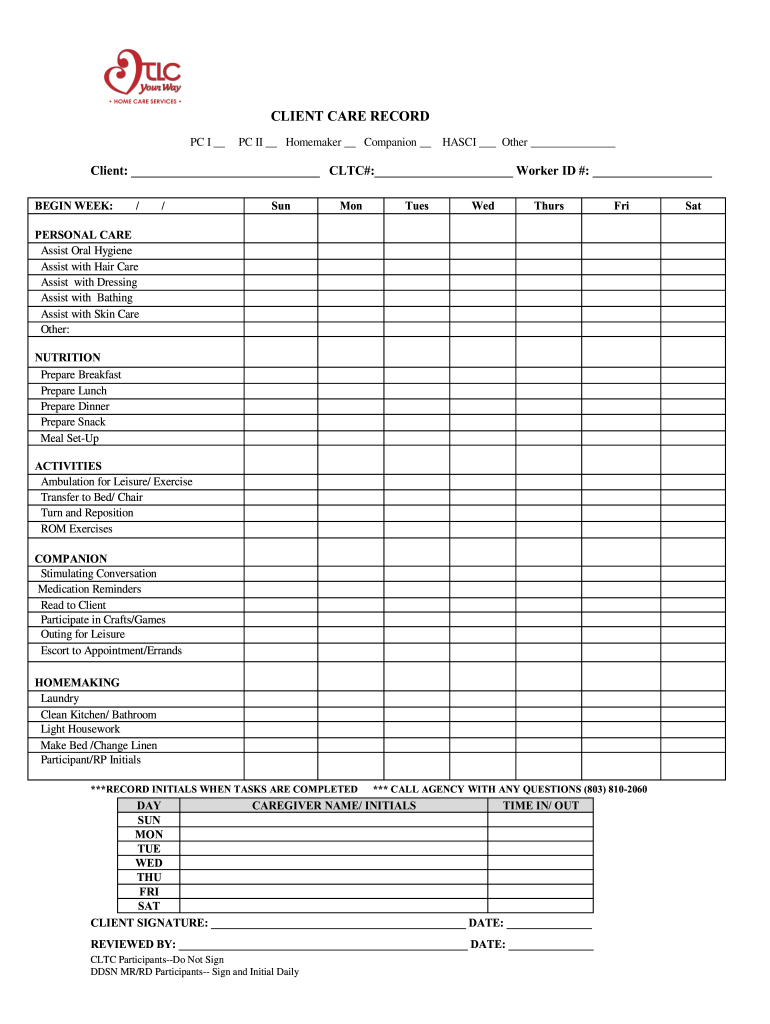
- Begin by filling in the client’s name and CLTC# at the top of the form. This information is essential for identifying the client.
- Select the appropriate services provided by checking the boxes under PC I, PC II, Homemaker, Companion, or HASCI. If other services are provided, specify them in the space provided.
- For each day of the week, document caregiver names and initials along with time in/out for accurate tracking of service hours.
- In the Personal Care section, mark all tasks that were assisted with during the week. Be sure to include any additional tasks under 'Other' if applicable.
- Complete the Nutrition and Activities sections by checking off all relevant tasks performed for meal preparation and engagement activities.
- At the end of the form, ensure both client and caregiver signatures are obtained where required. Remember to review all entries for accuracy before finalizing.
Start using our platform today to easily manage your client care records online for free!
Fill out client care record online
It's free
It's free
Security and compliance
At DocHub, your data security is our priority. We follow HIPAA, SOC2, GDPR, and other standards, so you can work on your documents with confidence.
Learn more


