Type text, add images, blackout confidential details, add comments, highlights and more.
02. Sign it in a few clicks
Draw your signature, type it, upload its image, or use your mobile device as a signature pad.
03. Share your form with others
Send it via email, link, or fax. You can also download it, export it or print it out.
How to use or fill out rd100 registration with our platform
Ease of Setup
DocHub User Ratings on G2
Ease of Use
DocHub User Ratings on G2
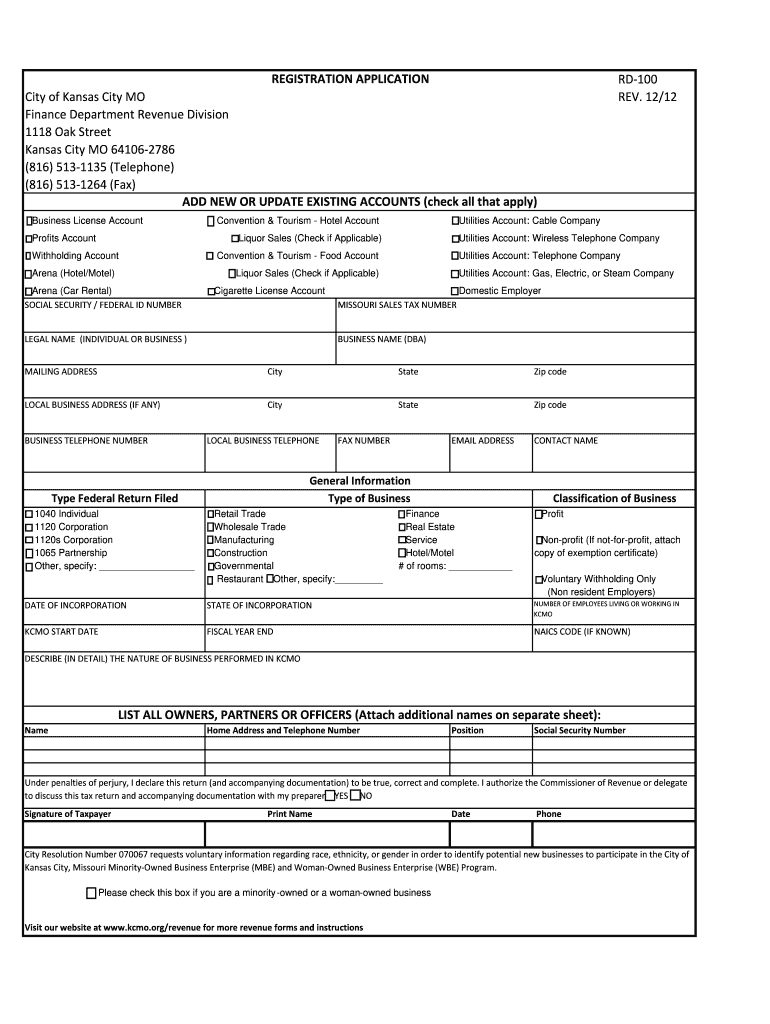
Click ‘Get Form’ to open the rd100 registration application in the editor.
Begin by filling out your legal name and business name (DBA) in the designated fields. Ensure accuracy as this information is crucial for your registration.
Provide your mailing address, including city, state, and zip code. If you have a local business address, fill that out as well.
Enter your business telephone number and email address. This will facilitate communication regarding your application.
Indicate the type of business and classification by selecting from the provided options. Be specific to ensure proper categorization.
Complete the sections regarding ownership details, including names and social security numbers of all owners or partners.
Finally, review all entered information for accuracy before signing and dating the form at the bottom.
Start using our platform today to streamline your rd100 registration process for free!
Annual report on the implementation of the monitoring of offenders required to comply with the Sex Offender Registry requirements. The report shall include at aRead more
Command Mode: Global Mode. Usage Guide: This command can be used for explaining and describing a prefix-list, e.g. the application and attention matters of theRead more
Cost $100, due at registration, by April 30. Save $10 if registered by April 1. SPACE IS LIMITED. You will receive a phone call or email to confirm your childsRead more
Cookie consent notice
This site uses cookies to enhance site navigation and personalize your experience.
By using this site you agree to our use of cookies as described in our Privacy Notice.
You can modify your selections by visiting our Cookie and Advertising Notice.