




Here's how it works



How to use or fill out national insurance bahamas forms with our platform

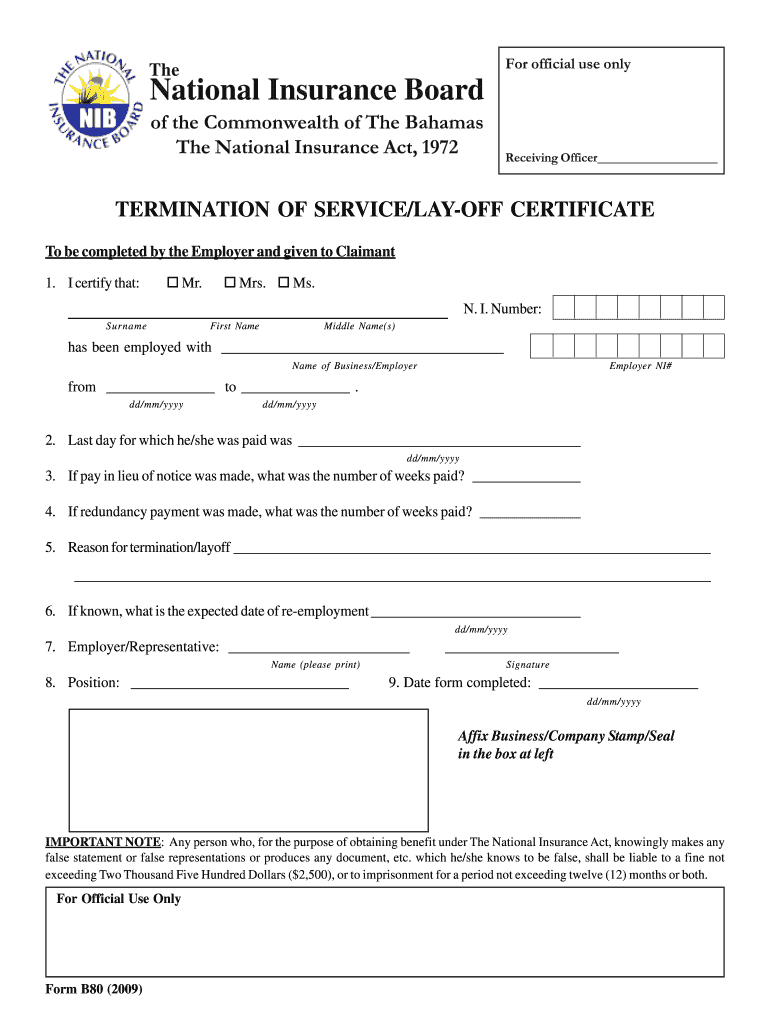
- Click ‘Get Form’ to open the National Insurance Termination of Service/Lay-Off Certificate in the editor.
- Begin by certifying the employee's details. Select Mr., Mrs., or Ms. and enter their N.I. Number, surname, first name, and middle names.
- Fill in the name of the business/employer and their NI# along with the employment dates from start to end (dd/mm/yyyy).
- Indicate the last day for which the employee was paid by entering the relevant date.
- If applicable, specify the number of weeks paid for pay in lieu of notice and redundancy payment.
- Provide a reason for termination or layoff in the designated section.
- If known, enter the expected date of re-employment.
- Complete employer/representative details including name, position, signature, and date form completed.
- Finally, affix your business/company stamp/seal in the designated box.
Start using our platform today to fill out your National Insurance forms online for free!
It's free
See more national insurance bahamas forms versions
Got questions?
What do I need to sign my nib card bahamas electronically?
Electronic document signing requires a software solution that works in compliance with data security and eSignature laws. DocHub is a perfect tool for that, as it meets all the above mentioned requirements. Whatever method you like to sign your nib card bahamas in DocHub, your eSignature will be legally binding and court-admissible.
How do you complete renew nib card bahamas on Android?
It is a no-brainer on a computer or via a mobile device to fill out a renew nib card bahamas with DocHub. All you need to do is open any installed web browser on your smartphone and proceed to the DocHub site. Once authenticated, add your document and open it in editing mode. Use our toolbar to make your edits and save adjustments. Optionally, keep your file in your files or send it to a recipient on the spot.
What is a nib card?
What benefits are offered by NIB?
How does a nib work?
Security and compliance
At DocHub, your data security is our priority. We follow HIPAA, SOC2, GDPR, and other standards, so you can work on your documents with confidence.
Learn more


