




01. Edit your form online
Type text, add images, blackout confidential details, add comments, highlights and more.

Type text, add images, blackout confidential details, add comments, highlights and more.

Draw your signature, type it, upload its image, or use your mobile device as a signature pad.

Send it via email, link, or fax. You can also download it, export it or print it out.
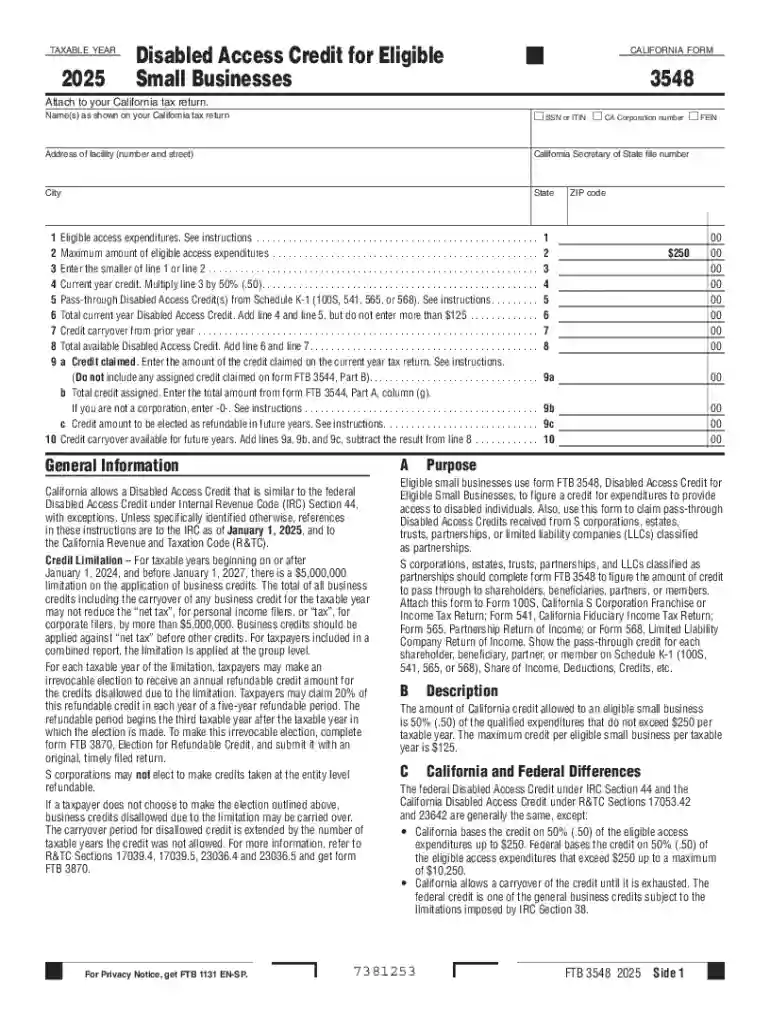
The California Disabled Access Credit Form 3548 is a tax form used by eligible small businesses in California to claim a credit for making their establishments more accessible to individuals with disabilities. This incentive is anchored in both state and federal laws aimed at promoting inclusivity by reducing financial barriers for businesses that improve accessibility. The form specifically pertains to the expenses incurred by businesses in removing architectural, communication, physical, or transportation barriers that impede access.
To qualify for the California Disabled Access Credit, businesses must meet specific criteria. Primarily, the credit is available to small businesses that had gross receipts of $1 million or less in the preceding tax year or employed no more than 30 full-time employees. The covered expenses must contribute directly to enhancing accessibility in compliance with the Americans with Disabilities Act (ADA). Eligible expenses may include costs for modifying building entrances, installing ramps and appropriate signage, or obtaining assistive listening devices.


To obtain the California Disabled Access Credit Form 3548, businesses can access the form through the California Franchise Tax Board's official website. It is also commonly available through tax preparation software like TurboTax or QuickBooks, which may offer guidance on how to properly fill out and file the form.
Gather Required Information: Collect receipts and documentation related to accessibility improvements.
Fill Out Business Information: Enter the business name, address, tax identification number, and other identifying details.
Calculate Total Expenses: Sum all qualified expenses related to accessibility improvements.
Compute the Eligible Credit: According to the instructions on the form, typically a percentage of eligible expenses is calculated to determine the credit amount.
Attach to Tax Return: Once completed, attach Form 3548 to your California tax return.
Review & File: Double-check all entries, then file your tax return with the form attached via mail or electronically.
Businesses must provide comprehensive documentation when claiming the credit. This includes:
Document retention is essential, as incomplete or erroneous submissions may attract audits or lead to disallowed credits.
Typically, smaller enterprises like retail shops, cafes, and service providers benefit greatly from the California Disabled Access Credit Form 3548. This is particularly true for businesses operating in older buildings that require significant modifications to meet ADA standards.
The California Disabled Access Credit must be claimed by the original tax filing deadline. For most businesses, this will align with the federal tax filing deadline, typically April 15. Extensions are possible but require formal requests, and businesses should be aware that any delay in claiming this credit might impact their eligibility or result in penalties.
While both the IRS and the state of California offer versions of the Disabled Access Credit, rules and eligibility differ slightly. The IRS Form 8826 is used to claim the federal Disabled Access Credit. Coordinating between state and federal requirements ensures full advantage of both programs without duplication or error.
Non-compliance, such as failing to secure documentation or inaccurately reporting expenses, can lead to significant penalties. The California Franchise Tax Board might disallow the credit, which could result in additional tax liabilities, interest, and fines.
Understanding and correctly utilizing the California Disabled Access Credit Form 3548 not only aids compliance but also fosters inclusion, helping businesses play a proactive role in creating equitable environments for all individuals.
We've got more versions of the California Disabled Access Credit Form 3548 form. Select the right California Disabled Access Credit Form 3548 version from the list and start editing it straight away!
At DocHub, your data security is our priority. We follow HIPAA, SOC2, GDPR, and other standards, so you can work on your documents with confidence.
S corporations, estates, trusts, partnerships, and LLCs classified as partnerships should complete form FTB 3548 to figure the amount of credit to pass throughRead more
Jul 1, 2005 The California Franchise Tax Board 2006 Annual Report is a summary of the departments major program activities during the 2006 calendarRead more
The Reference Guide also contains information on how to order supplies and accessories, technical specifications, support, and warranty information.Read more


