







Definition & Meaning
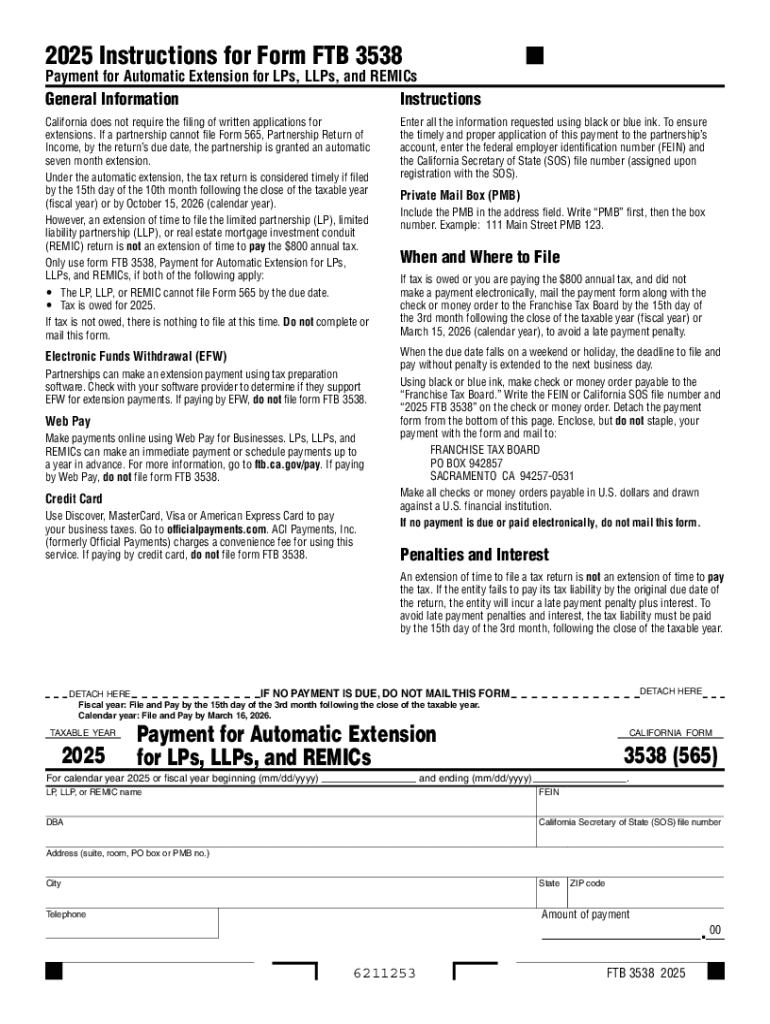
California Form FTB 3538, formally known as the Payment for Automatic Extension for LPs, LLPs, and REMICs, is a tax document used by certain business entities in California to request an automatic extension for filing their state tax returns. This form is essential for Limited Partnerships (LPs), Limited Liability Partnerships (LLPs), and Real Estate Mortgage Investment Conduits (REMICs) that need additional time to prepare complete and accurate tax returns. The form is not a request to extend the time to pay taxes but solely to extend the filing period.
How to Use the California Form FTB 3538
To correctly use the California Form FTB 3538, follow these steps:
- Determine Eligibility: Ensure your entity is an LP, LLP, or REMIC that operates in California.
- Calculate Payment: Estimate your tax liability for the year and prepare to pay any taxes due to avoid penalties.
- Complete the Form: Fill in business details, including business name, address, and tax identification number.
- Submit Payment: Attach a check for the estimated tax due. Note that failure to pay the estimated taxes may result in penalties.
- File Extension: Submit the form to the California Franchise Tax Board (FTB) by the original tax return due date to secure the extension.
How to Obtain the California Form FTB 3538
The California Form FTB 3538 can be obtained in several ways:
- Online Download: Visit the official California Franchise Tax Board website. The form is available as a downloadable PDF, making it easy to print and complete.
- Tax Software: Commercial tax preparation software often includes the latest forms, including Form FTB 3538, integrating this step into the overall tax filing process.
- Tax Professional: Request the form directly from your tax advisor or accountant, who can provide it as part of their services.
Steps to Complete the California Form FTB 3538
Filling out the form requires careful attention to detail. Here is a step-by-step guide:
-
Entity Information:
- Enter the legal name of the entity and the Federal Employer Identification Number (FEIN).
- Provide the address as recorded with the FTB.
-
Tax Year and Payment Information:
- Indicate the beginning and end dates of the tax year for which you are filing.
- Calculate the amount of the payment being made with this form.
-
Prepare Payment:
- Write the check payable to "Franchise Tax Board."
- Include the FEIN, California corporation number, and "2023 Form FTB 3538" on the payment.
-
Mail the Completed Form and Payment:
- Use the address provided in the form instructions specific to the payment type and service center.
Why You Should Use California Form FTB 3538
Utilizing Form FTB 3538 provides significant benefits:
- Avoid Penalties: By filing for an extension and making an estimated payment, entities can avoid penalties associated with late filings.
- Ensure Accuracy: It gives additional time to compile financial data accurately, which is critical for compliance and proper state tax obligation discharge.
- Flexibility: The form provides a buffer to navigate complex tax matters seamlessly by extending deadlines.
Key Elements of the California Form FTB 3538
Several critical components are included in this form:
- Identification Details: Includes entity name, FEIN, and mailing address.
- Tax Year Specifications: The precise tax period being extended.
- Payment Details: Amount being paid with the form for projected taxes due.
- Signature Block: Not typically required for this payment extension form, simplifying submission.
Filing Deadlines / Important Dates
Timely submission is crucial. Consider these key deadlines:
- Original Due Date: This is usually the 15th day of the fourth month after the close of the tax year.
- Extended Tax Return Filing Deadline: Six months after the original return due date.
- Estimated Payment Deadline: Must be paid by the original return due date to avoid interest and penalties.
Eligibility Criteria
Entities must meet specific criteria to utilize Form FTB 3538:
- Business Structure: Must be LPs, LLPs, or REMICs.
- Operating Presence: Must have business operations in California.
- Tax Liability: Possess a reasonable expectation of tax liability for the filing year.


Penalties for Non-Compliance
Failing to comply with the guidelines for Form FTB 3538 can lead to consequences:
- Late Filing Penalties: If the form and payment are not submitted by the due date, penalty charges can apply.
- Interest on Late Payments: Additional interest accrues on any unpaid tax amounts beyond the original due date.
Examples of Using the California Form FTB 3538
- Scenario One: An LLP based in San Francisco realizes it needs more time to gather all accounting records for the fiscal year. They file the 3538 form to extend their filing deadline while submitting an estimate of owed taxes.
- Scenario Two: A REMIC operating in Los Angeles needs an extension due to new accounting adjustments. Filing FTB 3538 ensures compliance and prevents penalties until the final return is accurately completed.
Digital vs. Paper Version
Options for submission are flexible:
- Digital Submission: Tax software often supports E-filing, mitigating the need for physical forms.
- Paper Filing: Traditional approach requiring physical submission to the specified FTB address.
Both methods have pros and cons, often determined by the taxpayer’s capabilities and preferences.




