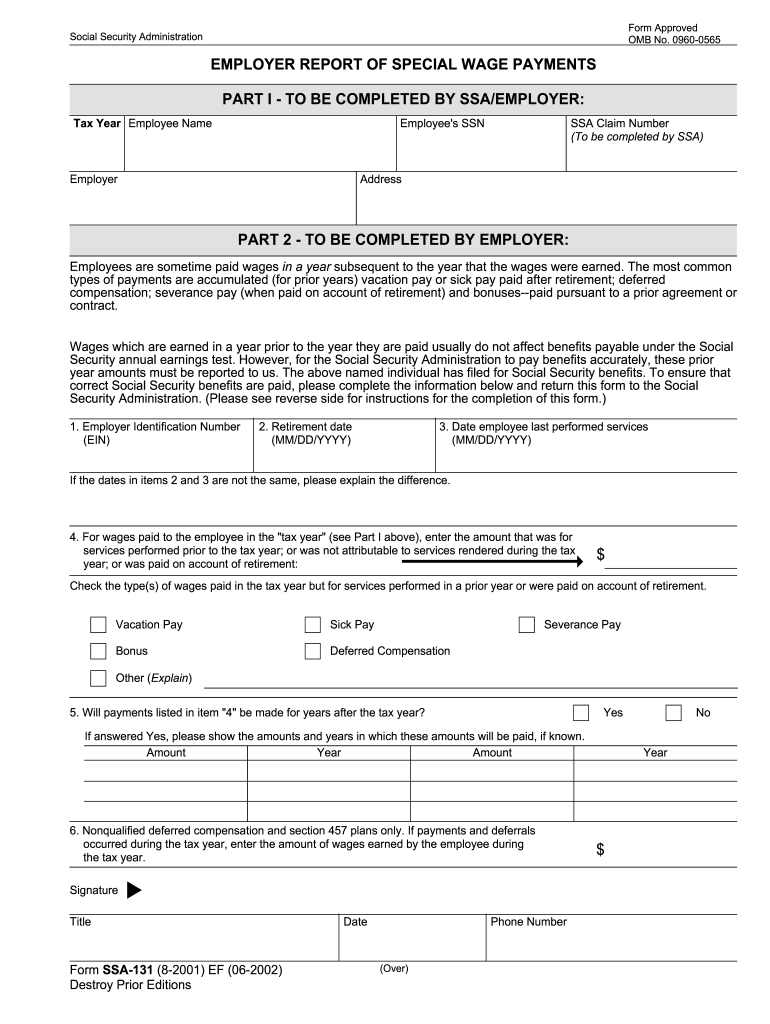
Ssa 131 form 2026

Get Form
ssa 131 Preview on Page 1

Here's how it works

01. Edit your ssa 131 online
Type text, add images, blackout confidential details, add comments, highlights and more.
02. Sign it in a few clicks
Draw your signature, type it, upload its image, or use your mobile device as a signature pad.
03. Share your form with others
Send ssa 131 form via email, link, or fax. You can also download it, export it or print it out.

How to use or fill out SSA 131 form with our platform

Form edit decoration
9.5
Ease of Setup
DocHub User Ratings on G2
9.0
Ease of Use
DocHub User Ratings on G2
  1. Click ‘Get Form’ to open the SSA 131 in the editor.
  2. Begin by filling out Part I, entering the tax year, employee name, SSA claim number, employee's SSN, employer name, and address.
  3. Proceed to Part II. Enter the Employer Identification Number (EIN) and the retirement date of the employee. If not retired, indicate 'Not Retired'.
  4. Input the date when the employee last performed services. This should be earlier than or equal to the retirement date.
  5. In item 4, specify any wages paid during the tax year for services performed in prior years or on account of retirement. Include amounts for vacation pay, sick pay, severance pay, bonuses, etc.
  6. Indicate if payments listed in item 4 will occur in future years and provide details if known.
  7. Complete any additional required fields and add your signature along with your title and contact information before submitting.

Start using our platform today to fill out your SSA 131 form easily and for free!

be ready to get more

Complete this form in 5 minutes or less

Get form

Got questions?

We have answers to the most popular questions from our customers. If you can't find an answer to your question, please contact us.
Contact us

With DocHub, you can rapidly sign your ssa 131 form or any other paperwork on iOS, even without installing extra programs. You can access your DocHub account from any internet-connected browser and complete and sign your document in any preferred method with just a couple of clicks.

When you edit your ssa 131 form with DocHub, you will not need to look for other applications or solutions to eSign it. An electronic signature is part of DocHub’s substantial editing toolset, which enables you to implement changes in your form without switching between platforms. Simply complete your form, double-check the correctness of your data and place your electronic signature at the end to make it submission-ready within a few minutes.

Use Form SSA-131 to report special wage payments made to an employee. Also use this form to report nonqualified deferred compensation and section 457 plan deferrals and payments that could not be reported in box 11 of Form W-2. Copy of Form SSA-131, Employer Report of Special Wage Payments.
Submit Form SSA-131 to the SSA office nearest your place of business. Or, the employee can submit it to the SSA office handling the claim. You or the employee must submit this form before the SSA can exclude the special wage payments for purposes of the earnings test.
In all other instances, use the Inquiry Response Benefit Verification screen or the paper Form SSA-2458 (Report of Confidential Social Security Benefit Information) to manually generate a BEVE letter or respond to benefit and payment questions.

Security and compliance

At DocHub, your data security is our priority. We follow HIPAA, SOC2, GDPR, and other standards, so you can work on your documents with confidence.

Learn more
ccpa2
pci-dss
gdpr-compliance
hipaa
soc-compliance

People also ask

The SSA-131 "Employer Report of Special Payments\u201d form was developed at the request of the payroll community, to be used in reporting special payments to SSA in individual situations. The intent is to have a standard form that employers are familiar with and that can be sent to employers and returned directly to SSA.
In all other instances, use the Inquiry Response Benefit Verification screen or the paper Form SSA-2458 (Report of Confidential Social Security Benefit Information) to manually generate a BEVE letter or respond to benefit and payment questions.
Use Form SSA-131 to report special wage payments made to an employee. Also use this form to report nonqualified deferred compensation and section 457 plan deferrals and payments that could not be reported in box 11 of Form W-2. Copy of Form SSA-131, Employer Report of Special Wage Payments.
SSA and its affiliated State disability determination services use Form SSA-827, "Authorization to Disclose Information to the Social Security Administration (SSA)" to obtain medical and other information needed to determine whether or not a claimant is disabled.
The SSA-131 "Employer Report of Special Payments\u201d form was developed at the request of the payroll community, to be used in reporting special payments to SSA in individual situations. The intent is to have a standard form that employers are familiar with and that can be sent to employers and returned directly to SSA.

Related links