Type text, add images, blackout confidential details, add comments, highlights and more.
02. Sign it in a few clicks
Draw your signature, type it, upload its image, or use your mobile device as a signature pad.
03. Share your form with others
Send mu4r filing via email, link, or fax. You can also download it, export it or print it out.
How to use or fill out mu4r filing with our platform
Ease of Setup
DocHub User Ratings on G2
Ease of Use
DocHub User Ratings on G2
Click ‘Get Form’ to open the MU4R filing in the editor.
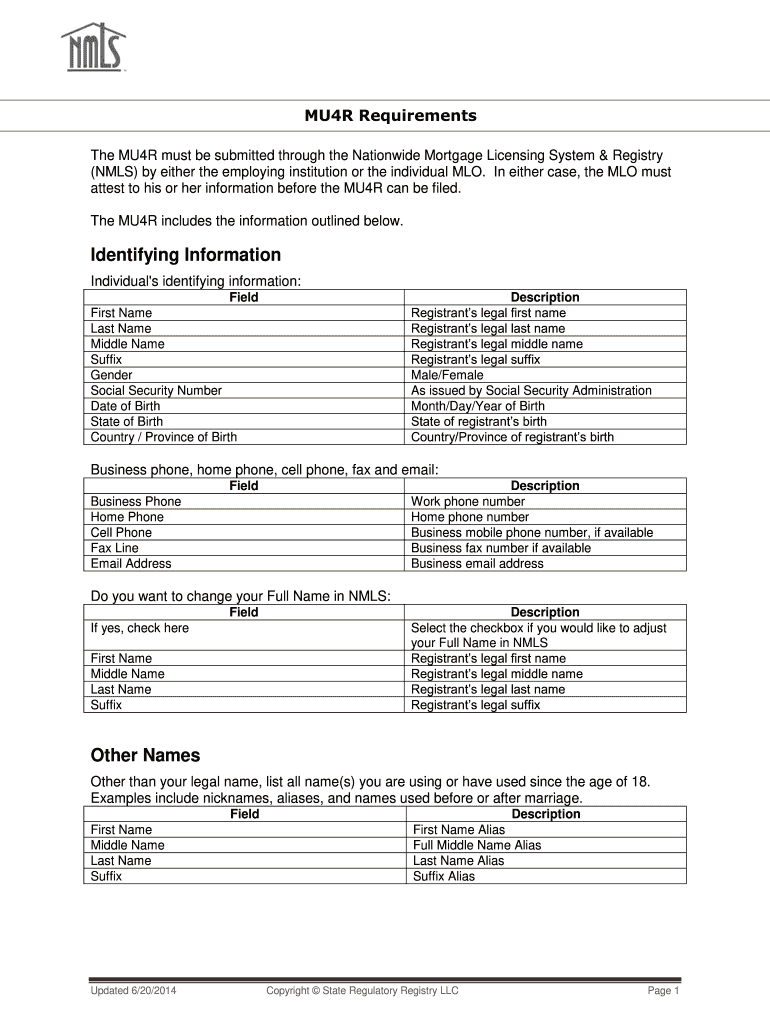
Begin by entering your identifying information. Fill in your first name, last name, middle name, suffix, gender, social security number, date of birth, state of birth, and country/province of birth.
Next, provide your contact details. Enter your business phone, home phone, cell phone, fax number, and email address.
If you wish to change your full name in NMLS, check the appropriate box and input the new first name, middle name, last name, and suffix.
List any other names you have used since age 18 in the designated fields for first name, middle name, last name, and suffix.
Provide your current residence address including street address, city, state, country/province and postal code.
Fill out your employment history by indicating if you are engaging in mortgage loan origination activities and providing details about your current employer.
Answer all disclosure questions truthfully. Select 'Yes' or 'No' as applicable for each question regarding criminal history or disciplinary actions.
Start filling out your MU4R filing today for free using our platform!
NATIONWIDE MORTGAGE LICENSING SYSTEM REGISTRY MU4R Requirements The MU4R must be submitted through the Nationwide Mortgage Licensing System RegistryRead more
Cookie consent notice
This site uses cookies to enhance site navigation and personalize your experience.
By using this site you agree to our use of cookies as described in our Privacy Notice.
You can modify your selections by visiting our Cookie and Advertising Notice.