






Definition & Meaning of DR-1 10-25 Fillable
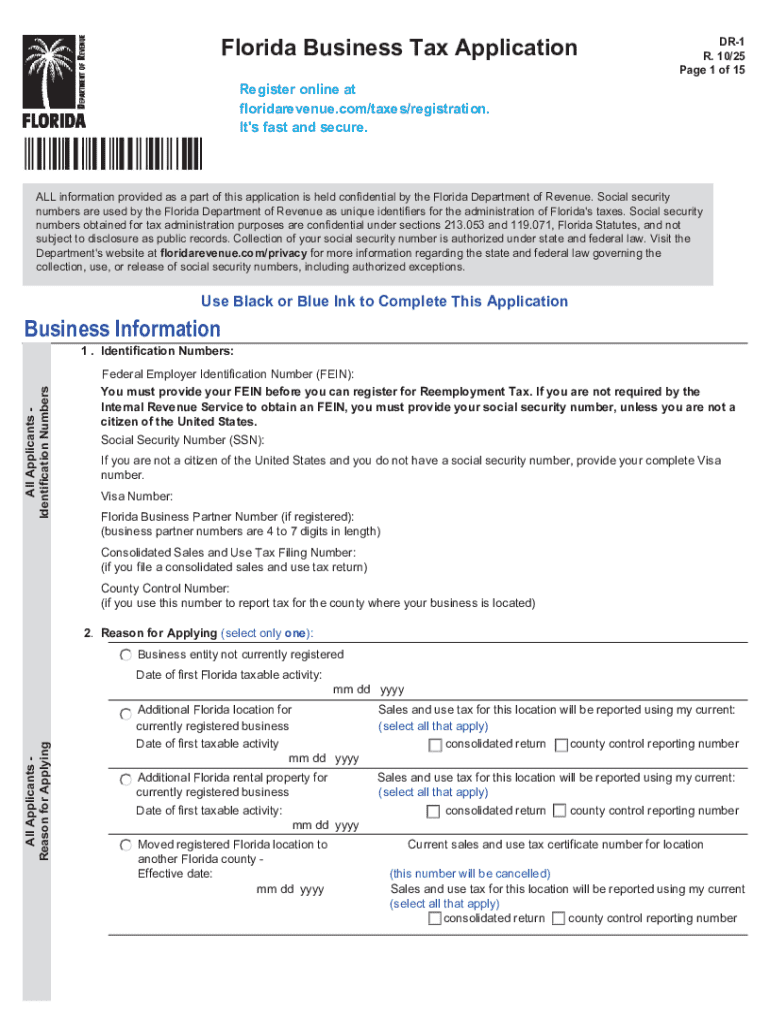
The DR-1 10-25 fillable form refers to the Florida Business Tax Application, officially named Form DR-1. It is an essential document for businesses to register for various tax types in the state of Florida. This form enables businesses to align with regulatory requirements by detailing obligations such as sales tax, reemployment tax, and other related taxes. The fillable feature of the form allows users to complete it electronically, facilitating a more efficient submission process.
How to Use the DR-1 10-25 Fillable Form
Using the DR-1 10-25 fillable form involves several steps that streamline the process of registering a business for state taxes in Florida:
-
Access the Form: Obtain the fillable version of the form through the Florida Department of Revenue's official website or authorized platforms like DocHub.
-
Input Business Details: Enter relevant business information, including name, physical address, and contact numbers. This section typically requires details about the business's legal structure and contact information for designated representatives.
-
Select Tax Categories: Identify and select the specific taxes applicable to your business, such as sales and use tax, which may vary based on business activities.
-
Complete Identification Sections: Provide necessary identification numbers, including federal employer identification numbers (FEIN) or Social Security numbers, as required.
-
Validation and Review: After entering all information, review the form for accuracy. The fillable format allows for easy editing before submission.
-
Submit the Form: Once verified, submit the completed form electronically, or print and mail it to the Florida Department of Revenue if indicated.
Steps to Complete the DR-1 10-25 Fillable Form
The process of completing the DR-1 10-25 fillable form involves critical steps to ensure registration accuracy:
-
Opening the Form: Utilize software that supports fillable PDFs, such as Adobe Acrobat Reader, which allows for easy completion of the form.
-
Entering Personal and Business Information: Include owner details and all required business identification information. Ensure that every field marked as necessary is appropriately filled.
-
Answering Tax-Related Queries: The form will inquire about the nature of your business and the applicable taxes. Businesses should respond based on their operations to ensure correct tax compliance.
-
Inserting Electronic Signatures: Use DocHub’s digital tools to affix legally binding electronic signatures. The ability to save your signature for future use simplifies form processes.
-
Verification and Error Checking: Before finalizing the form, check for any errors or omissions. The system provides features for highlighting missing fields or discrepancies.
Who Typically Uses the DR-1 10-25 Fillable Form
Multiple entities require the DR-1 10-25 fillable form for tax-related purposes:
-
New Businesses in Florida: Essential for newly established entities that must register for state taxes.
-
Expanding Entities: Companies expanding their operations into Florida often use this form to set up applicable tax accounts.
-
Professional and Legal Advisors: Accountants and tax professionals may utilize this form on behalf of their clients, managing tax registrations efficiently.


Key Elements of the DR-1 10-25 Fillable Form
Several critical components make up the DR-1 10-25 fillable form:
-
Tax Registration Sections: Detailed parts where businesses specify which taxes they are applying for.
-
Business Identification Information: Fields that require business names, addresses, and contact information.
-
Owner Information Section: Required details about business owners and partners, including their personal identification numbers.
-
Electronic Filing Information: Instructions on how to complete and submit the form digitally, emphasizing security via encryption.
Legal Use of the DR-1 10-25 Fillable Form
The DR-1 10-25 fillable form serves several legal functions for businesses in Florida:
-
Regulatory Compliance: Acts as documentation for legal obligations related to state taxes.
-
Framework for Tax Obligations: Establishes a structured approach for businesses to adhere to various tax rules and regulations.
-
Audit and Record Keeping: Provides a verifiable trail for auditing purposes by maintaining records of tax registration and compliance.
State-Specific Rules for the DR-1 10-25 Fillable Form
Florida has distinct rules governing tax applications via the DR-1 form:
-
Mandatory for Certain Taxes: Businesses engaged in activities subject to sales and use tax, reemployment tax, and other state levies must complete this form.
-
Florida-Based Guidelines: Compliance with Florida's specific tax guidelines, such as electronic filing preferences and submission deadlines, is required.
Filing Deadlines and Important Dates
Understanding critical timelines associated with the DR-1 10-25 fillable form is crucial:
-
Submission Deadline: While there may not be a strict filing deadline, prompt registration following business setup is recommended to avoid penalties.
-
Regular Updates: Businesses should update their registration information whenever they experience significant changes like ownership shifts or business expansions.
By following these detailed steps and guidelines, businesses can effectively complete and utilize the DR-1 10-25 fillable form to meet their tax registration needs in Florida.