




Here's how it works

01. Edit your duties online form online
Type text, add images, blackout confidential details, add comments, highlights and more.

02. Sign it in a few clicks
Draw your signature, type it, upload its image, or use your mobile device as a signature pad.

03. Share your form with others
Send digital duties form via email, link, or fax. You can also download it, export it or print it out.
How to use or fill out Duties Form 62 Purchaser Statement - State Revenue Office - sro vic gov with our platform

- Click ‘Get Form’ to open it in the editor.
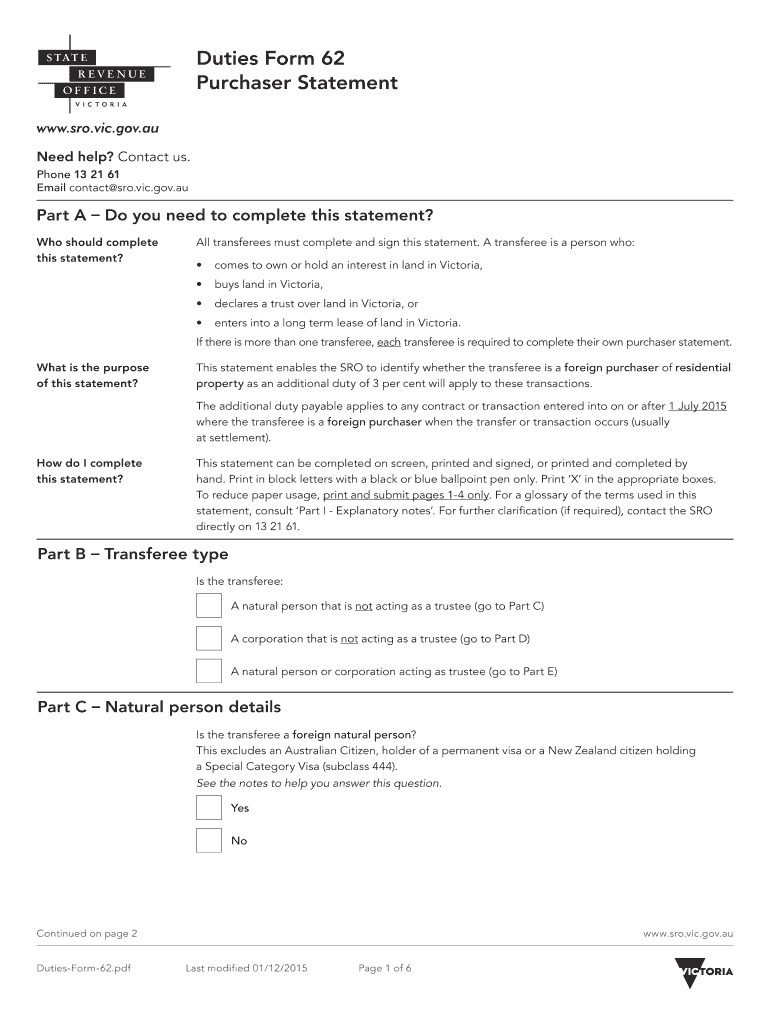
- Begin with Part A, determining if you need to complete the statement. Ensure all transferees sign this statement.
- In Part B, select the appropriate transferee type: natural person, corporation, or trustee.
- For natural persons in Part C, provide details such as name, address, date of birth, and citizenship status. Indicate if you are a foreign natural person.
- If applicable, complete Part D for corporations by providing the corporation's name, position of authorized officer, and incorporation details.
- In Part E for trusts, fill in trustee details and confirm if acting on behalf of a foreign trust.
- Part F requires property details; specify if it is residential and provide the property address and title particulars.
- Finally, in Part G acknowledge that all information is correct by signing and dating the form.
Start using our platform today to easily complete your Duties Form 62 for free!
Fill out Duties Form 62 Purchaser Statement - State Revenue Office - sro vic gov online
It's free
It's free
See more Duties Form 62 Purchaser Statement - State Revenue Office - sro vic gov versions
We've got more versions of the Duties Form 62 Purchaser Statement - State Revenue Office - sro vic gov form. Select the right Duties Form 62 Purchaser Statement - State Revenue Office - sro vic gov version from the list and start editing it straight away!
Got questions?
We have answers to the most popular questions from our customers. If you can't find an answer to your question, please contact us.
Contact us
How do you pay stamp duty in Victoria?
Stamp duty can be paid by direct deposit, cheque, credit card, and other major payment options. In most cases, youll receive a notice from the State Revenue Office VIC delivered to the address of the purchased property or by email. This letter will often contain: The amount of stamp duty payable.
How do I contact duties online in Victoria?
If you have a question or need more information about becoming a registered user, contact DOL Support Services on 13 21 61 or email dutiesonline@sro.vic.gov.au.
How to avoid paying stamp duty in Victoria?
If you buy a property with a dutiable value of $600,000 or less, you get the first home buyer stamp duty exemption. You pay zero stamp duty. If you buy a property with a dutiable value between $600,001 to $750,000.00 you get the first home buyer duty concession. This is a sliding scale concession up to $750,000.00.
What is a digital duties form in Victoria?
The all-in-one Digital Duties Form is mandatory for property transfers in Victoria. It is linked and pre-populated into a Duties Online (DOL) transaction for a quicker and easier assessing process.
How to contact land tax Victoria?
Contact us For all enquiries. 13 21 61. International callers. (+61) 3 9628 0000. Business hours. 8:30 am5 pm (AEST/AEDT), Monday to Friday, excluding public holidays. General enquiries. (+61) 3 9628 6222. Payroll tax. (+61) 3 9628 6700. Land tax. (+61) 3 9628 6856. Customer services. Land transfers and declarations of trust.
Security and compliance
At DocHub, your data security is our priority. We follow HIPAA, SOC2, GDPR, and other standards, so you can work on your documents with confidence.
Learn more


People also ask
How do I email the Victoria State Revenue Office?
State Revenue Office Postal Address:GPO Box 1641 MELBOURNE VIC 3001 Telephone: 03 9628 6801 Fax: Email: foi@sro.vic.gov.au Website: .sro.vic.gov.au2 more rows Feb 10, 2025


