







Definition and Meaning
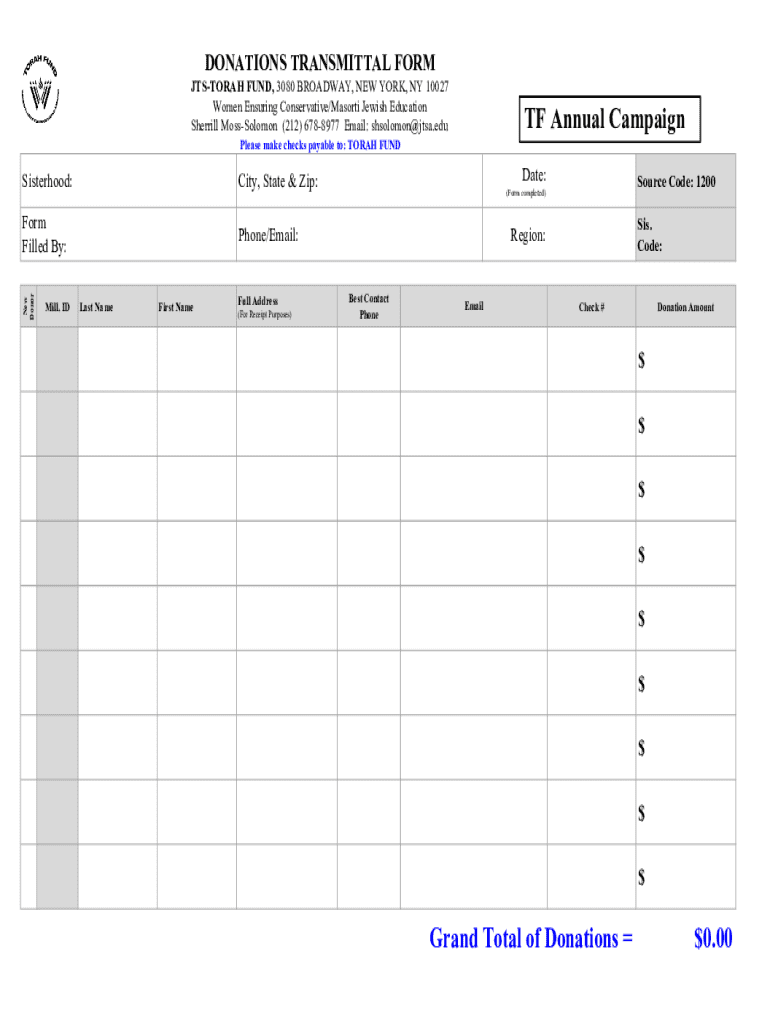
The Donations Transmittal Form is a crucial tool used to efficiently manage and record charitable contributions. Typically associated with organizations like the JTS-Torah Fund, the form serves as a standardized method to document donor information, track donation amounts, and outline instructions for submitting donations. This form ensures transparency and accuracy in charitable transactions, often including sections for donor details, donation specifications, and guidelines for handling matching gifts and pin distributions. Its primary purpose is to streamline the process of reporting and acknowledging donations, making it an essential asset in philanthropic operations.
Key Elements of the Donations Transmittal Form
Understanding the structure and components of the Donations Transmittal Form is vital for accurate completion. Key elements include:
-
Donor Information: Captures essential details about the contributor, such as name, address, and contact information. This section helps maintain comprehensive records for future correspondence and acknowledgment.
-
Donation Amount: Specifies the financial contribution made by the donor. This entry ensures that the donation is recorded accurately for auditing and tax purposes.
-
Submission Instructions: Provides detailed guidelines on how to submit the form and donations, whether through physical mail, online methods, or in-person delivery. Adherence to these instructions is crucial to ensure timely processing.
-
Matching Gifts Information: Offers space to indicate if the donation is part of an employer’s matching gift program, which can significantly increase the total contribution.
-
Pin Distribution Details: For organizations like the JTS-Torah Fund, this section might detail the distribution of commemorative items, such as pins, as part of donor acknowledgment.
How to Use the Donations Transmittal Form
Utilizing the Donations Transmittal Form effectively involves several steps to ensure accuracy and compliance:
-
Gather Required Information: Before filling out the form, collect all necessary information, including donor details and the donation amount. This preparation facilitates a smoother completion process.
-
Complete the Form: Carefully fill out each section of the form, ensuring that all information is accurate and legible. Pay particular attention to sections related to matching gifts and special instructions for donation submissions.
-
Review for Accuracy: Double-check all entries before submitting the form to prevent errors that could lead to processing delays or miscommunications.
-
Submit the Form: Follow the specified submission instructions, which may involve mailing the form to a designated address, submitting it online, or delivering it in person to ensure it reaches the intended recipient promptly.
-
Retain a Copy: Keep a photocopy or digital version of the completed form for personal records. This practice is important for future reference, especially during tax season or if issues arise.
Steps to Complete the Donations Transmittal Form
Completing the Donations Transmittal Form accurately and efficiently requires a methodical approach. Follow these steps for successful completion:
-
Read Instructions Carefully: Begin by reviewing the form’s instructions to understand each section's requirements.
-
Fill in Donor Information: Enter the donor's name, address, phone number, and email address to ensure all future communications reach the correct person.
-
Specify Donation Details: Record the exact donation amount, including any specifications regarding the use or purpose of the funds.
-
Include Matching Gifts: If applicable, fill out the matching gifts section with any pertinent information regarding employer matching programs.
-
Sign and Date: Confirm the form’s authenticity with the donor's signature and the date of completion.
-
Follow Submission Guidelines: Adhere to the form’s outlined submission methods, taking care to meet any mentioned deadlines.
Who Typically Uses the Donations Transmittal Form
The Donations Transmittal Form is commonly used by various stakeholders within charitable and nonprofit organizations, including:
-
Individual Donors: Those contributing to causes such as the JTS-Torah Fund, aiming to support specific initiatives or broader organizational goals.
-
Charitable Organizations: Groups like the JTS-Torah Fund, which rely on these forms to maintain organized records of donations and to facilitate donor communication.
-
Administrators and Accountants: Professionals responsible for managing the financial aspects of donations and ensuring compliance with relevant guidelines.
-
Fundraising Teams: Utilizing the form to track contributions and optimize their fundraising efforts by analyzing donor trends and patterns.


Legal Use of the Donations Transmittal Form
The Donations Transmittal Form plays a significant role in ensuring legal compliance with charitable contribution tracking. Specifically, it provides:
-
Documentation for Tax Purposes: Essential proof for donors claiming tax deductions related to their contributions, supporting them during audits or reviews.
-
Compliance with Donation Regulations: Helps organizations adhere to federal and state laws regulating charitable donations and their acknowledgment.
-
Transparency and Accountability: By systematically recording each transaction, the form contributes to transparent financial practices and organizational credibility.
Form Submission Methods (Online, Mail, In-Person)
Understanding the various methods for submitting the Donations Transmittal Form can greatly enhance its effectiveness in addressing donors’ preferences:
-
Online Submission: Considered the most efficient and convenient, allowing instant form submission through an organization’s website. This method also often supports digital payment options and immediate confirmation.
-
Mail Submission: Traditional but still popular for donors who prefer or require physical documentation. It involves mailing the completed form, typically with a check or money order.
-
In-Person Submission: Ideal for donors who desire personal interaction or wish to receive immediate acknowledgment. Often available at specific events or organizational offices.
Required Documents
When preparing to submit the Donations Transmittal Form, certain documents may be necessary to complete the process effectively:
-
Proof of Donation: Receipts or confirmations of electronic transfers when applicable are required to validate the transaction.
-
Matching Gift Forms: If leveraging employer matching programs, submitting pertinent documentation may be necessary.
-
Identification: Occasionally, forms of identification are required, particularly for in-person submissions, to verify donor identity.
Each of these documents plays a crucial role in ensuring the accuracy, transparency, and acknowledgment of charitable contributions, underscoring the importance of this carefully structured form.




