






Definition & Meaning
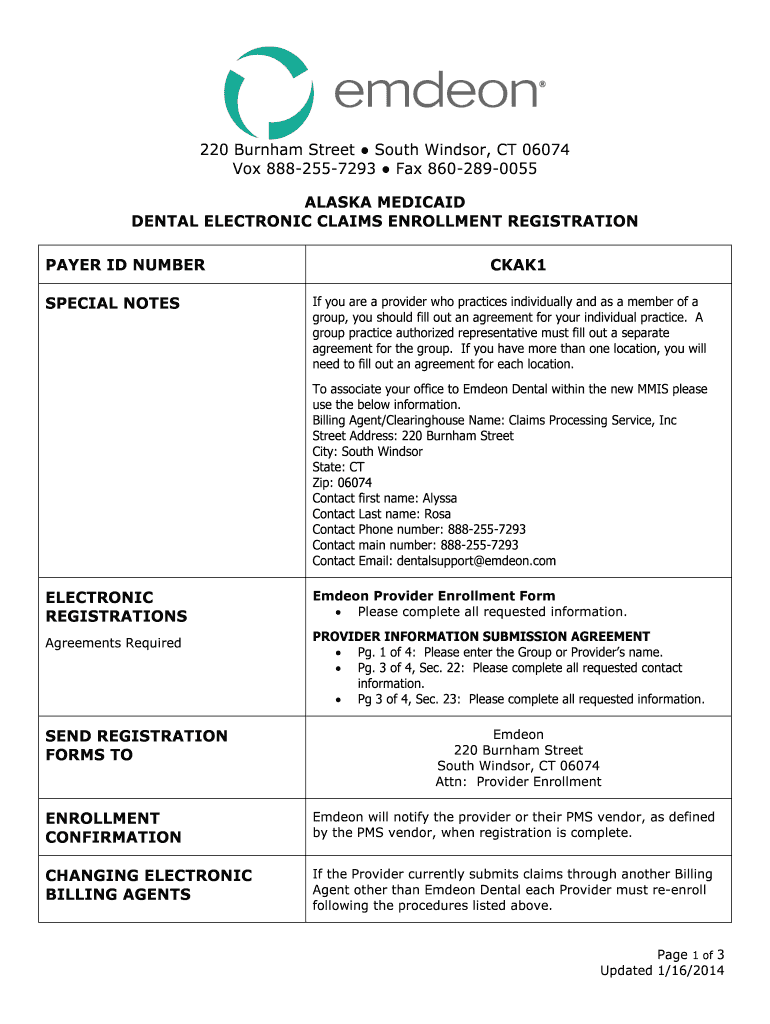
The "Alaska Medicaid Dental Electronic Claims Enrollment Registration" is a critical form that enables dental service providers to electronically submit claims to the Alaska Medicaid system. This document is essential for streamlining the claims process by transitioning from manual paper submissions to digital platforms. E-claims reduce processing time, allow for immediate validation of data, and provide quicker reimbursements. For both dental practices and group providers, this registration form is a step towards efficient management of billing processes with Alaska Medicaid.
How to Use the Alaska Medicaid Dental Electronic Claims Enrollment Registration
Understanding how to use the Alaska Medicaid Dental Electronic Claims Enrollment Registration form is key for providers looking to optimize their claims processes. After downloading the form, providers must fill out all required sections, which include personal, business, and contact information. Ensuring accuracy in these entries is crucial for preventing delays in registration. Once completed, the form can either be submitted electronically or mailed to the appropriate Medicaid office as per given instructions. Upon approval, providers can begin submitting claims electronically, thus integrating seamlessly into the Medicaid processing system.
Steps to Complete the Alaska Medicaid Dental Electronic Claims Enrollment Registration
-
Gather Required Information: Ensure you have necessary documents like your Medicaid provider number, tax ID, and practice information before starting.
-
Fill Out Personal Details: Include your full name, practice details, and contact information as specified in the form.
-
Complete Provider Information: Accurately input practice-related data such as your licensing details and operational specifics.
-
Agree to Terms: Thoroughly read and accept all terms and conditions related to electronic claims submission.
-
Submit Documentation: Attach any supplemental documentation that may be required.
-
Review and Double-check: Ensure all information is accurate and complete before submission to prevent any processing glitches.
-
Submit the Form: Send the form electronically if supported, or mail it to the given Medicaid office address.
Required Documents
To effectively complete the Alaska Medicaid Dental Electronic Claims Enrollment Registration, certain documents must be prepared:
- Medicaid Provider Number: Verification of Medicaid-approved provider status.
- Tax Identification Number (TIN): Proof of business registration and tax obligations.
- License of Practice: Valid credentials to ensure the qualification to practice dental services.
- Legal Agreements: Signed copies of adherence to Medicaid electronic claim standards.
Having these documents ready ensures a smooth and thorough processing of your registration.
Eligibility Criteria
Eligibility for the Alaska Medicaid Dental Electronic Claims Enrollment Registration includes being:
- A licensed dental service provider or group practice.
- Registered with Alaska Medicaid and holding a current provider number.
- Compliant with all regulatory standards set by both state and federal bodies governing healthcare claims and data submission.
These criteria are essential to maintain the integrity and efficiency of the Medicaid system.


Important Terms Related to Alaska Medicaid Dental Electronic Claims Enrollment Registration
- E-Claims: Electronic submissions of claims that expedite verification and payment processes.
- Provider Number: A unique identifier assigned to registered Medicaid providers.
- EDI (Electronic Data Interchange): The standardized format used for electronic data exchange in health insurance claims.
Understanding these terms is critical for effective communication and compliance with Medicaid’s electronic claims processes.
State-Specific Rules for the Alaska Medicaid Dental Electronic Claims Enrollment Registration
Alaska-specific regulations must be followed for successful enrollment in electronic claims processing:
- Compliance with Regional Regulations: Adherence to state guidelines for electronic data submissions.
- Data Privacy: Assurance that all submitted claims data comply with Alaska’s privacy laws.
- Regular Updates: Keeping informed about any changes in claim submission procedures specific to Alaska.
Awareness and adherence to these rules ensure smooth operations within the Medicaid framework.
Form Submission Methods
The Alaska Medicaid Dental Electronic Claims Enrollment Registration offers several submission methods:
- Online Portal: Streamlined electronic submission through the state's designated Medicaid website.
- Mail: Forms can be printed and mailed to the designated Medicaid office if electronic submission is not possible.
- In-Person: Some offices may offer drop-off services for added convenience.
Providers should choose the method that best fits their operational capabilities and ensures timely enrollment.